The Epic Games Launcher, listed as the Epic Games Store app, is a free download for Windows PCs and Macs, with no iPhone version in the US: the Epic Games app on the App Store handles chat and sign-in and cannot open the store.
On this page
Below are the official Windows and Mac downloads, the winget route, the system requirements, the weekly free games, and the legitimate iPhone options for Fortnite and your PC library.
Which Epic Games Launcher download do you need?
Match your device to a row. The launcher itself runs only on Windows and macOS; every other row is an official alternative from Epic, Apple, Microsoft or NVIDIA.
| Your device | What to get | Where | Note |
|---|---|---|---|
| Windows 11 or Windows 10 PC | Epic Games Launcher | Epic Games download page | Free; x86 and x64 builds |
| Windows PC, from the Microsoft Store or winget | Epic Games Store app | Microsoft Store listing | Product ID XP99VR1BPSBQJ2 |
| Mac | Epic Games Launcher for Mac | Epic Games download page | Epic describes the app as built for PC and Mac |
| iPhone or iPad, to play Fortnite | Fortnite | Fortnite on the App Store | Free, about 4.5 GB |
| iPhone or iPad, for chat and sign-in codes | Epic Games app | Epic Games on the App Store | Cannot open the Epic Games Store |
| iPhone, Mac or Chromebook, for PC games you own | GeForce NOW | GeForce NOW | Streams supported games you own on the Epic Games Store; Free membership available |
| Any web browser, Fortnite only | Xbox Cloud Gaming | Fortnite on Xbox Cloud Gaming | Touch, controller or mouse and keyboard |
Download Epic Games Launcher for Windows 11 and Windows 10
Both links below are official and free. Epic's page is the publisher's own download, and the Microsoft Store listing installs the same Windows launcher, fetched from Epic's download servers.
- Epic Games Launcher for Windows and Mac (Epic Games): Epic's own download page
- Epic Games Store app (Microsoft Store): Listed as Free, Windows 10 or later
How to install the Epic Games Launcher on Windows 11 and 10
- Open the Epic Games download page in your browser and download the Windows installer.
- Run the installer from your Downloads folder and approve the Windows prompt to let it make changes.
- When the install finishes, open the Epic Games Launcher from the Start menu.
- Sign in with your Epic Games account, or create a free account from the sign-in screen.
- Open the store inside the launcher to browse games, or open your library to install games you already own.
Install the Epic Games Launcher from the Microsoft Store or with winget
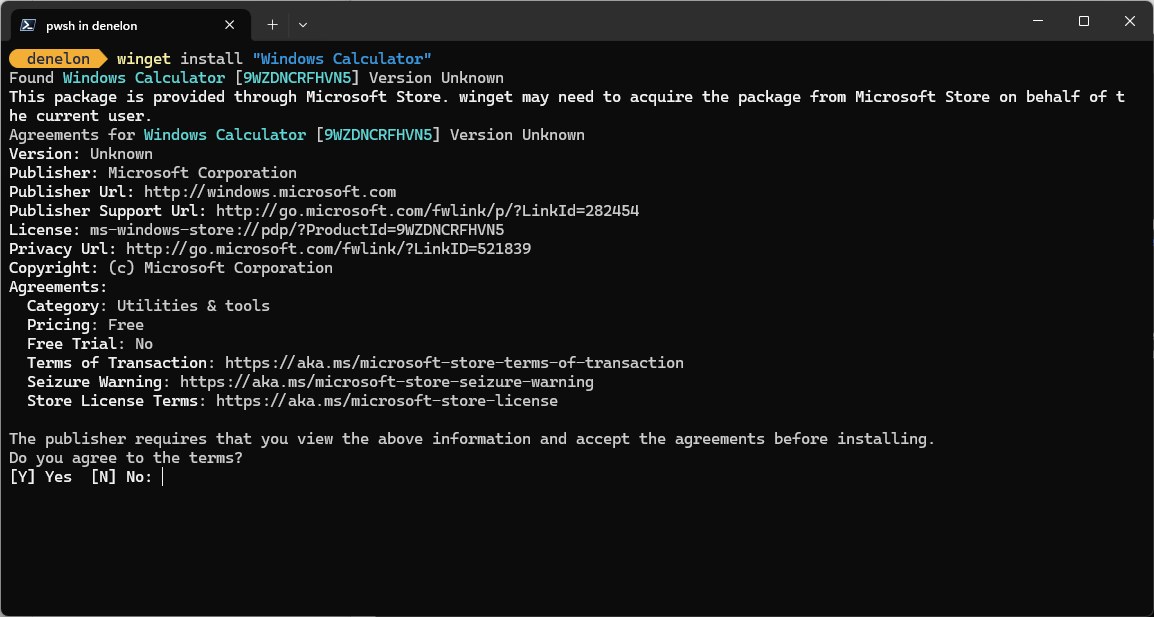
The Microsoft Store, formerly the Windows Store, lists the launcher as the Epic Games Store app under product ID XP99VR1BPSBQJ2. That ID also works with winget, the Windows package manager, from Terminal or PowerShell.
winget install XP99VR1BPSBQJ2 -s msstoreInstalls the Epic Games Store app from the Microsoft Store source. Store IDs do not need the exact-match option, and winget asks you to accept the license terms before it installs.
You should see: winget reports a successful install, and the Epic Games Launcher appears under Start > All apps.
Is the Epic Games Launcher free, and where are the Epic Store free games right now?
The launcher costs nothing: the Microsoft Store lists it as Free, and Epic gives away a free game every week through the store.
The weekly free game changes every week, so check the free games page in the store before you buy anything. Epic also hands out Unreal Engine at no cost through the same launcher.
| What | Price | Where to find it |
|---|---|---|
| Epic Games Launcher | Free | Epic Games download page |
| Weekly free game | Free for the giveaway week | Epic Store free games |
| Fortnite, Rocket League, Fall Guys | Free-to-play | Epic Games Store, inside the launcher |
| Unreal Engine | Free to download | Inside the Epic Games Launcher |
| New releases and other paid games | Paid | Epic Games Store, with monthly sales |
How to download Rocket League for free through the Epic Games Launcher
Rocket League is free-to-play on the Epic Games Store, so it installs from the launcher without a purchase. The same steps claim the weekly free game.
- Open the Epic Games Launcher and sign in with your Epic Games account.
- Search the store for Rocket League and open its store page.
- Claim the game at no charge with your account.
- Open your library, select Rocket League and start the install.
- Launch Rocket League from the library once the download completes.
Epic Games Launcher system requirements for Windows
These are the minimum Windows requirements from the Microsoft Store listing. Each game you install has its own, usually higher, requirements on its store page.
| Component | Minimum |
|---|---|
| Operating system | Windows 10 or later (Windows 11 included) |
| Architecture | x86, x64 |
| Processor | Intel Core 2 Duo / AMD Athlon 2×2 |
| Memory | 2 GB |
| Graphics | DirectX 9.0c compatible GPU: NVIDIA GeForce 7800 (512MB), AMD Radeon HD 4600 (512MB) or Intel HD 4000 |
| DirectX | Version 9 |
| Input | Keyboard and mouse |
Can you download the Epic Games Launcher on Mac?
Yes. Download the Mac launcher from the Epic Games download page; Epic describes the app as built for PC and Mac. Check each game's store page for macOS support before you buy, because the store also sells Windows games. For a game without a Mac version, GeForce NOW streams supported games you own on the Epic Games Store to a Mac, and it has a Free membership.
Can you download the Epic Games Store on iPhone?
No. There is no Epic Games Store or Epic Games Launcher for iPhone or iPad in the US App Store. The Epic Games app there is for chat, parties and Epic Authenticator sign-in codes, and its listing states that it cannot access the Epic Games Store.
Fortnite is on the App Store directly. For supported PC games you own on the Epic Games Store, GeForce NOW streams them to iPhone and iPad.
- Fortnite (App Store) (4.5 GB): Free with in-app purchases
- Epic Games app (App Store) (97.2 MB): Chat and 2FA only, requires iOS 17.6 or later
- GeForce NOW (NVIDIA): Streams supported PC games you own on the Epic Games Store

How to download Fortnite on iPhone
Fortnite installs from the App Store, not from Epic. It runs on iPhone 11 and newer, iPhone XS and newer, iPhone 12 Mini and newer, and iPhone SE 3 and newer.
- Check that your iPhone has at least 4.5 GB of free storage, the size of the Fortnite app.
- Open the App Store on your iPhone and search for Fortnite.
- Check that the developer is Epic Games and the price is free, then download it.
- Open Fortnite and sign in with your Epic Games account, the same account you use in the launcher on PC.
- On an older iPhone that is not on the supported list, play Fortnite in the iPhone's web browser through Xbox Cloud Gaming instead.
Fix Epic Games Launcher download and install problems
Fortnite will not install on an older iPhone
The model is older than the App Store device list.
- Compare your model with the list on the Fortnite App Store page.
- If it is not listed, open the Fortnite page on Xbox Cloud Gaming in a web browser and play with touch or a controller.
winget lists several packages or no single match for Epic Games
A name search can match more than one package or source, while the Microsoft Store product ID names exactly one.
- Run winget install XP99VR1BPSBQJ2 -s msstore.
- Accept the source and package agreements when winget asks.
A game in your library will not run on a Mac
The game has no macOS version.
- Check the game's store page for macOS support.
- Stream it through GeForce NOW if it is one of the supported games, using your connected Epic Games Store account.
How to uninstall the Epic Games Launcher on Windows
- Close the launcher and any Epic games that are running.
- Select Start > Settings > Apps > Installed apps.
- Find the Epic Games Launcher, select More > Uninstall, and confirm.
- If it is missing from Settings, open Control Panel, select Programs > Programs and Features, right-click the launcher and select Uninstall.
Epic Games Launcher FAQ
Is the Epic Games Launcher free?
Yes. The launcher is free to download for Windows and Mac, and the Microsoft Store lists it as Free. You pay only for games you buy; free-to-play games and the weekly free game cost nothing.
Which platforms does the Epic Games Store support?
The Epic Games Store app runs on Windows PCs and Macs. There is no store app for iPhone in the US App Store, and the Epic Games app on iPhone cannot access the store.
Do I need to download the Epic Games Store to play Fortnite?
Not on iPhone or Android. Fortnite is its own free app on the App Store and Google Play, and Xbox Cloud Gaming streams it in a web browser. On a Windows PC, you download Fortnite free through the Epic Games Launcher, where it is listed among the free-to-play games.
Does the Epic Games Launcher work on Windows 11?
Yes. The Microsoft Store listing requires Windows 10 or later, which includes Windows 11, on x86 or x64 hardware. The minimum is 2 GB of memory and a DirectX 9.0c compatible graphics card.
Can I play Epic Games Store games on a Chromebook or iPhone?
Yes, through GeForce NOW, for supported games. It streams games you own from a connected Epic Games Store account to Chromebooks, iPhones, iPads, Macs and Android devices. A Free membership is available, and you must own the game or pick a free-to-play title.
What is the Epic Games app on the App Store?
It is Epic's companion app for text and voice chat, parties and Epic Authenticator two-factor sign-in. It is free, about 97.2 MB, and requires iOS 17.6 or later. It cannot access the Epic Games Store.
How often does the Epic Games Store give away free games?
Epic gives away a free game every week through the Epic Games Store. The current offer is on the store's free games page, and it changes each week, so claim it from the launcher before the giveaway ends.
Can I install the Epic Games Launcher with winget?
Yes. Run winget install XP99VR1BPSBQJ2 -s msstore in Terminal or PowerShell. The ID is the Microsoft Store product ID for the Epic Games Store app, so it does not need the exact-match option.