To cancel Xbox Game Pass, sign in at account.microsoft.com/services with the account that pays for it, select Manage next to the plan, then select Cancel and follow the prompts.
On this page
Game Pass billed through Google Play, the Apple App Store or a prepaid code is handled differently, and turning off recurring billing stops renewal while keeping access until the expiry date.
Quick summary: how to cancel Xbox Game Pass
This works for Game Pass Ultimate, Premium, Essential and PC Game Pass bought directly from Microsoft, from any browser on a PC, phone or tablet.
- Go to account.microsoft.com/services and sign in with the Microsoft account that bought the subscription.
- Find your Game Pass plan and select Manage.
- Select Cancel (on some plans the link reads Upgrade or Cancel).
- Read the page and follow the remaining prompts until the cancellation is confirmed.
Which cancellation method should you use?
| Your situation | Where to cancel | Why |
|---|---|---|
| Microsoft bills you directly | account.microsoft.com/services | Works from any browser and shows refund eligibility during cancellation |
| You are at your Xbox console | Your console | Microsoft lets you cancel on the console before the next billing date |
| You subscribed through Google Play or the Apple App Store | Google Play or Apple support | The store that billed you handles cancellation and refunds |
| You redeemed a prepaid code or card | Nothing to cancel | A prepaid subscription shows Paid with pre-paid card and cannot have recurring billing turned on |
| You bought the subscription in Germany | Microsoft Support | German purchases can be cancelled without signing in to the Microsoft account |
How to cancel Xbox Game Pass online (Microsoft account)
Sign in with the Microsoft account that bought Game Pass. With the wrong account signed in, the plan's Manage link does not appear.
- Open account.microsoft.com/services in a browser and sign in.
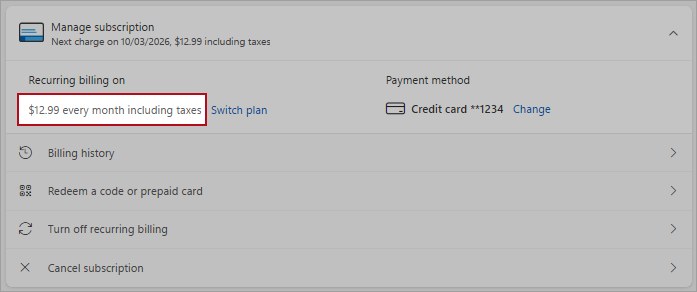
- Under Services & subscriptions, locate your Game Pass plan and select Manage.
- If you see Turn on recurring billing instead of Manage, the plan already ends on the date shown and nothing else is needed.
- Select Cancel, or Cancel subscription if that is the label shown.
- Scroll through the page; it states whether the cancellation qualifies for a refund.
- Follow the remaining prompts to finish.
Cancelling vs. turning off recurring billing
Recurring billing is switched on by default, so Game Pass charges you again at the end of each period until you stop it.
| Turn off recurring billing | Cancel the subscription | |
|---|---|---|
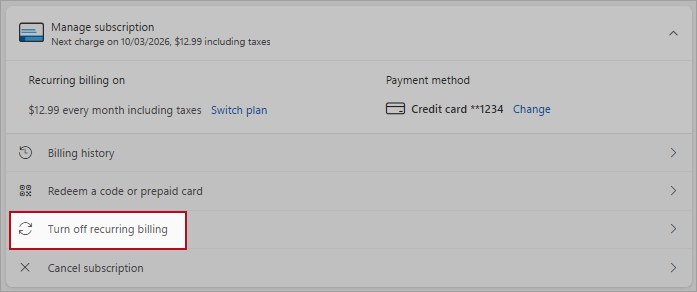
| Where | Manage > Turn off recurring billing | Manage > Cancel |
| Future charges | Stopped | Stopped |
| Access | All benefits continue until the expiry date | Library access ends when the subscription is cancelled or expires; a renewal cancelled after it was billed runs to the end of that term |
| Refund | Request one through Manage > Cancel instead | The cancellation page states whether you qualify |
| Undo | Select Turn on recurring billing | Select Renew or Resubscribe, or buy again |
What happens after you cancel Xbox Game Pass?
| Question | Answer |
|---|---|
| Do I keep playing until the end date? | With recurring billing turned off, yes, until the expiry date. A renewal you cancel after it was billed also runs to the end of that term without another charge. |
| What happens to Game Pass games? | Library access ends when the subscription is cancelled or expires, or earlier if a game leaves the library. |
| Will I be charged again? | No, as long as you cancel more than 2 days before the billing date. |
| Can I come back later? | Yes. Select Renew or Resubscribe on the subscription, or buy the plan again. |
After you rejoin, you can play whatever is in the library at that point, including the Game Pass games added each month.
Will I get a refund if I cancel Xbox Game Pass?
| Case | Refund |
|---|---|
| You forgot to turn off recurring billing and were just charged | You can get the most recent recurring charge back if you cancel within 30 days after payment, once per Microsoft account per subscription product |
| Any subscription length bought in Canada, Denmark, France, Israel, Korea or Turkey | Prorated refund when you cancel |
| A renewed subscription longer than 1 month bought in Finland, Germany (after March 1, 2022), Netherlands, Poland or Portugal | Prorated refund for the renewal period only |
| Prepaid code or card from a retailer | The retailer's return policy applies |
| Google Play or Apple App Store subscription | Ask that store for the refund |
Eligibility is decided automatically during cancellation, and not every cancellation produces a refund. For the 30-day recurring-charge refund, you can also send a request to the Xbox Support team through the Request a refund link in the Game Pass FAQ on xbox.com.
Other ways to cancel or pause Game Pass
To stop paying without losing the time already paid for, turn off recurring billing instead of cancelling. The plan keeps working until its expiry date and can be switched back on later.
- Go to account.microsoft.com/services and select Manage on the Game Pass plan.
- Select Turn off recurring billing.
- Read the details, then select I don't want my subscription or I want to keep my benefits.
- To resume later, return to the same page and select Turn on recurring billing.
Recurring billing can also be switched off and back on from your Xbox console. A subscription billed by Google Play or the Apple App Store is cancelled in that store instead.
How to check Xbox Game Pass is cancelled
- Open account.microsoft.com/services again and find the Game Pass plan.
- Confirm it shows Turn on recurring billing or an expiry date, not a renewal date or a notice of an upcoming charge.
- Note the expiry date shown, which is when access ends.
- After the old billing date passes, open Manage your payments in the Microsoft account dashboard to confirm no new charge appeared.
Still cannot cancel Xbox Game Pass?
The Game Pass plan or its Manage link is missing
You are signed in with a different Microsoft account from the one that pays.
- Sign out of account.microsoft.com.
- Sign in with the account that bought Game Pass.
- Open Services & subscriptions again.
There is no cancel option, only Turn on recurring billing
Recurring billing is already off.
- Check the expiry date shown next to the plan.
- Keep playing until that date; no further charge is taken.
There is no option to cancel or turn off recurring billing
The subscription was bought through a third party such as Google Play, the Apple App Store or a retailer.
- Find the receipt to see who billed you.
- Cancel through that store or retailer's own subscription settings or support.
Cancellation is blocked by an overdue balance
Money is owed on the subscription, or the payment card has expired.
- Check the card on file has not expired.
- If the payment is past-due, select Manage > Cancel subscription; a past-due plan can be cancelled immediately without paying the past-due amount.
- If cancelling is still refused, pay the overdue amount and try again.
You were charged after cancelling
The cancellation landed within 2 days of the billing date, or a different account was billed.
- Check the subscription end date under Services & subscriptions.
- Open Manage your payments to investigate the charge.
- If the charge was a renewal you did not want, cancel within 30 days after payment to claim the one-time refund.
Tips for managing your Xbox Game Pass subscription
| Tip | Why it helps |
|---|---|
| Turn off recurring billing right after a promotional sign-up | After a promotion the plan renews at the then-current regular price unless cancelled |
| Cancel a trial before the trial period ends | A trial left running is charged to your payment method |
| Watch for price-change notices | Microsoft may raise charges on at least 30 days notice |
| Use prepaid codes if you never want auto-renewal | A plan paid with a prepaid card cannot have recurring billing turned on |
Game Pass, like other subscription services, renews automatically by default, so check its renewal date at account.microsoft.com/services before each billing period ends.
Xbox Game Pass cancellation FAQ
Can I cancel Xbox Game Pass from my phone?
Yes. Open account.microsoft.com/services in your phone's browser, sign in with the paying account, select Manage on the plan and then Cancel. If you subscribed through Google Play or the Apple App Store, cancel in that store instead.
Can I cancel Xbox Game Pass on my console?
Yes. Microsoft lets you cancel Game Pass on your Xbox console as well as in your Microsoft account. Either way, cancel before the next billing date to avoid another charge.
Will I get a refund if I cancel mid-month?
Only in certain cases: you live in a country with prorated refunds, or you are reversing a recurring charge within 30 days after payment. Eligibility is checked automatically during the cancellation process, and not every cancellation produces a refund.
What is the difference between cancelling and turning off recurring billing?
Turning off recurring billing stops future charges and keeps access until the expiry date. Cancelling also stops future charges and is the step that can issue a refund when you qualify. Both are on the Manage page.
Do I keep Game Pass until the end of the month after cancelling?
Turn off recurring billing instead of cancelling if you want to keep it: access then continues until the expiry date shown in your account. A renewal cancelled after it was billed also runs to the end of that term without another charge.
Why was I still charged after cancelling Game Pass?
Cancellations must be made more than 2 days before the billing date, and a different Microsoft account may hold the subscription. Check the end date under Services & subscriptions and investigate the charge on Manage your payments.
Can I cancel a Game Pass free trial or promotional offer?
Yes. Cancel before the trial or promotional period ends to avoid being charged. Otherwise the subscription continues automatically at the then-current regular price plus applicable taxes.
How do I cancel Game Pass bought with a gift card or code?
There is nothing to cancel. A subscription paid with a prepaid code shows Paid with pre-paid card next to the expiration date, and recurring billing cannot be turned on for it. When it expires, buy a new one if you want to continue.