Warframe is a free download for Windows 11 and Windows 10 PCs and for iPhone and iPad, but it has no Mac version: Digital Extremes states there is no Mac or Linux support, so on a Mac you stream the Xbox version through Xbox Cloud Gaming in a browser.
On this page
Warframe is also on Xbox Series X|S, Xbox One, PS5, PS4, Nintendo Switch and Android, and one linked Warframe account can carry your progress across all of them.

Which Warframe download do you need?
Pick the row for the device you play on; the Mac row is the only one that streams instead of installing.
| Your device | How you get Warframe | Official link | What it costs |
|---|---|---|---|
| Windows 11 or 10 PC | Native download from the publisher | warframe.com/download | Free, in-app purchases |
| Windows 11 or 10 PC with Steam | Native download through Steam | Warframe on Steam | Free To Play |
| Xbox Series X|S or Xbox One | Native download from the Xbox store | Warframe on Xbox | Free+ |
| PS5 or PS4 | Native download from PlayStation Store | Warframe on PlayStation | Free |
| Nintendo Switch | Native download from Nintendo | Warframe for Nintendo Switch | Shown on the Nintendo listing |
| iPhone or iPad | Native app from the App Store | Warframe on the App Store | Free, in-app purchases |
| Android phone or tablet | Native app from Google Play | Warframe on Google Play | Free-to-play, in-app purchases |
| Mac | No Mac client; stream the Xbox version at xbox.com/play | Xbox Cloud Gaming | Game Pass Essential (from $10/month), Premium or Ultimate |
Download Warframe for Windows 11 and Windows 10
The warframe.com and Steam versions list the same minimum spec, including 75 GB of available space. A Steam install still needs a Warframe account, which Steam lets you link to your Steam account.
- Warframe for Windows from warframe.com (75 GB available space): Select Download for Windows; the publisher's own installer, with Windows 7 64-Bit as the minimum OS
- Warframe on Steam (75 GB available space): Free To Play; requires a Warframe account that supports linking to Steam; Steam itself needs Windows 10 or later
- Warframe standalone installer: Under Download Standalone Installer: 2GB parts with an MD5 checksum each; slower than the regular download and meant for multi-installs such as internet cafes
How to install Warframe on Windows 11 and 10
- Open warframe.com/download and select Download for Windows.
- Run the downloaded installer on a 64-bit edition of Windows with at least 75 GB of available space.
- Sign in with your Warframe account, or create a PC Warframe account if you do not have one.
- Let the launcher finish downloading the game files, then start Warframe from the launcher.
- Standalone installer only: select Download Standalone Installer, download every listed part and the .exe file, then run
Get-FileHash <file> -Algorithm MD5in PowerShell on each file. - Compare each Hash value with the MD5 listed beside that file on warframe.com/download, download again any file whose values differ, then run the .exe file.
Identical hash values mean identical file contents, but Microsoft notes that MD5 is no longer considered secure against attack, so download the parts from warframe.com only.
Install Warframe through Steam
- If Steam is not on the PC, select Install Steam at store.steampowered.com, install it and sign in.
- Open the Warframe Steam page and select Play Game.
- Choose the install drive in Steam and let the download finish.
- Launch Warframe and sign in with a Warframe account; Steam lists it as a required third-party account that supports linking to your Steam account.
- Check that Warframe shows as installed in your Steam library before you close Steam.
Download Warframe on Xbox Series X|S and Xbox One
Warframe is Optimized for Xbox Series X|S and supports Smart Delivery, console keyboard and mouse, and online co-op for two to four players.
- On the console, open the Store and search for Warframe.
- Select the Warframe listing from Digital Extremes, listed as Free+ in the console Store and on the Warframe page on xbox.com, and get it.
- Start Warframe from your library once the install completes.
Install Warframe through PlayStation Store or Nintendo
Warframe is free on both PS5 and PS4, with a separate edition for each console and PS5 Pro Enhanced support. PlayStation lists online play as required, and online features need an account for PlayStation. The Nintendo Switch version supports Cross Platform Save and Cross Platform Play with the PC, console and mobile versions.
- PS5 or PS4: open the Warframe page on playstation.com, sign in with your PlayStation account and select Add to Library for the edition that matches your console.
- On the console, open PlayStation Store or your game library, find Warframe and start the download.
- Nintendo Switch: on the console, open the Nintendo store, search for Warframe and download it; the Warframe listing on nintendo.com confirms the Switch version.
- Launch Warframe on the console once the download completes.

Is Warframe on Game Pass?
You do not need Game Pass to download or play Warframe on Xbox: the store lists it as Free+, and Xbox gives all players online multiplayer in free-to-play games at no charge. Game Pass Essential, Premium or Ultimate matters only for streaming Warframe with Xbox Cloud Gaming, which the Xbox store lists as cloud playable on those three plans.
Is Warframe free?
| What you buy | US price | Where the price is listed |
|---|---|---|
| Warframe base game | Free | Steam, Xbox, PlayStation, App Store |
| 75 Platinum | $4.99 | Xbox, PlayStation, App Store |
| 175 Platinum | $9.99 | Xbox, PlayStation, App Store |
| 380 Platinum | $19.99 | Xbox, PlayStation, App Store |
| 1025 Platinum | $49.99 | Xbox, PlayStation, App Store |
| 2200 Platinum | $99.99 | Xbox, PlayStation |
| 3450 Platinum | $149.99 | Xbox, PlayStation |
| 4600 Platinum | $199.99 | Xbox |
| Citrine Prime Access – Complete Pack | $139.99 | Xbox, PlayStation |
Platinum is sold as virtual currency, and PlayStation lists in-game purchases as optional.
Warframe system requirements and download size
| Spec | Windows PC (minimum) | iPhone and iPad |
|---|---|---|
| Operating system | Windows 7 64-Bit (32-bit not supported) | iOS 15.6 or iPadOS 15.6 or later |
| Processor | Intel Core i7 860, Intel Core i5 750 or AMD FX-4100 (SSE 4.2 support required) | A12 Bionic chip or later |
| Graphics | DirectX 11+ capable graphics card; DirectX 12 needs Windows 10 20H2 or Windows 11 | Not stated |
| Memory | 4 GB RAM | Not stated |
| Storage | 75 GB available space | Up to 4 GB |
| Internet | Broadband connection required | Not stated |
Can you download Warframe on Mac?
No. Warframe has no Mac client; stream the Xbox version from xbox.com/play in a browser on macOS 14.1.2 or later with Game Pass Essential, Premium or Ultimate. Digital Extremes lists no Mac or Linux client, and the App Store version is listed for iPhone and iPad only. Xbox Cloud Gaming runs on a Mac in a supported browser rather than an app, and Warframe is cloud playable on the Xbox store.
Plan on an internet connection of at least 20 Mbps, over Ethernet or 5 GHz Wi-Fi, and connect a controller before you start.
Warframe on iPhone and Android
Warframe on iPhone and iPad is free with in-app purchases and supports PlayStation, Xbox and MFi controllers. It needs iOS 15.6 or later and an A12 Bionic chip or later, which covers iPhone XS, iPhone XR, iPhone SE (2nd generation) and newer models.
- Warframe on the App Store (iPhone and iPad) (Up to 4 GB): Free with in-app purchases; iOS 15.6 or later
- Warframe on Google Play (Android): Free-to-play with in-app purchases; select Install
Fix Warframe not downloading or installing
Warframe will not install through Steam on an older PC
The Steam client supports only Windows 10 and later.
- Check which Windows version and edition the PC runs.
- On a version older than Windows 10, install Warframe from warframe.com/download with Download for Windows instead of Steam.
- Confirm the PC runs a 64-bit edition; 32-bit Windows is not supported.
The download stops for lack of space
The PC version needs 75 GB available space.
- Free space on the install drive until at least 75 GB is available.
- Restart the download from the launcher or Steam.
There is no DirectX 12 option
DirectX 12 support needs Windows 10 20H2 or Windows 11.
- Install the latest feature update from Windows Update.
- Restart Warframe once the PC runs Windows 10 20H2 or later; on older versions, Warframe supports DirectX 11 only.
The App Store says Warframe is not compatible with the iPhone
The app needs iOS 15.6 or later and an A12 Bionic chip or later.
- Update the iPhone or iPad to the latest iOS or iPadOS version it supports.
- If the device is older than iPhone XS or iPhone XR, play on another platform or stream from xbox.com/play.
The standalone installer is very slow
The standalone installer is slower than the regular download; it is meant for multi-installs such as internet cafes.
- Cancel it and use Download for Windows on warframe.com/download for a single PC.
- Keep the standalone installer only for setting up several PCs.
Warframe will not stream on a Mac
The browser, macOS version, plan or connection does not meet Xbox Cloud Gaming requirements.
- Update to macOS 14.1.2 or later and a supported browser.
- Check that your plan is Game Pass Essential, Premium or Ultimate.
- Switch to Ethernet or 5 GHz Wi-Fi with at least 20 Mbps, then reload xbox.com/play.
Frequently asked questions
Is Warframe free on PC?
Yes. Warframe is free-to-play on Windows 11 and Windows 10 from warframe.com and Steam, where the store lists it as Free To Play. The game downloads at no cost, and Platinum, Prime Access and bundles are optional purchases.
Can you play Warframe on a Mac?
Only through the cloud. Digital Extremes offers no Mac client, but the Xbox version of Warframe is cloud playable at xbox.com/play in a browser on macOS 14.1.2 or later with Game Pass Essential, Premium or Ultimate and a controller.
Is Warframe on iPhone?
Yes. Warframe is a free App Store download for iPhone and iPad, up to 4 GB in size. It needs iOS 15.6 or later and a device with an A12 Bionic chip or later, and it supports PlayStation, Xbox and MFi controllers.
Is Warframe on Nintendo Switch, PS5 and Xbox?
Yes. Warframe is available on Nintendo Switch, PS5, PS4, Xbox Series X|S and Xbox One. Get it from nintendo.com, PlayStation Store or the Xbox store; PlayStation and Xbox list the base game as free.
Do you need Game Pass to play Warframe online on Xbox?
No. Xbox gives all players online multiplayer in free-to-play games on their console at no charge, and the Xbox store lists Warframe as Free+. Game Pass Essential, Premium or Ultimate is only needed to stream it with Xbox Cloud Gaming.
Does Warframe have cross-save between PC and console?
Yes. Cross Platform Save links one account from each platform to a Primary Account, including PC, PlayStation, Xbox, Nintendo Switch and mobile. You need a PC Warframe account to set it up, and linking is permanent.
Do you need a Warframe account to play on Steam?
Yes. Steam lists a Warframe account as a required third-party account for Warframe, and that account supports linking to your Steam account. The game itself costs nothing on Steam, where the store lists Warframe as Free To Play.
How big is the Warframe download on PC?
Warframe needs 75 GB of available space on a Windows PC, whether it comes from warframe.com or Steam. Install it on a 64-bit edition of Windows, since 32-bit Windows is not supported, and on a drive with that much free space.
Does Warframe still run on Windows 7?
The minimum spec still names Windows 7 64-Bit, but the Steam client supports only Windows 10 and later. On Windows 7, use the installer from warframe.com instead, and expect DirectX 11 only, since DirectX 12 needs Windows 10 20H2.
Can PC and console players play Warframe together?
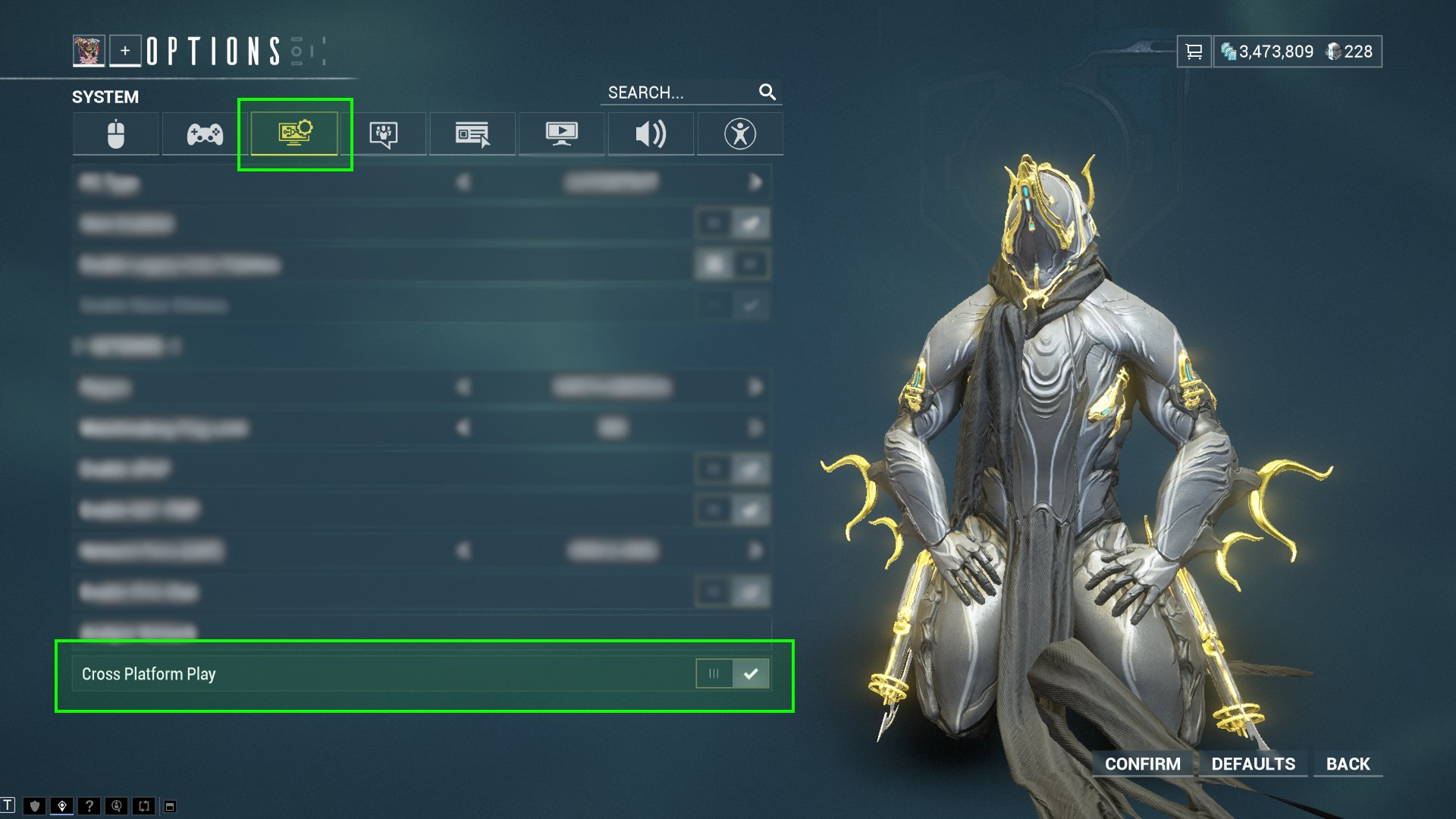
Yes. Cross Platform Play lets PC, Xbox, PlayStation, Nintendo Switch and mobile players join squads and use public matchmaking together. Turn the Cross Platform Play setting on or off in the game's Options menu.