To create a custom texture pack in Minecraft, make a pack folder with a manifest.json file (Bedrock Edition) or a pack.mcmeta file (Java Edition), add PNG textures named exactly like the vanilla textures they replace, and activate the pack in a world.
On this page
The steps below build a working Bedrock pack on a Windows PC first, then cover Java Edition, installing the pack on every device, realistic PBR textures and fixing a pack that will not load.
The fastest way to create a custom texture pack in Minecraft
On a Windows 10 or Windows 11 PC with Minecraft: Bedrock Edition, a working texture pack is one folder, one manifest.json file and one PNG. This one replaces the dirt block texture.
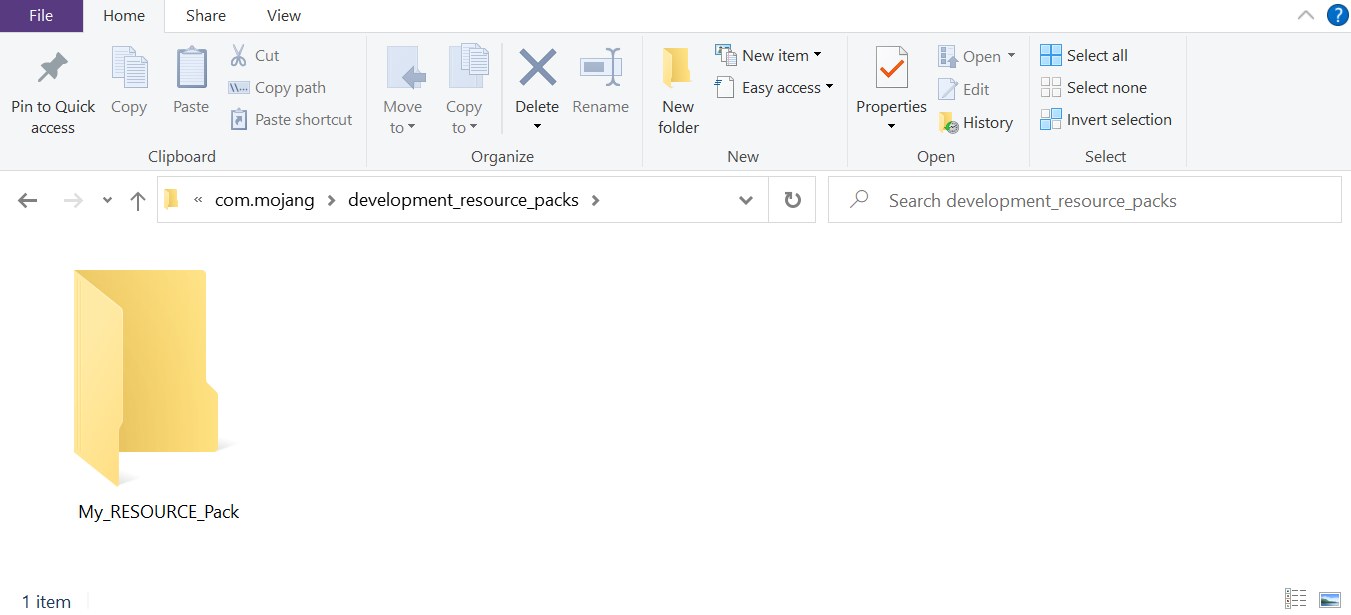
- Press Win+R, paste
%appdata%\Minecraft Bedrock\users\shared\games\com.mojanginto the Open field and select OK. - Open the
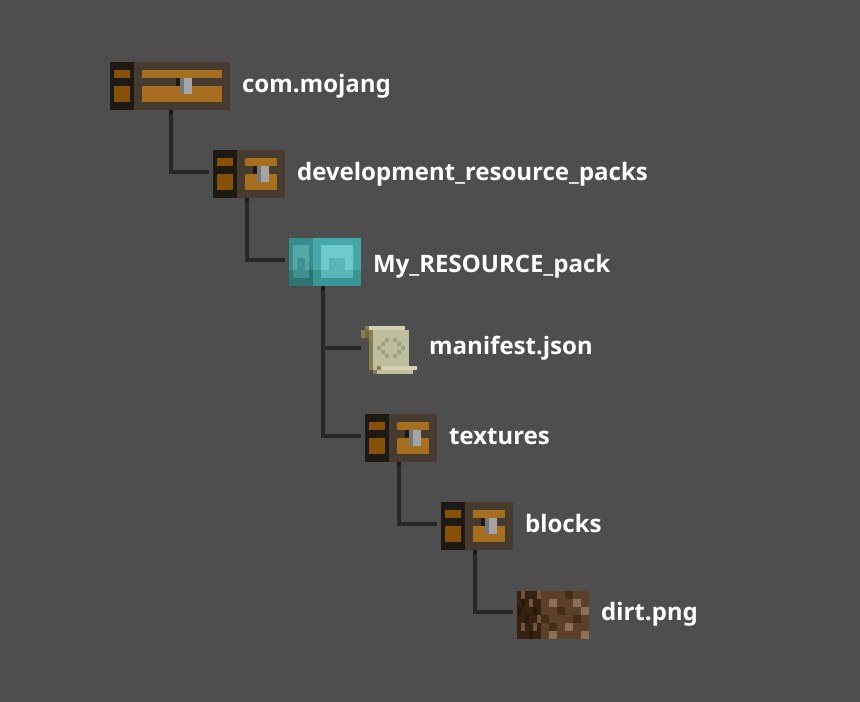
development_resource_packsfolder and create a folder inside it calledMy_RESOURCE_Pack. - Inside that folder, create
manifest.jsonwith a name, a description, two different UUIDs, a version and a minimum engine version (the full file is in the manifest section below). - Create a folder called
texturesinsideMy_RESOURCE_Pack, and a folder calledblocksinsidetextures. - Draw a 16 by 16 pixel image and save it in the
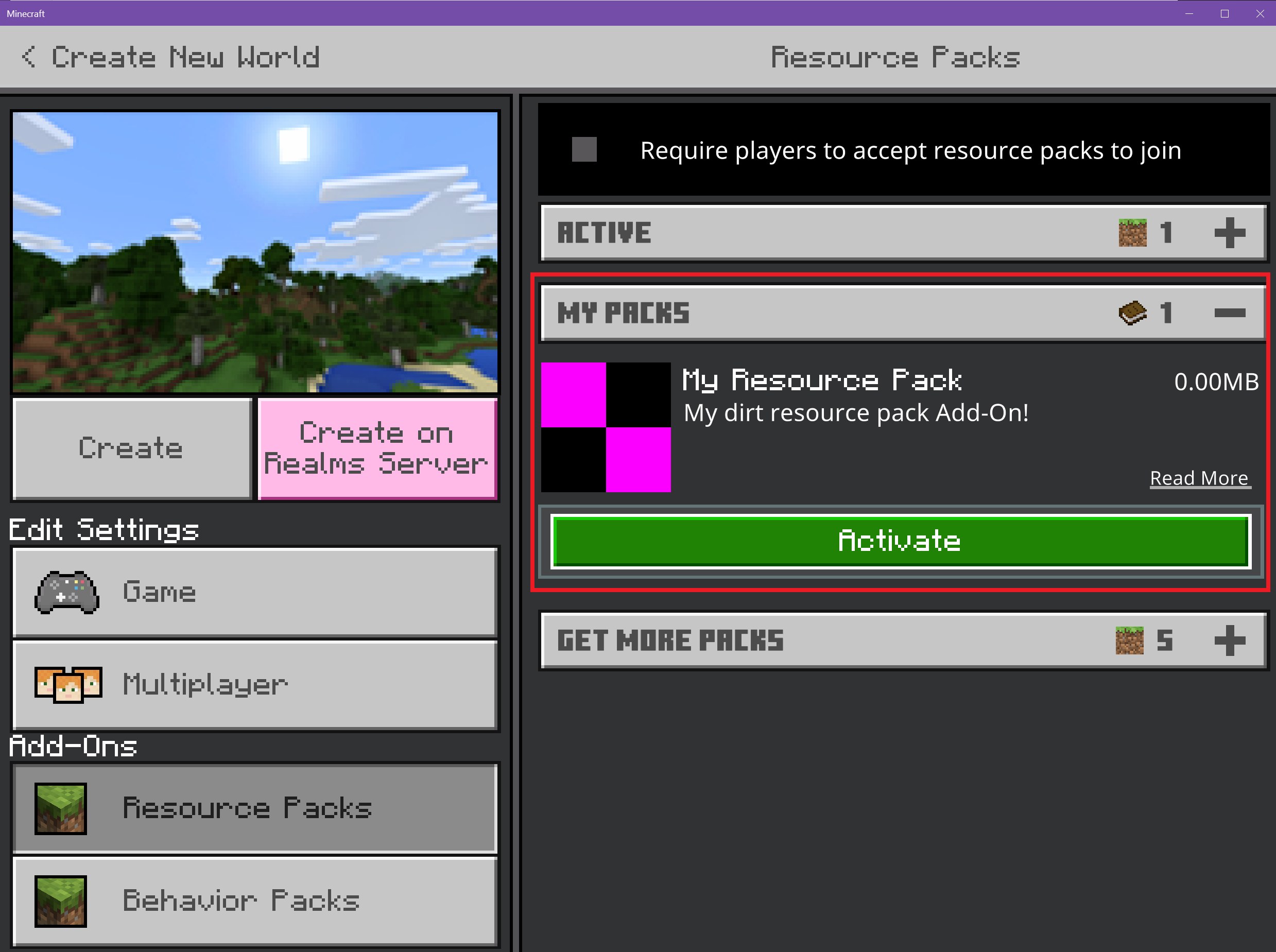
blocksfolder asdirt.png. - Launch Minecraft, select Play > Create New World, scroll to the Add-Ons section under Settings, select Resource Packs, open MY PACKS, select your pack and select Activate, then Create.
Which Minecraft edition is your texture pack for?
Bedrock and Java packs use different files and folder names, so a pack built for one edition does not load in the other. Pick the row that matches the edition you play.
| Your situation | Build this | Why |
|---|---|---|
| You play Bedrock Edition on Windows | A folder with manifest.json and textures/blocks, placed in development_resource_packs |
Development pack folders are updated each time Minecraft launches, so edits show up on the next start |
| You play Bedrock Edition on console, Android or iOS | The same Bedrock pack, built on a Windows PC and then moved to the device | Phones import a finished .mcpack file and consoles load the pack through a Realm world |
| You play Java Edition | A folder with pack.mcmeta and an assets/minecraft/textures tree |
Java reads the supported resource pack versions from pack.mcmeta, not from a manifest |
| You want realistic lighting on Bedrock | A Bedrock pack plus texture set files and the pbr capability |
Vibrant Visuals and ray tracing read extra PBR layers that a plain PNG does not carry |
What do you need to make a Minecraft texture pack?
| Item | What it is for | Detail |
|---|---|---|
| An image editor | Drawing the textures | MS Paint handles a plain 16 by 16 texture; transparency effects and .tga files need a more capable graphics editor |
| A text editor | Writing manifest.json or pack.mcmeta |
Any editor works; Visual Studio Code understands JSON natively and has Bedrock extensions such as Blockception's Minecraft Bedrock Development |
| File Explorer settings | Seeing the real file names and the hidden AppData folder | Select the View tab and tick File name extensions and Hidden items, so manifest.json does not end up as manifest.json.txt |
| Two UUIDs (Bedrock only) | Identifying the pack | The header and the modules section each need a different UUID |
| A Windows 10 or Windows 11 PC (Bedrock) | Building and testing the pack | Bringing the pack to a console also needs a Realms subscription |
How to create the manifest.json file for a Bedrock texture pack
Minecraft reads the manifest to list the pack in the Add-Ons section of a world. The header describes the pack, and the modules section declares it as a resource pack.
- In
My_RESOURCE_Pack, right-click and select New > Text Document, then rename itmanifest.json. - Open the file in your text editor and paste:
{"format_version": 2, "header": {"description": "My dirt resource pack Add-On!", "name": "My Resource Pack", "uuid": "<FIRST UUID>", "version": [1, 0, 0], "min_engine_version": [1, 16, 0]}, "modules": [{"description": "My First Add-On!", "type": "resources", "uuid": "<SECOND UUID>", "version": [1, 0, 0]}]} - Replace
<FIRST UUID>and<SECOND UUID>with two different UUIDs (the PowerShell command further down generates them). - Change
nameanddescriptionto your own text; the description appears below the pack name in the game, so keep it to one or two lines. - Raise
min_engine_versionto the newest game version available, since the field tells the game whether your pack needs any backwards compatibility. - Save the file.
How to draw and save a custom block texture
A texture replaces the vanilla one only when the folder path and the file name match exactly. Bedrock block textures sit in textures/blocks.
- In
My_RESOURCE_Pack, create a folder namedtextures, and inside it a folder namedblocks. - Open MS Paint, select File > Properties, set Width and Height to 16 pixels and select OK.
- Draw the texture; a single fill color is enough to test the pack.
- Select File > Save As, choose PNG picture, open the
blocksfolder and save the file asdirt.png. - To replace a different block, copy its exact file name from the Minecraft Vanilla Resource Pack and save your image under that name.
- Add a square
pack_icon.pngto the pack root, next tomanifest.json, so the pack has an icon in the selection screen; 256×256 pixels displays best.
Generate the two pack UUIDs from PowerShell
New-Guid; New-GuidNew-Guid creates a random globally unique identifier. Running it twice gives the two different values the Bedrock manifest needs, one for the header and one for the modules section.
You should see: Two GUIDs in the xxxxxxxx-xxxx-xxxx-xxxx-xxxxxxxxxxxx pattern; paste each one between the quotation marks of one uuid field.
How to create a texture pack for Minecraft Java Edition
Java Edition uses a pack.mcmeta file instead of a manifest. Since Java 1.21.9, the pack section needs min_format and max_format, and pack_format is only required for packs that also support resource pack versions below 65.
- Create a folder for the pack and, inside it, the path
assets/minecraft/textures/block. - Create
pack.mcmetain the pack folder and paste:{"pack": {"description": "My texture pack", "min_format": 97, "max_format": 97}} - Set
min_formatandmax_formatto the resource pack version of the release you play (see the version table further down). A single number inmax_formataccepts any minor version of that major version. - Draw a 16 by 16 PNG and save it in
blockunder the vanilla sprite name it replaces, for exampledirt.png. - Put the finished pack folder in your Java Edition game directory's resource pack folder.
- Start the game, open the resource pack selection screen, find your pack with the search box and select it so it loads.
How to install Minecraft texture packs you made
Where the finished pack goes depends on the device. On a Bedrock console, the pack reaches the game inside a world uploaded to a Realm from a Windows PC.
| Device | Where the pack goes | How to turn it on |
|---|---|---|
| Bedrock on Windows | development_resource_packs while you work on it, or open the finished .mcpack file to import it |
Resource Packs in the world's Add-Ons settings, then MY PACKS > Activate |
| Bedrock on Android | Copy the .mcpack file to the device and open it from Storage > Explore in the Settings app |
Wait for the import notification, then activate it in the Resource Pack tab when editing a world |
| Bedrock on iOS | Open the .mcpack file and tap Open in Minecraft |
Activate it in the Resource Pack tab when editing a world |
| Bedrock on console | A world with the pack active, uploaded from the Windows PC to your Realm | Launch Minecraft on the console and open that world on the Realm |
| Java Edition | The game directory's resource pack folder | Select the pack in the resource pack selection screen |
How to share a texture pack as an .mcpack file
An .mcpack file is a zipped resource or behavior pack. Opening one imports the pack into Bedrock Edition.
- On the PC, zip the contents of
My_RESOURCE_Pack. - Change the file extension from
.zipto.mcpack. - Before sending an updated copy, raise the
versionnumbers inmanifest.json: an imported pack replaces the old one only when its version is higher, and is ignored when it is the same or lower. - Send the file to the other device and open it there.
Which kind of texture pack should you make?
The style decides the canvas size and how many textures you replace. A pack only overrides the files it contains, so a small pack is a finished pack too.
| Style | Canvas size | How to build it |
|---|---|---|
| Vanilla-improving packs | 16x, the same 16 by 16 canvas as the dirt texture above | Redraw only the textures you want to change and leave the rest vanilla |
| Cartoon & stylized texture packs | 32x | Use bright flat fills and simple outlines; 32x gives more room for shapes than 16x |
| Realistic & high-resolution texture packs | 32x up to 128x | Add detail on the larger canvas; on Bedrock, add PBR texture sets for Vibrant Visuals lighting |
| Specialized & utility packs | The size of the file you replace | Replace one item, model or effect and leave everything else vanilla |
How to make realistic and high-resolution texture packs on Bedrock
Vibrant Visuals and ray tracing (RTX) read the same Physically Based Rendering (PBR) texture sets. A texture set adds layers for metalness, emissive, roughness and bump mapping on top of the color image. Vibrant Visuals is cross-platform, while ray tracing is restricted to RTX devices.
Vibrant Visuals also applies texture sets to entities, particles and items, placed in textures/entity, textures/particle or textures/items. Items take a normal map only, because Vibrant Visuals cannot apply a heightmap to texture-based objects.
- Keep
dirt.pngintextures/blocksas the color layer, which is the only required layer. - Save a 3-channel image named
dirt_mer.pngnext to it, where red is metalness, green is emissive and blue is roughness. - Save either a normal map (
dirt_normal.png) or a 1-channel heightmap (dirt_heightmap.png), never both in one texture set. - Create
dirt.texture_set.jsonin the same folder and paste:{"format_version": "1.16.100", "minecraft:texture_set": {"color": "dirt", "metalness_emissive_roughness": "dirt_mer", "normal": "dirt_normal"}} - In
manifest.json, add"capabilities": ["pbr"]after the modules section and setmin_engine_versionto[1, 21, 120]or higher. - Relaunch Minecraft so the development pack updates, then open a world with the pack active; an invalid texture set logs
CONTENT_ERRORand is not used.
How to check your custom texture pack loaded
- In Bedrock, open the world's Resource Packs settings and confirm your pack is in the active list with its name and description.
- Find or place a dirt block: it should show your new texture.
- Look at a grass block; it keeps the vanilla look because dirt with grass on it has a different texture name, which confirms only the file you replaced changed.
- In Java Edition, confirm the pack is selected in the resource pack screen and the replaced block shows your texture in the world.
- If the texture is still vanilla, compare your pack with the official sample resource pack on the Minecraft samples GitHub.
Which resource pack version does each Minecraft Java release use?
Use this number for min_format and max_format in pack.mcmeta. From 1.21.9 onward the version has a minor part, and a minor version increase stays compatible with packs made for the same major version.
| Java Edition release | Resource pack version | Released |
|---|---|---|
| 26.3 | 97.1 | 9/15/26 |
| 26.2 | 88.0 | 6/16/26 |
| 26.1 | 84 | 3/24/26 |
| 1.21.11 | 75.0 | 12/9/25 |
| 1.21.9 | 69.0 | 9/30/25 |
| 1.21.4 | 46 | 12/2/24 |
Can you edit the best Minecraft texture packs instead of starting from scratch?
Only when the pack's license allows it. MIT and CC-BY-4.0 are open licenses that permit changes and sharing as long as the original author is credited, while All Rights Reserved means editing and sharing the pack needs the author's permission.
Each pack's Modrinth page lists its license and the game versions it supports, so check both there before opening the pack's files.
| Pack | What it changes | Resolution | License on Modrinth | Newest listed game version |
|---|---|---|---|---|
| Clarity | Pixel-perfect textures for any world | 32x | All Rights Reserved | 1.21.1 |
| Tooniverse | Colorful, cute and cartoony overhaul | 32x | All Rights Reserved | 1.21.11 |
| Epic Adventures | Stylized realistic fantasy theme | 32x | All Rights Reserved | 1.20.1 |
| ModernArch | Realistic look that stays close to vanilla | 128x | All Rights Reserved | 26.3 |
| Fire Rekindled | Animated texture overhauls, PBR supported | 16x | MIT | 1.21.11 |
| Custom Totem 3D | Uses your own skin as the Totem of Undying | Not listed | MIT | 26.1.2 |
| Night Vision | Night vision effect for Polytone or OptiFine | Not listed | CC-BY-4.0 | 26.2 |
Fix a custom texture pack that does not work
The pack does not appear in the Add-Ons section
A malformed manifest.json is the usual cause.
- Check that the header and modules sections carry two different UUIDs.
- Turn on File name extensions under the View tab and confirm the file is
manifest.json, notmanifest.json.txt. - Check every curly brace and bracket; a JSON linting tool finds the broken line.
- Confirm the pack folder sits directly inside
development_resource_packs.
The pack shows up but the texture does not change
A folder or file name does not match the vanilla path, or another pack loads over yours.
- Check that
texturesandblocksare spelled exactly and nested in that order. - Check that the PNG has exactly the same name as the vanilla texture it replaces.
- Move your pack above other active packs; with pack stacking, the pack applied last overwrites files with the same name.
The Java Edition pack is not accepted by the game
The version range in pack.mcmeta does not include the game's resource pack version.
- Look up your release in the version table above.
- Set
min_formatat or below that number andmax_formatat or above it. - Remove
supported_formatsunless the pack also targets resource pack versions below 65.
An updated .mcpack does not replace the old pack
The import ignores a pack whose version is the same as or lower than the installed one.
- Raise
versionin the header and the module ofmanifest.json, for example from[1, 0, 0]to[1, 0, 1]. - Zip the pack, rename it to
.mcpackagain and reopen it.
PBR textures do not show in Vibrant Visuals
The texture set is invalid or the manifest lacks the pbr capability.
- Confirm
manifest.jsonlistspbrundercapabilitiesandmin_engine_versionis[1, 21, 120]or higher. - Check that the texture set defines a color layer and does not define both a normal map and a heightmap.
- Keep every image the texture set references in the same resource pack as the
.texture_set.jsonfile.
The pack has no icon in the selection screen
The pack root has no valid pack_icon.png.
- Save a square PNG named
pack_icon.pngin the pack root, next tomanifest.json. - Keep only one
pack_icon.pngper pack and make sure it is a real PNG, not a renamed JPEG.
Frequently asked questions about custom Minecraft texture packs
Is a texture pack the same as a resource pack in Minecraft?
Yes, in practice. A Minecraft texture pack is built as a resource pack, the folder structure that holds custom textures, models and sounds, with a manifest.json file on Bedrock or a pack.mcmeta file on Java. A texture pack is simply a resource pack that contains only textures.
What size should a Minecraft texture be?
Start with 16 by 16 pixels: a 16 by 16 PNG saved as dirt.png replaces the vanilla dirt texture with no other change. Packs on Modrinth also come in 32x and 128x, which carry more detail per block but mean drawing far more pixels for every texture you replace.
Do I need to replace every texture in a pack?
No. A pack only overrides the files it contains, and every texture you leave out keeps its vanilla look. A pack holding a single dirt.png works, which makes it the quickest way to test the folder structure before drawing anything else.
Can I make a Minecraft texture pack on a phone or console?
Build it on a Windows 10 or Windows 11 PC, where the Bedrock development folders sit inside com.mojang, then move it. A phone imports the finished .mcpack file, and a console gets the pack through a world with the pack active that the PC uploads to a Realm.
Why does my Bedrock pack need two UUIDs?
The header UUID identifies the pack and the modules UUID identifies its resources module, and Minecraft uses them to tell packs apart and prevent duplicates. Pasting the same value into both fields is one reason a pack never appears in the Add-Ons section.
Is a texture pack the same as a skin pack?
No. A skin pack changes how the player character looks and lives in the separate skin_packs folder on Bedrock, like the Chinese New Year skin pack or the free skin pack Minecraft released. A texture pack changes blocks, items and the world.
Will a Java texture pack work on Bedrock Edition?
No. Bedrock needs a manifest.json file and its own folder names, such as textures/blocks, while Java reads pack.mcmeta and assets/minecraft/textures/block. The PNG images can be reused, but the pack has to be rebuilt in the other edition's structure.
Can I sell a texture pack I made?
Bedrock creators sell content such as texture packs through the Minecraft Marketplace, which means joining as a Marketplace Partner. A pack built on someone else's All Rights Reserved textures cannot be sold or shared without that author's permission.