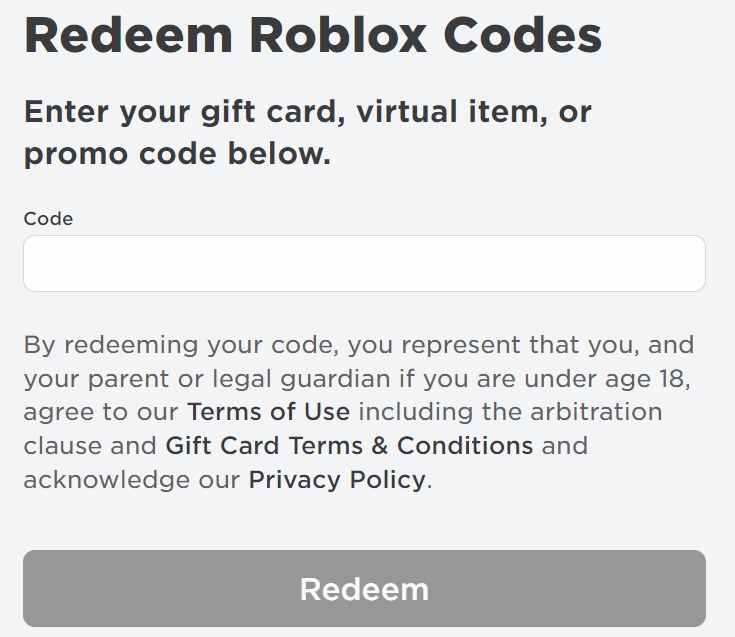
To redeem a Roblox gift card, sign in to your Roblox account at roblox.com/redeem in a web browser, type the PIN from the card and select Redeem.
On this page
The steps below cover phones, tablets and Xbox, turning Roblox Credit into Robux, checking your balance and fixing a code that will not go through.
Quick steps to redeem a Roblox gift card
Redemption happens on the Roblox website in a web browser, on a computer, phone or tablet.
- Find the PIN on the physical card, or on the e-gift card for a digital purchase.
- Open a web browser and go to roblox.com/redeem.
- Log in to the Roblox account that should receive the value.
- Type the code into the text box.
- Select Redeem and wait for the confirmation message.
- If the card held Roblox Credit, select Get Robux on the same page to turn it into Robux.
Robux and Credit land on whichever account is signed in when you select Redeem, so confirm you are on the right account first.
Which device can you redeem a Roblox gift card on?
| Your device | Where to redeem | Why |
|---|---|---|
| Windows PC, Mac or Chromebook | roblox.com/redeem in a web browser | The standard redemption route |
| iPhone, iPad, Android phone or Fire tablet | roblox.com/redeem in the device's browser | The standard Roblox mobile app has no redemption page |
| Samsung Galaxy phone or tablet | The Roblox app: More > Redeem, or the browser | Only Samsung Galaxy users can redeem inside the Roblox app |
| Xbox or PlayStation | A browser on another device, signed in to the same Roblox account | Redemption is not available on consoles |
Additional tips to check before you redeem a Roblox card
| Check | Why it matters |
|---|---|
| You are signed in to the right account | Robux are added to the account that is logged in when the code is redeemed |
| The card came from an authorized retailer or roblox.com/giftcards | Cards bought from unauthorized sellers, resellers or auction sites are not honored |
| You are 18 or older, or a parent or guardian agrees | The U.S. gift card terms require that consent to redeem |
| You enter one code at a time | Roblox accepts as many cards as you like, but each one goes in separately |
| The receipt is kept until the Robux show up | Roblox Support asks for it, plus photos of the card's front and back, if a code fails |
A card is redeemed in full in one go; the U.S. terms do not allow partial redemption.
How to redeem Roblox gift cards on PC
- Open a web browser on your Windows PC, Mac or Chromebook.
- Go to roblox.com/redeem and log in.
- Enter the PIN in the text box exactly as printed.
- Click Redeem.
- Read the confirmation message, then check Available Credit under the Redeem button.
Only Credit needs the extra Get Robux step; a card denominated in Robux states its Robux amount on the card and redeems directly for Robux.
How to redeem Roblox gift cards on mobile, iPad and tablets
On iPhone, iPad, Android and Fire tablets, the redemption page lives in the browser, not the Roblox app. Samsung Galaxy devices are the exception.
iPhone, iPad, Android or Fire tablet
The standard Roblox mobile app has no redeem option.
- Open the web browser on the device.
- Go to roblox.com/redeem and log in with the account you play on.
- Type the code and tap Redeem.
- If the card held Credit, tap Get Robux while still in the browser.
- Open the Roblox app and tap the Robux icon at the top to see the balance.
Samsung Galaxy phone or tablet
The Roblox app on Samsung devices includes a redeem tile.
- Open the Roblox app on your Samsung device.
- Go to the More page.
- Tap the Redeem tile.
- Enter the code and wait for the confirmation message.
How to redeem a Roblox gift card for Xbox
A Roblox gift card code cannot be redeemed on an Xbox or any other console. Redeem it on the web with the Roblox account you sign in to on Xbox.
- On a phone or computer, go to roblox.com/redeem in a browser.
- Log in with the same Roblox account you use on Xbox.
- Enter the gift card code on the web page and select Redeem.
- If the card held Credit, select Get Robux to convert it.
- On the Xbox, open the Roblox app from the home menu and go to the Robux menu.
- Check the figure next to My Balance in the lower-left corner.
How to turn Roblox Credit into Robux
A gift card worth money is stored as Roblox Credit after redeeming. Credit can only be used in a web browser, so convert it there.
- Log in at roblox.com/redeem on the account that received the card.
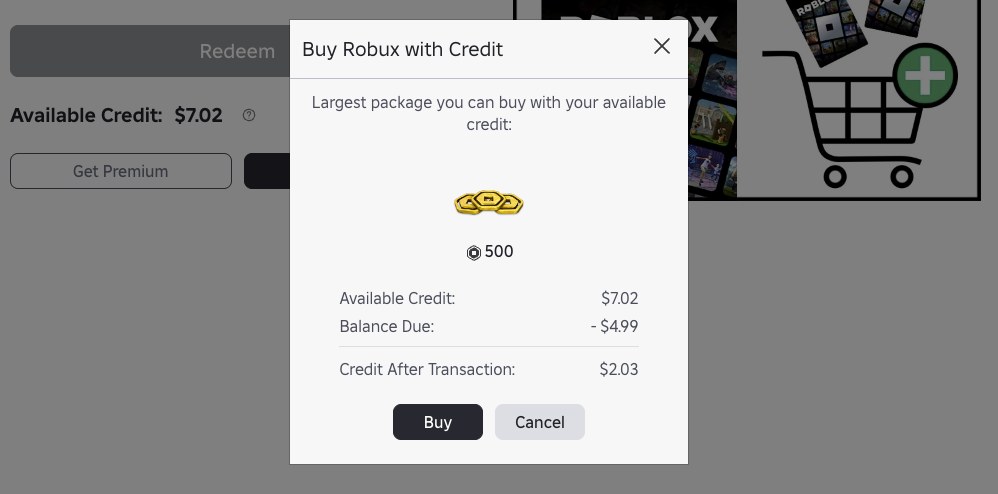
- Select Get Robux. The largest package your Credit can pay for is pre-selected.
- To pick a different package, go to roblox.com/upgrades/robux instead.
- Click Buy; a confirmation window appears.
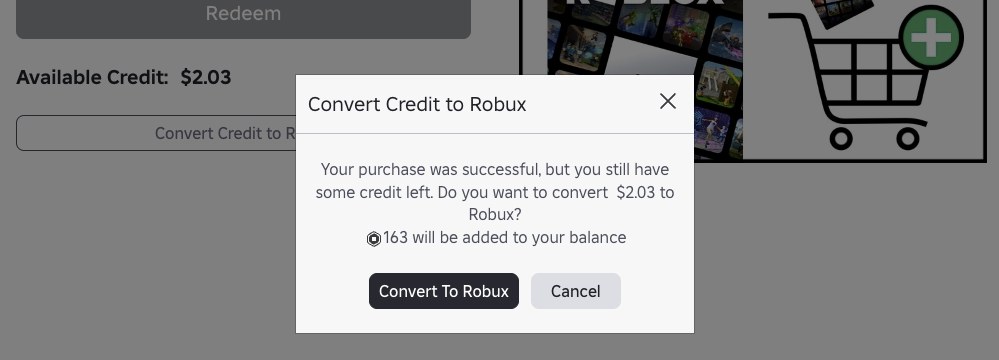
- If Credit remains, choose Buy to spend it on more Robux, or Cancel to keep it for later.
- For a remainder too small for a full package, select Convert Credit to Robux on the redemption page, then refresh the page to see the new Robux balance.
Credit cannot be combined with a credit card on one purchase; if the Credit does not cover the whole package, Roblox asks for another payment method. In the U.S., turning Credit into Robux may be subject to sales tax, depending on your state.
How to check Roblox Credit balance and Robux after redeeming
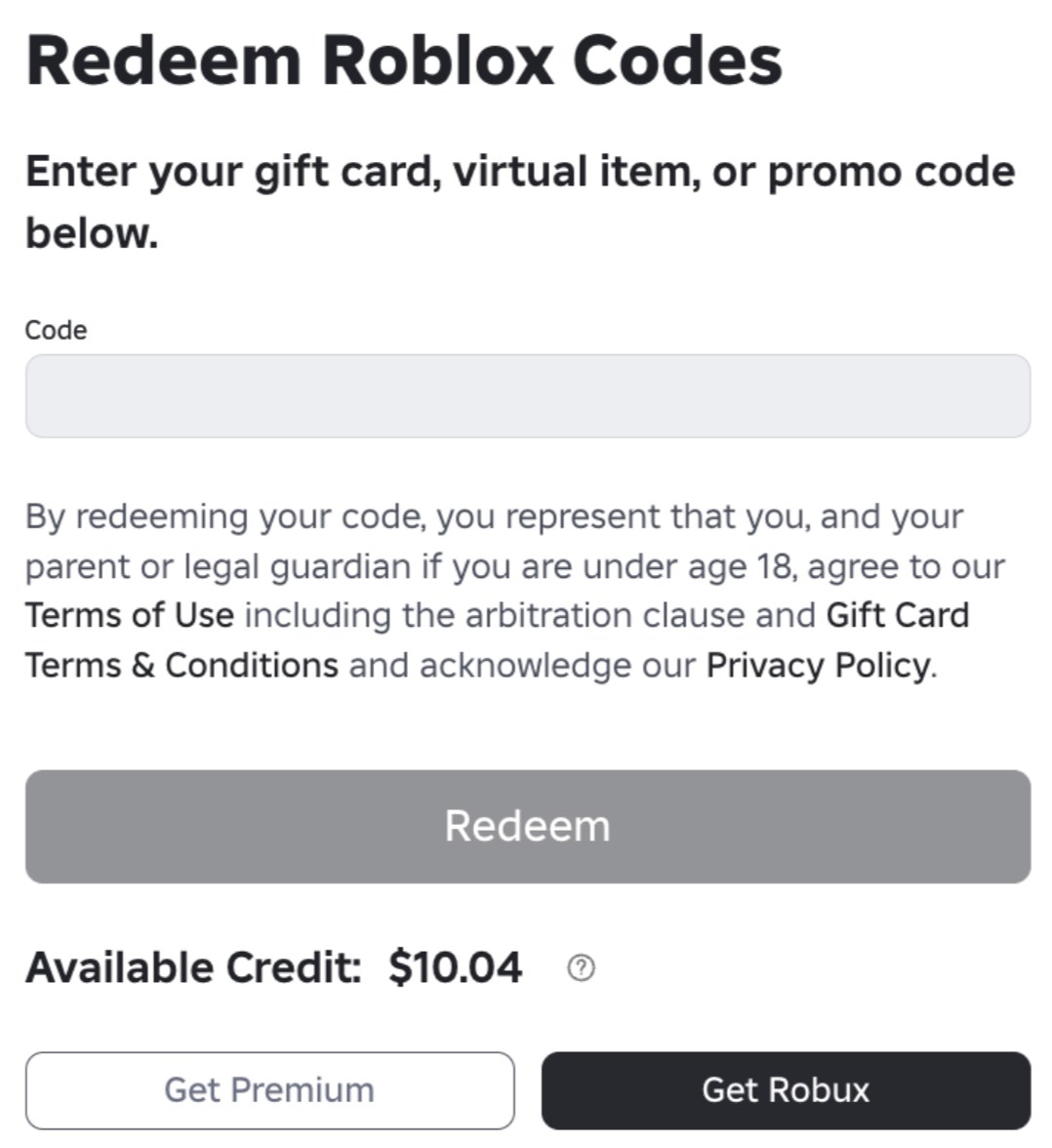
- In a browser, open roblox.com/redeem and read Available Credit under the Redeem button.
- Or open Billing Settings and read the Balance next to the Roblox Credit line.
- No Credit line at all means no gift card Credit sits on that account.
- For Robux, look at the Robux balance in the upper-right corner of the website, or tap the Robux icon at the top of the mobile app.
- To see the purchase itself, click the Robux icon, click your Robux amount and open My Transactions.
- For the card's free virtual item, open the Gift Card page and click the item's name; the page says you own it.
Credit never shows in the Roblox mobile app. Only Robux do.
What are Roblox gift cards?
A Roblox gift card is a prepaid card or digital code that adds Roblox Credit or Robux to one account. A card that redeems directly for Robux states the Robux amount on the card.
| Card type | What redeeming adds | Details |
|---|---|---|
| Standard Roblox gift card (money value) | Roblox Credit | A $100 card becomes $100 in Credit; cards from other countries convert to your account's currency |
| Robux-denominated card | The Robux amount printed on the card | Redeems directly for Robux |
| Amazon Gift Card | Robux only | Cannot be redeemed for Roblox Credit |
| Mini Pack coin | 50 Robux per coin | 40 coins per bag, each with its own PIN; no virtual item included |
| Party Pack card | 200 Robux per card | 25 physical cards per pack; Robux only, no virtual item included |
Every Roblox gift card includes a free virtual item, limited to one unique item per account per month. Buying Robux with gift card Credit gives up to 25% more Robux, the same bonus as buying on the web or a computer. U.S. cards do not expire and carry no inactivity fees.
Where can you buy Roblox gift cards?
| Source | What you get | Note |
|---|---|---|
| Local retailers and their online stores | Physical gift cards; Mini Packs and Party Packs at select retailers | Buy only from authorized retailers and keep the receipt |
| Roblox digital gift cards | A digital e-gift card | Sold online in the United States, Canada, UK, Germany, France, Netherlands, Spain, Italy and Australia |
| Countries without Roblox cards | No card | Pay for Robux with a credit card or PayPal instead |
Digital cards from roblox.com/shopgiftcards are sold through Roblox's partner CashStar, so questions about a digital purchase, including a missing PIN, go to the CashStar Customer Support form.
How to get Roblox gift card, retail and promo codes
| Code type | How you get it | Where to redeem |
|---|---|---|
| Gift card PIN | Bought at an authorized retailer or roblox.com/giftcards | roblox.com/redeem |
| Retail code (Mini Pack, Party Pack) | Bought at a physical or online retailer | roblox.com/redeem |
| Promo code | Roblox events and giveaways; it may expire after a short time | roblox.com/redeem |
Robux are purchased from Roblox for real money or earned as a creator, and there is no other way to get them. Roblox treats any person, website or experience claiming otherwise as a scam and asks players to report it through Report Abuse.
Why can't I redeem my Roblox gift card?
Roblox gift card code shows an error or says it is invalid
Some letters and numbers on the card look alike.
- Retype the code, swapping look-alike characters: 0 for O, 1 for I, 2 for Z, 5 for S, 6 for G or Q, 8 for B.
- Confirm the page is roblox.com/redeem in a browser, not the app or a console.
- If it still fails, contact Roblox Support at roblox.com/support or 1 (888) 858-2569 in the U.S., with the card PIN, serial number, receipt photo and a photo of the error.
The code says it has already been redeemed
The Robux may have been added to a different account you use.
- Log in to each Roblox account you use and check its Credit and Robux balance.
- If the card was still sealed and untampered with when you bought it, contact Roblox Support with the receipt and the code.
There is no redeem option in the Roblox app or on Xbox
Redemption is not available in the standard mobile app or on consoles.
- Open a web browser on any phone, tablet or computer.
- Redeem at roblox.com/redeem with the same account.
- Check the Robux balance in the app or on the console.
Gift card Credit does not appear in the Roblox app
Credit is only visible and usable in a web browser.
- Open roblox.com/redeem in a browser.
- Select Get Robux to convert the Credit.
- Tap the Robux icon at the top of the app to see the Robux balance.
A digital Roblox gift card PIN never arrived
Digital cards from roblox.com/shopgiftcards are sold through CashStar, not issued by Roblox directly.
- Fill in the CashStar Customer Support form with your purchase details.
- For a code promised by another store's promotion, contact that retailer; Roblox does not issue or reissue those codes.
The free virtual item did not arrive
Each account gets one unique gift card item per month, and Mini Pack coins and Party Pack cards include no item.
- Open the Gift Card page and click the item name to confirm whether you already own it.
- Check any other accounts you have logged into.
- If the card went to the wrong account by mistake, contact Roblox Support with the card PIN, serial number and photos of the receipt and card.
A promo code will not redeem
Promo codes are often active only for a short time.
- Check that you are logged in, then reenter the code at roblox.com/redeem.
- Check your inventory in case you already own the item.
- If the code's time frame has passed, it can no longer be redeemed.
Frequently asked questions about redeeming Roblox gift cards
Can I redeem a Roblox gift card on Xbox?
No. Roblox gift cards cannot be redeemed on Xbox or any other console. Redeem the code at roblox.com/redeem in a browser on a phone or computer, signed in to the account you use on Xbox, then check My Balance in the Robux menu of the Xbox app.
Can I redeem a Roblox gift card in the app?
Only on Samsung Galaxy devices, from the More page and the Redeem tile. The standard Roblox app on iPhone, iPad, Android and Fire tablets has no redemption page, so open roblox.com/redeem in the device's browser instead.
How do I redeem a Roblox gift card on an iPad or Fire tablet?
Open the web browser on the iPad or Fire tablet, go to roblox.com/redeem, log in and enter the code. Convert any Credit with Get Robux in the browser, then tap the Robux icon in the Roblox app to see the balance.
Where do I enter a Roblox gift card code I bought online?
Enter it at roblox.com/redeem in a web browser, the same page used for physical cards. A digital card bought at roblox.com/shopgiftcards comes from Roblox's partner CashStar, so a missing PIN is a question for the CashStar Customer Support form.
Why won't my Roblox gift card redeem?
Look-alike characters are the first thing to check: 0 and O, 1 and I, 8 and B. Retype the code with those swaps, confirm you are on roblox.com/redeem in a browser rather than the app or a console, and contact Roblox Support with the receipt if it still fails.
Can I redeem more than one Roblox gift card?
Yes. Roblox lets one account redeem as many cards as you like, but each card goes in separately at roblox.com/redeem. The free virtual item is limited to one unique item per account per month.
Can I redeem a Roblox gift card from another country?
Yes. All Roblox codes redeem worldwide, and the value converts to your account's local currency automatically. Under the U.S. terms, no fee is charged for the currency conversion, which uses monthly exchange rates from XE.com.
Do Roblox gift cards expire?
No. Under the U.S. terms, Roblox gift cards and Credit do not expire, and no inactivity or maintenance fees apply. Promo codes are different: many are only active for a short period, so redeem those right away.
Can I get a refund on a Roblox gift card?
No. Roblox does not refund gift cards, and the value cannot be exchanged for cash except where the law requires it. Lost, damaged or stolen cards are not replaced either, so redeem a card soon after buying it.