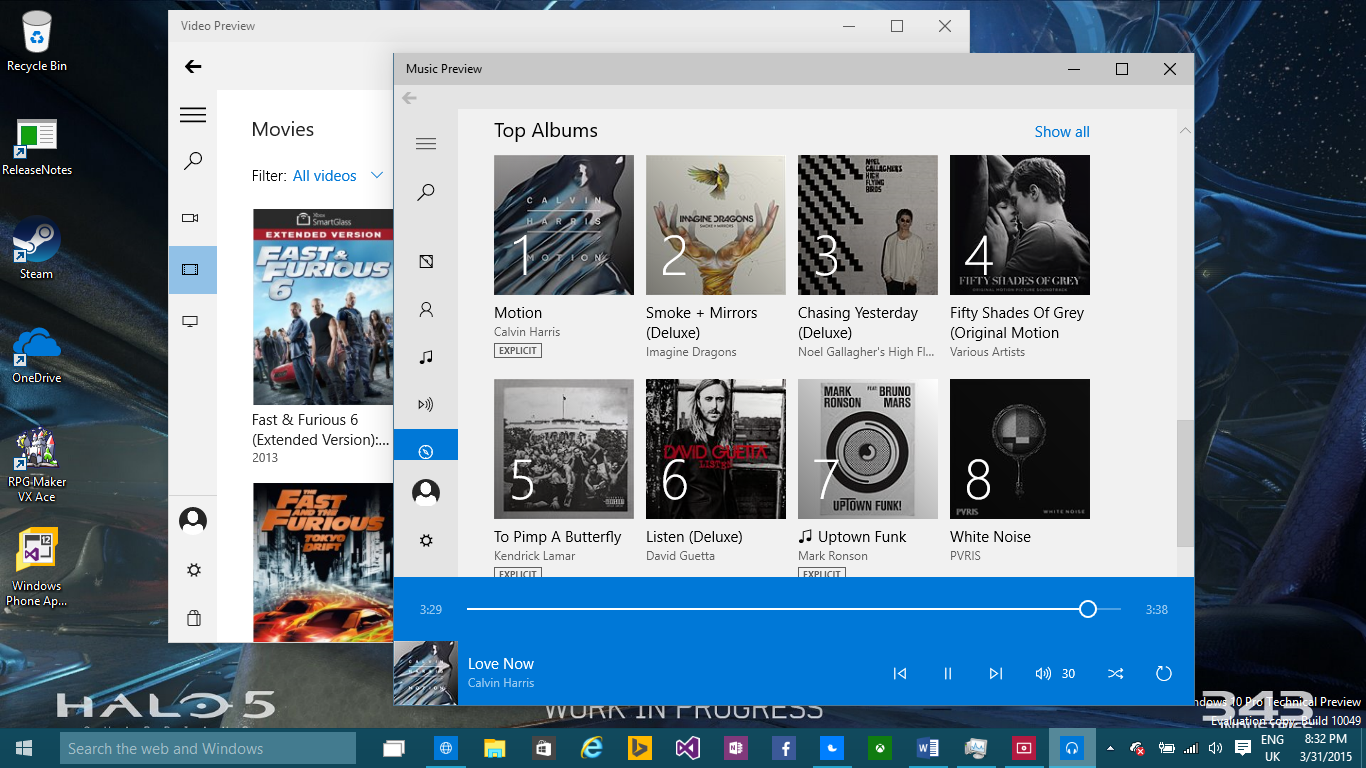
Microsoft have released new preview versions of its Xbox Music and Video apps for Windows 10 through the Store Beta. Currently no major features have been added, except the use of the white theme seen throughout a lot of the Windows 10 apps. The biggest change however is the dropping of the ‘Xbox’ branding from both apps.
The apps are called ‘Music Preview’ and ‘Video Preview’ and the Xbox brand cannot be seen in any of the Store descriptions nor throughout the apps. This could mean a variety of things and may only be present for the initial versions of these apps. It’s possible that Microsoft could name both services Microsoft Music and Microsoft Video with the Microsoft brand being one of companies recent strengths. To me, it’s an odd move. The Xbox brand is huge worldwide and one that everyone immediately recognizes. However, when Microsoft switched both services from the Zune branding to the Xbox branding in October 2012, they didn’t take off as much as the company hoped. The services would still remain under the Xbox division from what I know, they just may not use the divisions branding. Xbox Music even offered free music streaming (like Spotify) on Windows 8.1 and the web until December 2013 when Microsoft decided to axe that side of the service.

On the new Video Preview, you see three main categories on the left under the hamburger menu. These are for personal videos, Movies and TV Shows bought from the Xbox Video Store (or Video Store as referred to in this app). The ability to browse the Video Store and buy new content has actually been removed in this release. There is a store option which opens up the new Store Beta app on the TV & Movies section which is still listed as “Coming Soon.” Using the search feature in the Video Preview app only searches for videos in your collection presenting you with an option to search in the store. On both the Music and Video Preview apps is an area to manage your Microsoft Account which is displayed using your email address (if menu is toggled fully) which is something that really bugs me and I hope is changed in future updates.

The Music Preview app has the same categories on the left under the hamburger menu as seen on today’s Windows 8.1 version except ‘Collection’ has been divided up into three categories; Albums, Artists and Songs. The Search, Radio, Explore, Now Playing and playlist options remain and work the same like on the Windows 8.1 app. The Music Store is fully accessible in this Preview with the ability to add music to your collection and so is music stored on OneDrive. One thing I really like about this preview is the use of blue with white. I think the cyan-like now-playing bar and buttons really brightens up the app. The cyan colouring is also seen in the Video Preview app. Both apps feature the same description pages when you click on Music, TV and Movies.

So far, there isn’t any critical new features. The new white/blue colour scheme used in the apps really brighten them up in my opinion. Both apps load feel faster and snappier than their predecessors and they both feel closer to each other, more “universal” to say the least. The biggest question is why the removal of the Xbox branding? I believe it could be related to the new One Store concept that Microsoft have been working on. Adding movies, TV and music to this store was something Microsoft confirmed a while back and therefore the new brand for apps, games, music, movies and so forth may simply be known as the Windows Store which is available on every Microsoft product. I think this idea makes sense as there’s no point in half the Store using the Windows branding the other half using the Xbox brand. It’ll be interesting to see what happens in future updates to these apps.
If you’re running the Windows 10 Technical Preview, you can grab the Video Preview app and Music Preview app by clicking on the links.
^Alan (@BeetleComet)

Alan Walsh is a games journalist, head writer at AR12Gaming. They contributed 52 articles to ICXM in 2015, focused on game reviews, Windows and PC, and Xbox news: leads editorial for AR12Gaming and reviews titles for OpenCritic.