To install mods in Minecraft: Java Edition, install the CurseForge app or Modrinth App, pick a mod, and let the app build a profile with the matching game version and mod loader; Bedrock Edition uses add-ons instead, opened as .mcpack, .mcaddon or .mcworld files.
On this page
The steps below cover both editions on PC, phones and consoles, plus Java, Forge, modpacks, a check that the mods loaded, and fixes for the errors that stop a modded game from starting.
Install the mod you want with the CurseForge app
The CurseForge app reads each mod's game version and mod loader and builds a matching profile, so nothing has to be matched by hand. It runs on Windows 10 and 11, macOS 12 and higher, and official Ubuntu distributions.
- Download the CurseForge app from curseforge.com/download/app, install it and open it. On Windows, both the standalone app and the Overwolf CurseForge app support Minecraft Java Edition.
- Select Minecraft Java Edition. If the game is missing, open Settings, click the + button and choose Scan computer for games.
- Find the mod in Discover, Browse or the search field, or click Install on its page at curseforge.com and then Open to hand it to the app.
- Choose Create a new profile. The app reads the mod's game version and mod loader and sets the profile to match.
- Name the profile and click Create. Leave Advanced alone unless you need a specific game or loader version.
- To add the mod to a profile you already have instead, click Select a profile, pick it, then click Install.
- Open the profile from My Modpacks and click Play.
Keep adding mods to the same profile with Add More Content. Each mod must match the profile's Minecraft version and mod loader, and the app will not let you select a profile that does not fit.
Which way to install Minecraft mods fits your setup?
| Your situation | Use this | Why |
|---|---|---|
| Java Edition on Windows, macOS or Ubuntu, first time modding | CurseForge app | Creates the profile and sets the game version and mod loader for you |
| Java Edition, and you want an open-source launcher | Modrinth App | Open source, with Windows, Mac and Linux builds, and installs, updates and removes mods with one click |
| You already run a mod loader and have a .jar file | Manual install to the mods folder | No extra app; the .jar goes straight into the mods folder |
| Bedrock Edition on Windows 10 or Windows 11 | Open the .mcpack, .mcaddon or .mcworld file | Minecraft imports it and lists it in the world settings or the Play menu |
| Bedrock Edition on Android or iPhone | Open the file from storage or the share sheet | The device hands the file to Minecraft |
| Xbox, PlayStation or Switch | A Realm world built on a Windows PC | Java mods do not run on consoles, and a Realm carries a Bedrock world with its add-ons to the console |
How to install Java for Minecraft mods
Minecraft: Java Edition runs on the Java Virtual Machine, and modpacks need a working, current Java install. On Minecraft 1.16.5 or older, an out-of-memory error usually means a 32-bit Java is installed where a 64-bit one is needed.
- In Modrinth App, click the cog in the bottom-left to open settings and go to Java installations.
- Click Install recommended next to the Java 21, Java 17 and Java 8 locations, and wait for all three to download. Use the recommended versions even if the fields are already filled.
- With the CurseForge app, install the latest Java from java.com/download if a modpack reports that Java is missing; it installs to Program Files, so you need administrator rights.
- Restart the computer after a manual Java install, then launch the modpack again.
How to install mods with the Modrinth App
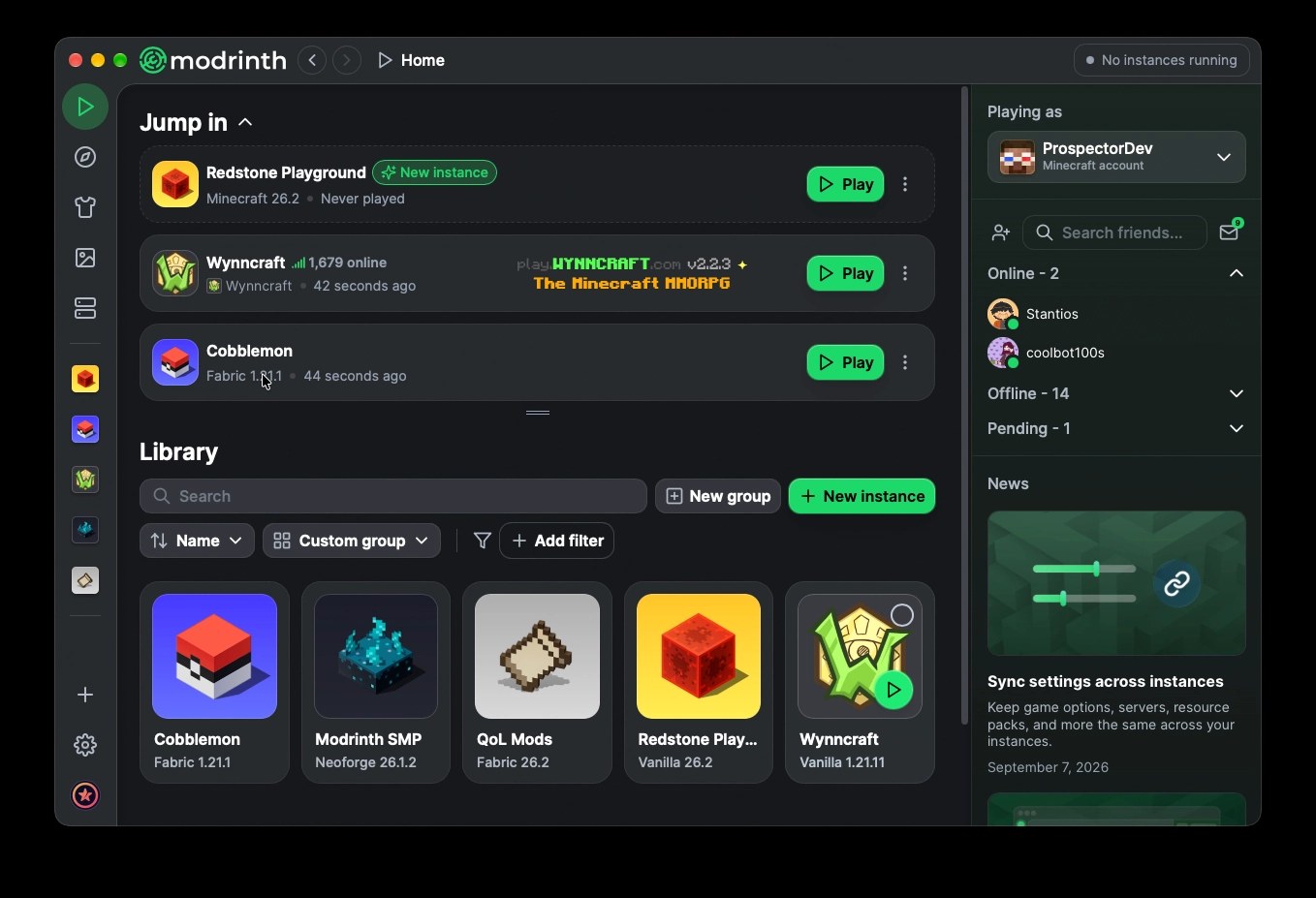
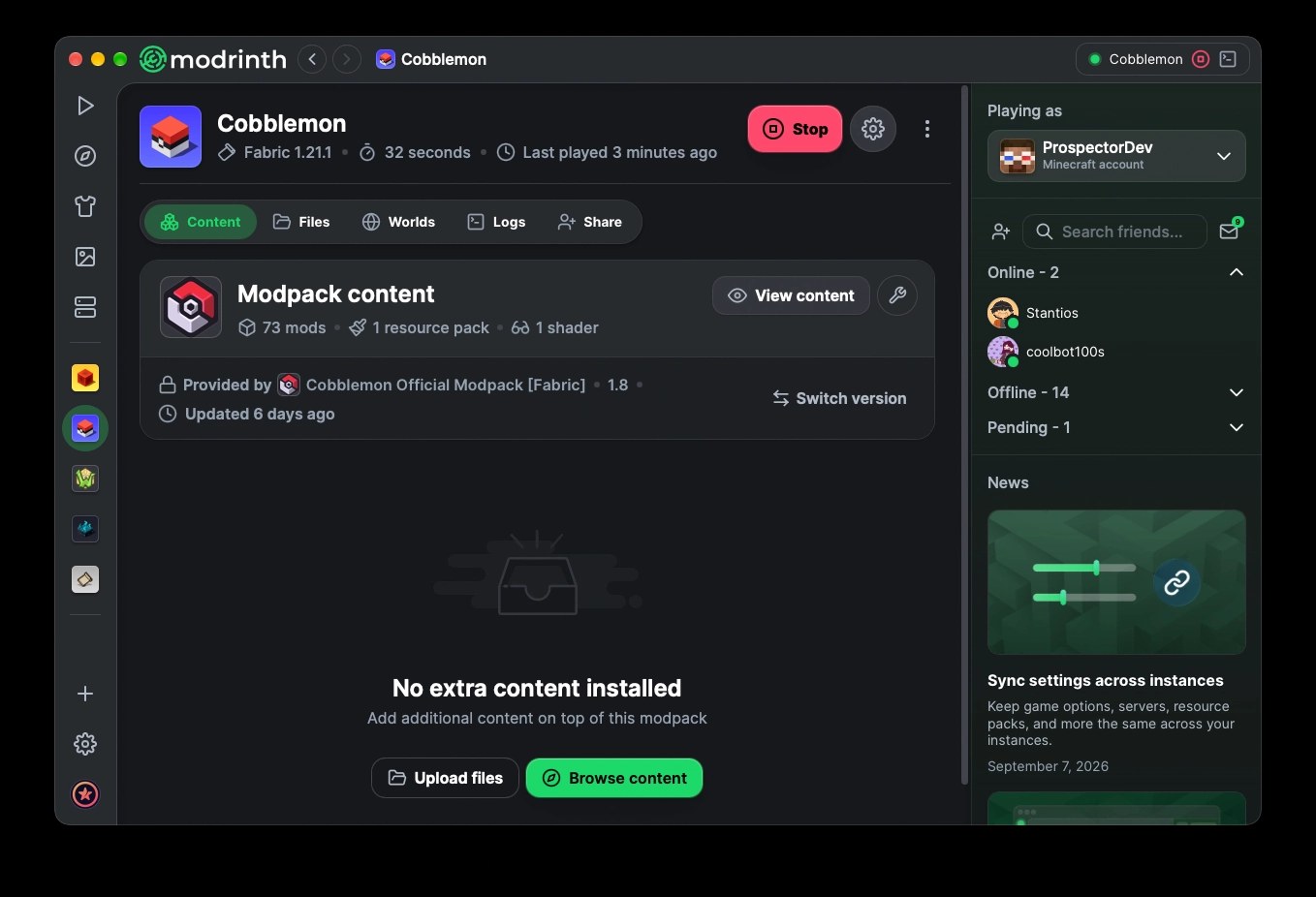
- Download Modrinth App from modrinth.com/app for Windows, Mac or Linux, then install and open it.
- Click Browse on the left side of the launcher.
- Search for the mod or modpack and click Install.
- Install a single mod into an instance whose game version and mod loader match the mod. To change either, open the instance settings and go to the Installation tab.
- Open the instance and launch it; the mod appears in the Mods section of the instance.
Adding mods for Minecraft manually to the mods folder
A manual install works when a mod loader is already in place. The mod file is a .jar, and it goes into the mods folder of the Minecraft directory the loader runs from.
- Check the mod's page on Modrinth or CurseForge for its supported Minecraft versions and loaders (Fabric, Forge, NeoForge or Quilt).
- Install that loader for the same Minecraft version; in Modrinth App, set it on the instance's Installation tab. Lithium, for example, asks only for the latest Fabric Loader.
- Download the .jar file that matches both your game version and your loader.
- Open the game directory. For the standard launcher it is
C:\Users\[user]\AppData\Roaming\.minecraft\; in Modrinth App, right-click the instance and select Open folder. - Put the .jar into the
modsfolder there. - Add any other mods the page lists as required, then start the game with the loader.
How to install modpacks in Minecraft
A modpack is a list of mods bundled with configuration files, effectively a modded game ready to play. One install sets up the mods, the loader and the game version together.
- In the CurseForge app, go to Browse and select Modpacks from the dropdown on the left.
- Filter by mod loader, game version or category, pick a pack and click Install.
- When it finishes, open the pack from My Modpacks and click Play.
- In Modrinth App, click Browse, find the modpack and click Install, then launch the new instance.
- To install a pack you were sent as a file, use the import option in the app; a CurseForge pack is a ZIP that must contain a manifest.json, and a Modrinth pack uses the .mrpack format.
How to install Minecraft Forge
Forge is a mod loader: it lets mods run in Minecraft, and every Forge mod needs a Forge profile of the same game version. NeoForge, Fabric and Quilt are separate loaders, and a mod runs only on the loaders its page lists.
- In the CurseForge app, install any Forge mod or Forge modpack; the app detects the mod loader type and sets the new profile to Forge.
- To pick a Forge version yourself, click Advanced while creating the profile. Only versions compatible with the mod are offered.
- To check which loader a mod supports before installing, open the All Mod Loaders dropdown on its page in the app.
- To check an existing profile, click it and see whether it says Forge or Fabric.
- In Modrinth App, open the instance settings, go to Installation, and set the loader to Forge and the game version you need.
How to install mods in Minecraft Bedrock on a Windows PC
Bedrock Edition does not load Java .jar mods. It uses add-ons: resource packs that change how the world looks and behavior packs that change how mobs, blocks and items act.
- Download the add-on or world file. In File Explorer, turn on File name extensions so you can see the real extension.
- If the file arrived as a .zip, rename the extension to .mcpack for a pack or .mcworld for a world.
- Open the file. Minecraft starts and imports it; a .mcaddon is a zip of .mcpack or .mcworld files and opens the same way.
- A pack shows an import confirmation. A .mcworld appears in the Play menu.
- Create or edit a world and add the pack from the Behavior Pack or Resource Pack tab, depending on the pack type.
How to install Minecraft add-ons on Android and iPhone
- Download the world or add-on file to the device.
- On Android, open the Settings app, select Storage > Explore, go to the folder you saved it in (usually Download) and select the file.
- On iPhone or iPad, tap the file wherever you received it (a link or an email attachment) and choose Open in Minecraft.
- Minecraft opens and confirms the import. Packs appear when you edit a world; worlds appear under Play.
How to add mods to Minecraft on Xbox, PlayStation and Switch
Java Edition is PC-only, so Java mods never run on a console. Console players can still play a Bedrock world built with add-ons by hosting it on a Realm from a Windows PC.
- On a Windows 10 or Windows 11 PC with Bedrock Edition, import the add-ons and create a world with them turned on.
- With a Realms subscription, upload that world to your Realm from the PC.
- On the console, launch Minecraft and open the add-on world from the Realm.
How to check that your Minecraft mods loaded
- Start by launching the Forge or Fabric profile from My Modpacks in the CurseForge app, or the instance in Modrinth App, rather than the plain game.
- Confirm the profile shows the Minecraft version and loader you expected; CurseForge shows the version next to the controller icon.
- In Modrinth App, open the instance's Mods section and confirm every mod is listed.
- In game, check something the mod changes. With Sodium, the Video Settings screen shows its redesigned options.
- If the game closes during loading, open the instance's Logs tab or the crash-reports folder before changing anything.
What are Minecraft mods?
A mod changes or adds to Minecraft, and what counts as one, and how it installs, depends on the edition.
| Type | Edition | File | What it needs |
|---|---|---|---|
| Mod | Java Edition (PC) | .jar in the mods folder | A mod loader (Fabric, Forge, NeoForge or Quilt) matching its game version |
| Modpack | Java Edition (PC) | CurseForge ZIP with manifest.json, or Modrinth .mrpack | The CurseForge app, Modrinth App or another compatible launcher |
| Add-on pack | Bedrock Edition | .mcpack or .mcaddon | Nothing extra; open the file and add it to a world |
| World with add-ons | Bedrock Edition and Minecraft Education | .mcworld | Opens into the Play menu |
| Marketplace content | Bedrock Edition | Bought or downloaded from the Minecraft Marketplace | A purchase for paid add-ons; free add-ons and worlds also exist |
Which Minecraft mods and modpacks to install first
Each project below is hosted on Modrinth. Confirm the game version and loader on the project page before installing, then browse the full modpack list or world generation mods for more.
| Goal | Project | Type and loader | What it does |
|---|---|---|---|
| Performance | Sodium | Mod; Fabric, NeoForge, Quilt; client-side | Replaces the rendering engine to raise frame rates and cut micro-stutter |
| Performance | Lithium | Mod; Fabric, NeoForge, Quilt; client, server or both | Optimizes game physics, mob AI and block ticking without changing vanilla mechanics |
| Performance modpack | Fabulously Optimized | Modpack; Fabric | Graphics and performance mods in a single install |
| World | Terralith | Mod or data pack; Fabric, Forge, NeoForge, Quilt | Almost 100 new biomes built from vanilla blocks |
| World | Biomes O' Plenty | Mod; Fabric, Forge, NeoForge | Adds 50+ biomes with new trees and flowers |
| Survival | Born in Chaos | Mod; Forge, NeoForge and others; client and server | Aggressive new mobs, structures and equipment that make survival harder |
| Horror | Cave Horror Project 1 | Modpack; Forge, 1.20.1 | A horror modpack with quests and a story |
| Vanilla-plus | Vanilla Perfected | Modpack; Fabric | Vanilla Plus mods and packs that stay close to the feel of the base game |
| Vanilla-plus | Better MC (BMC4 for Forge, BMC2 for Fabric) | Modpack; Forge or Fabric | A Vanilla+ modpack for players who want more than the base game |
Why can't I install Minecraft mods? Fixes by symptom
The profile is greyed out or marked incompatible
The mod and the profile are set to a different Minecraft version or a different mod loader.
- Hover over the question mark next to the profile to read the reason.
- Check the mod's versions in the All Game Version dropdown and its loaders in All Mod Loaders.
- Install the mod to a new profile with Create a new profile so the app matches both for you.
The game crashes after adding mods
An outdated mod, a mod built for another game version (a 1.20.1 mod may not work on 1.20.2), or two mods that conflict.
- In Modrinth App, click Update all in the instance's Mods section.
- Read the crash log; a line containing
Caused by: org.spongepowered.asm.mixinpoints to a mod whose ID appears next to.mixins.json. - If the log does not name a mod, disable half your mods and launch again, keep the half that still crashes, and repeat until one mod is left.
"Failed to launch modpack. An unexpected error occurred."
A damaged modding installation or a problem with the CurseForge launcher.
- Open the dots menu at the top right of the CurseForge app and select Repair Installation.
- If it still fails, open the app's settings, choose Minecraft and switch Use CurseForge launcher to Use Mojang launcher.
- Launch the modpack again; if it still fails, click the ? icon and select Create logs zip to send to CurseForge support.
The launch button says Play Demo instead of Play
The Minecraft account is not signed in correctly.
- Log out of your Minecraft account in the launcher.
- Log back in with the account that owns the game.
- Launch the modpack again and check that the button now says Play.
The modpack will not start and Windows says Java is missing
Java is not installed or is outdated.
- Install the latest Java from java.com, or use Install recommended under Java installations in Modrinth App.
- Restart the computer.
- Launch the modpack again.
The modding folder path is rejected
CurseForge cannot use the desktop, OneDrive, the vanilla .minecraft folder, a drive root, or a path with non-English or special characters.
- Keep the default path
C:\Users\[user]\curseforge\. - Or create a folder such as
C:\CurseForgeand select it with Advanced during setup.
No sound after launching a modpack
The game's sound assets did not load.
- Enter a single-player or multiplayer world.
- Press F3 + T once to reload the game's assets.
A Bedrock add-on opens as a .zip instead of importing
The file kept a .zip extension, so Windows does not hand it to Minecraft.
- Turn on File name extensions in File Explorer.
- Rename the file to .mcpack (or .mcworld for a world).
- Open it again.

Frequently asked questions about installing Minecraft mods
Can you add mods to Minecraft?
Yes. Java Edition on PC runs full mods through a mod loader such as Forge or Fabric, installed most easily with the CurseForge app or Modrinth App. Bedrock Edition uses add-ons, which are resource and behavior packs, and a Bedrock world with add-ons can reach a console through a Realm.
How do you install mods in Minecraft Bedrock on PC?
Download the add-on, rename it to .mcpack if it arrived as a .zip, and open it; Minecraft imports it. Then create or edit a world and add the pack from the Behavior Pack or Resource Pack tab. Java .jar mods do not work in Bedrock.
How do you install mods in Minecraft Education?
Minecraft Education does not use Java Edition mods. It loads worlds from .mcworld files, the same zip archive format that holds a Bedrock Edition world. Mod loaders such as Forge and Fabric, and the .jar mods they run, belong to Java Edition, the PC-only edition known for mod support.
How do you install Fabric mods in Minecraft?
Install a Fabric mod through the CurseForge app and it creates a Fabric profile, or set an instance's loader to Fabric on the Installation tab in Modrinth App. Then add only mods built for Fabric. Lithium, for example, needs nothing but the latest Fabric Loader, not even Fabric API.
How do you install mods on a Minecraft server?
Add only mods that support the server side, which each Modrinth project page lists under supported environments. Sodium is client-side only, while Lithium runs on a server without players needing it installed. A whole Modrinth modpack installs onto a server with Modrinth Servers or mrpack-install.
How do you install mods for Minecraft 1.12.2?
Create a profile set to 1.12.2 with the loader the mod lists, and install only mods built for that exact version; the app filters for it. In Modrinth App, click Install recommended under Java installations so Java 8 is installed alongside Java 17 and Java 21.
Should you use Forge or Fabric?
Use whichever loader your mods are built for, because a mod and its profile must use the same loader. Packs such as Cave Horror Project 1 run on Forge, while Sodium recommends Fabric Loader as the simplest, lightest option.
How do you use mods after installing them?
Launch the profile or instance that contains them, not the plain game. In the CurseForge app, open the pack from My Modpacks and click Play; in Modrinth App, launch the instance. Many mods need no setup: Sodium turns on every optimization your system supports by default.
Do mods work on every version of Minecraft?
No. Each mod file targets specific Minecraft versions and loaders, and a mod for 1.20.1 may not work on 1.20.2. Check the version list on the mod's page and match it to your profile before installing, or let the app filter for you.
Do Minecraft mods work on Xbox or PlayStation?
Java mods do not, because Java Edition is PC-only. A Bedrock world built with add-ons on a Windows 10 or Windows 11 PC can be uploaded to a Realm and opened on a console, which is the documented console route.