To log in to Roblox, enter your username and password at roblox.com on a PC, tap Login in the Roblox mobile app, or choose Sign In on the Roblox home screen on Xbox.
On this page
Email, phone number, one-time code, Quick Login and passkey sign-in each have limits, and Xbox adds its own account-linking and age rules.
The fastest way to login to Roblox
Username and password work on PC, mobile and Xbox alike, so this route works anywhere once you know both.
- Open roblox.com in a browser such as Microsoft Edge, Chrome or Firefox, or open the Roblox app on your phone, Windows PC or Xbox.
- Go to the login screen. In the mobile app the button is Login; on Xbox it is Sign In.
- Type your Roblox username and password and submit them.
- If 2-Step Verification is on, enter the code Roblox asks for, from your email inbox or your authenticator app.
How to login to Roblox on any device
Every login method except username and password is limited by platform or by what is verified on the account. Match your case to a row.
| Login method | Where it works | What the account needs |
|---|---|---|
| Username and password | Browser, Windows app, mobile apps, Xbox | Nothing extra |
| Email and password | Mobile and browser apps | A verified email address; fails if that email is on more than one account |
| Phone number and password | Some mobile apps only | A verified phone number |
| Email one-time code | Login page, for some users only | A verified email; Roblox sends a six-digit code |
| Quick Login | A new device near one already logged in; not on Xbox | Any device already signed in to the account |
| Passkey | iOS devices and web browsers; added from Settings in the iOS app, Android app or browser | A passkey added under Account Info > Login Methods |
How to login to Roblox on PC
On a Windows PC you can sign in on the Roblox website, which installs Roblox Player the first time you play, or in the Microsoft Store app. Roblox says Windows players need to download the new Store app to keep playing, and the old app will eventually stop working.
Log in on the Roblox website
- Go to roblox.com in Microsoft Edge, Firefox or Chrome and open the login page.
- Enter your username or verified email address, plus your password, and submit them.
- Open any experience and click the green Play button.
- On the first run, a pop-up shows that Roblox Player is installing; if the browser asks which program to use, select Roblox and confirm.
- Tick the option to remember the choice so the browser stops asking on later launches.
Log in in the Roblox – Windows app
The new Microsoft Store app is named "Roblox – Windows" and has a blue icon; the old app is just "Roblox" with a light gray icon.
- Install "Roblox – Windows" from the Microsoft Store.
- Open the app and log in with your usual Roblox username and password.
- Link your Xbox account when asked. It is a one-time step, because Microsoft Store games use your Microsoft account and its Xbox profile.
- Once you are logged in to the new app, uninstall the old gray-icon Roblox app.
Your progress, friends, Robux and inventory carry over to the new app, since they belong to the Roblox account.
How to login to Roblox on mobile
- Open the Roblox app on your iOS or Android device.
- Tap Login.
- Fill in your username and password. A verified email address also works in place of the username, and so does a verified phone number in some Roblox apps.
- Tap Login again.
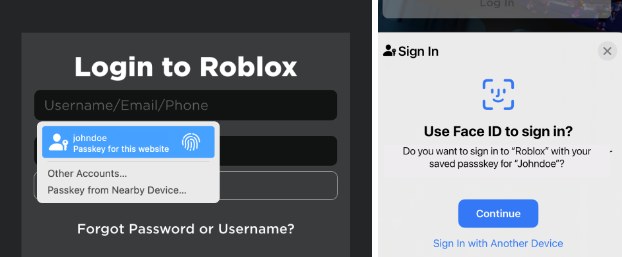
- If you added a passkey, confirm with Face ID, Touch ID or your screen lock instead of typing a password.
How to login to Roblox on Xbox
Roblox on Xbox ties your Roblox account to the Xbox profile that is signed in on the console, so start from the right profile.
- Launch Roblox on your Xbox. The home screen shows three options: Create Account, Sign In and the Xbox Gamertag of the signed-in profile.
- Select the Xbox Gamertag first if you need to switch to a different Xbox profile.
- Select Sign In to log in to an existing Roblox account and link it to the signed-in Xbox profile.
- Enter your Roblox username and password. Facebook sign-in and Quick Login are not available on Xbox.
- Choose Create Account instead if you have no Roblox account yet; the new account links to the same Xbox profile.
Roblox on Xbox is for ages 10 and up, and the age on your Xbox account must exactly match the age on your Roblox account. An Xbox Child Account needs permission from a parent in the Xbox family account before the app will launch. One Roblox account links to only one gamertag.
How to use Roblox Quick Login from another device
Quick Login signs a new device in from one that is already logged in, with no password. It does not work on Xbox, only works when the two devices are near each other, and may not be available to every player.
- On the new device, open the Roblox login page and click Log In with Another Device.
- Note the one-time code it shows; the code is valid for 5 minutes.
- On the device that is already logged in, go to Account Settings then Quick Login.
- Read the warnings, enter the code from the new device and click Enter.
- Review the details and select Grant Full Account Access; a success message appears when the new device is logged in.
Only enter a code you requested yourself. If a QR code option appears and fails, update the Roblox app, make sure the scanning device is logged in, or type the six-character code instead.
How to login to Roblox without a password
An email one-time code needs only a verified email address, though Roblox offers it to some users only. A passkey uses the same unlock you use for the device, and a passkey login skips the 2-Step Verification challenge.
- On the login page, press Email Me a One-Time Code and enter the email address verified on the account.
- Enter the six-digit code from your inbox on the same device that requested it; if the email is on several accounts, pick one.
- To set up a passkey for next time, open Settings in the iOS app, Android app or web browser.
- Under Account Info > Login Methods, press Add Passkey, verify with your password or an email code, then unlock your device to finish.
- To use a phone passkey on a computer, click the username field, choose Passkey from Nearby Device… or Use a Different Passkey, and scan the QR code with the phone.
Passkeys work on a mobile device with at least iOS 16, a computer with at least Windows 10, macOS Ventura or ChromeOS 109, Chrome 109 or later, Safari 16 or later, Edge 109 or later, and FIDO2 hardware keys. Add passkeys only to devices you own, since anyone who can unlock the device can open the account.
How to check you are logged in to the right Roblox account
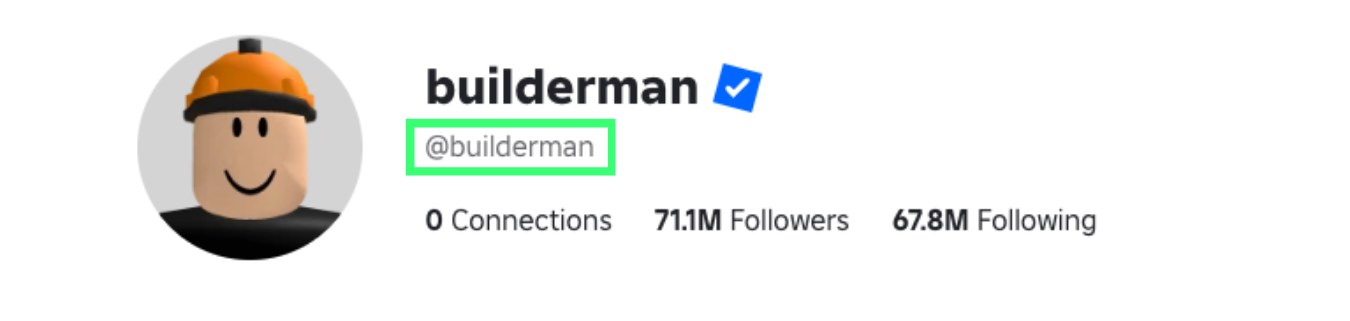
- Open your profile page and read the @username beneath your display name.
- On mobile, confirm your Robux balance shows and the Home screen options respond; if not, log out and back in.
- On the web, if the wrong account is signed in, click the gear icon at the top right of the Home page and select Switch Account to move between up to five saved accounts.
- On Xbox, press the X button on the Home screen and select Account; the page offers UNLINK followed by the gamertag the Roblox account is linked to.

Fix Roblox login problems on PC, mobile and Xbox
Forgot your Roblox password
The password has to be reset through Account Recovery, which needs an email or phone number on the account.
- Select Forgot Password or Username? on the Roblox login page.
- Enter the account email and press Submit, or open the Phone tab, select your country code, enter your number, press Continue, then select Verify to get a 6-digit code.
- Open the email and press Reset Password, or enter the phone code and press Verify.
- Pick the account if several match, then enter and confirm a new password you have not used before.
- With no email or phone number on the account, contact Roblox Customer Support and describe the login issue; Roblox verifies ownership before it resets an account.
Forgot your Roblox username
Recovery lists every username tied to the email or phone number you enter.
- Select Forgot Password or Username? on the login page.
- Enter your email and press Submit, or use the phone tab, enter your number and press Continue.
- Open the email link or enter the SMS code to see the matching usernames.
- With no email or phone on the account, check old purchase receipts, some of which show the username.
Email login says the email is linked to more than one username
Email login only works when the verified email belongs to a single account.
- Log in with the username and password instead.
- Check the email is typed exactly as it is on the account and that it is verified.
- Give each account its own password.
The one-time code never arrives or does not work
The email is unverified, mistyped, filtered as spam, or the code is entered on a different device.
- Check your spam or junk folder.
- Press Resend and check the inbox again.
- Enter the code on the same device that requested it.
- If codes still fail, log in with your password; codes may need a while before they work again.
Roblox login fails in a browser or the captcha will not load
A blocked captcha domain or a wrong system clock breaks browser sign-in.
- Add .arkoselabs.com and .funcaptcha.com to your browser or network allow list.
- Set the computer's clock to the correct time.
- Reset your password if sign-in still fails.
Roblox mobile app will not log in or shows no Robux
A wrong date and time or stale cookies on the device.
- Set the device date and time correctly in its settings.
- Log out, then log back in.
- Try logging in at roblox.com in Chrome, Safari, Edge or Firefox.
- Clear the device cookies if the problem continues.
Xbox error 901 when signing in or linking a gamertag
Error 901 appears during sign-up, sign-in or gamertag linking; at sign-in, a moderated Roblox account is one cause.
- Log in to the Roblox account on a computer or phone on the same home network.
- Once that works, log in on the Xbox over the same network.
- If the other device shows a moderation notice, submit an appeal through the Roblox support form.
Roblox will not link to your Xbox account
The age on Xbox does not exactly match the age on Roblox, or the Roblox account is already linked to another gamertag.
- Check the age in the Personal section of your Roblox Settings page.
- Check the age set on your Xbox account, using Microsoft's help page, and correct whichever one does not match.
- Unlink the Roblox account from the other gamertag first if it is already linked.
No passkey option appears at login
Passkeys do not sync across platforms, for example from an iPhone to a Windows PC.
- On the same platform, sign in to the iCloud or Google account used when the passkey was saved.
- On a different platform, log in with Quick Login, an email one-time code or your password.
- Add a new passkey on that device after you are in.
How to log out of Roblox or unlink it from Xbox
- Android: on the navigation bar at the bottom, tap More, tap the icon in the upper-right, then tap Log Out in the pop-up.
- iOS: tap More, then Settings, then Log Out, and confirm Log Out in the pop-up.
- Xbox: on the Home screen press the X button, select Account, then select UNLINK [YOUR GAMERTAG].
- Xbox from a browser: open your Roblox account settings, go to the Security tab and click Disconnect under Xbox.
Frequently asked questions
Can I log in to Roblox with my email instead of my username?
Yes, in the mobile and browser apps, as long as the email address is verified on the account. If the same email is attached to more than one account, Roblox asks you to log in with the username and password instead.
Can I log in to Roblox on Xbox with Facebook?
No. Facebook connect is not available through the Roblox app on Xbox. Sign in with your Roblox username and password, and reset the password first through Account Recovery if you have forgotten it.
Does Quick Login work on Xbox?
No. Roblox lists Quick Login as unavailable on Xbox. It works between other devices only when they are near each other, and the one-time code shown on the new device is valid for 5 minutes.
Do I need an Xbox account to play Roblox on a Windows PC?
For the Microsoft Store app, named "Roblox – Windows", yes: it asks you to link an Xbox account once, because Microsoft Store games use your Microsoft account and its Xbox profile. Your Robux, friends and inventory stay with the Roblox account.
Does a passkey skip Roblox 2-Step Verification?
Yes. Logging in with a passkey proves you hold the physical device, so Roblox does not show a 2-Step Verification challenge. Logging in with a password still triggers the challenge as usual.
How old do you have to be to play Roblox on Xbox?
Roblox is available for ages 10 and up on Xbox. The age on the Xbox account must exactly match the age on the Roblox account, or linking fails, and an Xbox Child Account needs parent permission to launch the app.
Can one Roblox account link to two Xbox gamertags?
No. A Roblox account can only be linked to one Xbox gamertag. To move it, unlink it from the console's Account settings or from the Security tab of your Roblox account settings, then sign in under the other profile.
How many Roblox accounts can I switch between?
Up to five, using the Account Switcher on the web under the gear icon on the Home page. It is limited to users 13 and older without parent privileges, and the saved accounts stay private to that device.
Can I recover a Roblox account without an email or phone number?
Not through Account Recovery, which needs an email or phone number on the account. Contact Roblox Customer Support and describe the login issue; Roblox verifies ownership before resetting an account. If only the username is lost, some purchase receipts show it.