To host a Minecraft server, start a Realm for a world that stays online without your PC, or run the free official server software on your own computer and let friends connect to it.
On this page
Java Edition and Bedrock Edition use separate server software, with different ports, setup steps and devices that can join.
The fastest way to host a Minecraft server: start a Realm
A Realm is a private server that Minecraft runs for you, so nothing needs installing and your PC can stay off. New subscribers can start with a free trial from inside the game.
- Open Minecraft and select Play.
- Choose Create New World and set up the world you want to share.
- Choose Add a 10 Player Realm or Add a 2 Player Realm.
- Read the terms, check I Agree, then select Start Trial if your account qualifies.
- Invite friends by gamertag or with a share link; members play for free and do not need their own subscription.
The trial lasts 30 days and then renews at the monthly price unless you cancel it. Realms only connects players on the same edition: Java with Java, Bedrock with Bedrock.
Which way to host a Minecraft server should you use?
| Your situation | Host with | Why |
|---|---|---|
| You want the world online when your PC is off, with no setup | Realms | Minecraft keeps the server running, backs up the world and handles connections |
| You play on Xbox, PlayStation, Switch or mobile and want to be the host | Realms for Bedrock | Bedrock Dedicated Server only runs on Windows or Ubuntu Linux, so a console cannot run it |
| Your group plays Bedrock and you have a Windows or Ubuntu PC to leave on | Bedrock Dedicated Server | Free, you set the player limit yourself, and Bedrock players on consoles and phones can join |
| Your group plays Java and wants mods or full control | Java Edition server | Free, runs on Windows, macOS and Linux, and Modrinth modpacks marked Client and server can run on it |
| You want to play on a big public server, not run one | The official Server Listing Site | Listed servers are reviewed against Minecraft's community standards |
The basics of hosting a Minecraft server
Every self-hosted server needs the same four things: matching software, a machine that stays on, an open port and the right edition on every player's device.
| What you need | Java Edition server | Bedrock Dedicated Server |
|---|---|---|
| Server software | The free server .jar from minecraft.net | The free ZIP package for Windows or Ubuntu from minecraft.net |
| Runtime | A compatible Java Runtime Environment, available from the command line | None; the package includes its own executable |
| Host operating system | Windows, macOS or Linux | Windows 10 or Windows Server 2016 and later, or Ubuntu 22.04 (LTS) or later |
| Default port | 25565 | 19132 (IPv4) and 19133 (IPv6) |
| Who can join | Minecraft: Java Edition players only | Bedrock players on Windows, Xbox, PlayStation, mobile and Nintendo Switch |
| Players outside your home network | Need the port forwarded on your router and allowed through the firewall | Need the port forwarded on your router and allowed through the firewall |
Bedrock Dedicated Server system requirements
| Component | Requirement |
|---|---|
| CPU | Intel Core i3 3210, AMD A8 7600 APU or equivalent |
| RAM | 4 GB RAM |
| Storage | 180 MB to 1 GB available space |
| Network | Broadband Internet connection |
| Windows | Windows 10 version 10.0.15063 or later, or Windows Server 2016 or later |
| Architecture | A 64-bit version of Windows or Ubuntu Linux |
| Linux | Ubuntu 22.04 (LTS) or later; other distributions are not supported |
Small servers can run with at least 1 GB of RAM, while larger worlds and more players need more memory, storage and processing power. A Java Edition server needs a computer that can run the server software and a compatible version of Java.
How to host a Minecraft: Java Edition server on Windows, macOS or Linux
The official Java server is a single .jar file. It only accepts Minecraft: Java Edition players.
- Install a compatible version of Java, such as the Microsoft Build of OpenJDK, if the computer does not have one.
- Open a terminal and run
java -versionto confirm Java works from the command line; on Windows, add Java to the PATH environment variable if it does not. - Download the server .jar from the Java Edition server page and move it into an empty folder.
- Open a terminal in that folder and start the server with the command in the next section.
- If the server stops after its first launch, read the console output and the files it created in the folder, do what they ask, then run the command again.
- Open port 25565 in the computer's firewall settings so other devices can reach the server.
- Forward port 25565 on your router to this computer if friends will join from outside your home network.
Start the Java server from the command line
java -jar <server-file>.jar noguiRuns the server .jar with Java. Replace <server-file> with the name of the file you downloaded. Leave out nogui if you want the server's graphical window instead of a console-only server.
You should see: New server files appear in the folder, and once any first-launch instructions are done the server keeps running in the terminal instead of returning to the prompt. If the terminal cannot find java, Java is missing from the PATH.
How to host a Bedrock Dedicated Server on Windows
- Download the Windows package from the Bedrock server page.
- Unzip it into an empty folder, such as
C:\MinecraftServer. - Open a command prompt or PowerShell from the Start menu.
- Change to the folder with
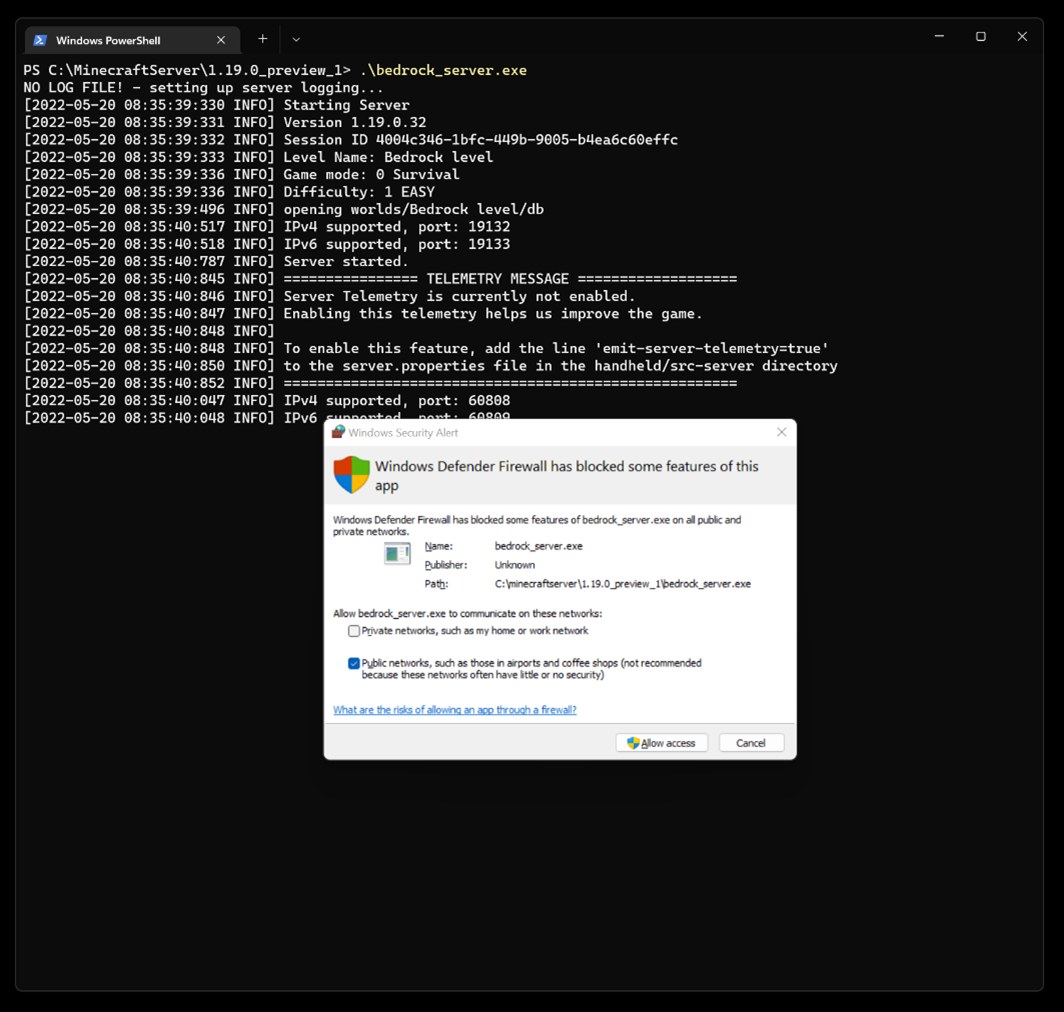
cd C:\MinecraftServer. - Start the server by typing
bedrock_server. - When Windows Defender asks how the server may communicate, choose private networks for LAN play or public for players joining over the internet.
- Forward port 19132 on your router to this PC for players outside your home network.
How to host a Bedrock Dedicated Server on Ubuntu Linux
- Download the Ubuntu package from the Bedrock server page.
- Unzip it into an empty folder, such as
~/MinecraftServer. - Open a Terminal window and run
cd ~/MinecraftServer. - Start the server with
LD_LIBRARY_PATH=. ./bedrock_server. - If the ufw firewall is enabled, open ports 19132 and 19133 with the commands in the next section.
- Forward port 19132 on your router to this machine for players outside your home network.
Open the Bedrock server ports on Ubuntu with ufw
sudo ufw allow 19132
sudo ufw allow 19133
sudo ufw reload
Allows the default server-port (19132, IPv4) and server-portv6 (19133, IPv6) through ufw, then reloads the firewall rules. Use your own numbers if you changed those ports in server.properties.
You should see: ufw confirms each rule, and a Bedrock player on another device can add the server and join.
How to change Bedrock server settings in server.properties
Bedrock Dedicated Server reads its options from server.properties in the server folder: one key=value pair per line. Stop the server, edit the file in a text editor, then start it again.
| Property | Default | What it controls |
|---|---|---|
| server-name | Dedicated Server | The name players see; any text without a semicolon |
| gamemode | survival | Game mode for new players: survival, creative or adventure |
| difficulty | easy | peaceful, easy, normal or hard |
| max-players | 10 | How many players can be on at once; higher values cost performance |
| online-mode | true | Requires Xbox Live sign-in; keep it on for any server open to the internet |
| allow-list | false | When true, only gamertags in allowlist.json can join |
| server-port | 19132 | The IPv4 port the server listens on |
| level-name | Bedrock level | Which folder in worlds/ is the active world |
| view-distance | 32 | Maximum view distance in chunks; higher values cost performance |
| player-idle-timeout | 30 | Minutes before an idle player is kicked; 0 turns it off |
To limit the server to friends, set allow-list to true and add each player with the command /allowlist add <GamerTag>, using quotes around a gamertag that contains a space. Give yourself admin rights with op <playername> in the server console.
How to set up a survival, modded or skyblock Minecraft server
The style of server comes from the world and content you load, not from different server software. Pick the row that matches what your group wants to play.
| Server style | Java Edition server | Bedrock Dedicated Server | Realms |
|---|---|---|---|
| Survival | Start the server with a new world | gamemode is survival by default | Create the world in survival before adding the Realm |
| Modded | Install a modpack marked Client and server on Modrinth on the server and on every player's game; Modrinth lists each pack's game version and loader (Fabric, Forge, NeoForge or Quilt) | Put behavior packs and resource packs in the server's behavior_packs and resource_packs folders | Realms for Bedrock supports Minecraft Marketplace and user-created content; Realms Plus adds the Marketplace Pass catalog |
| Skyblock or another custom map | Load the map as the server's world | Copy the world folder into worlds/ and set level-name to that folder's exact name | Switch the active world among the Realm's three world slots |
Packs placed in a world's own folder only load with that world; packs in the top-level folders load for any world the server runs.
How to let friends join your Minecraft server
| How you host | What friends do | What they need from you |
|---|---|---|
| Realms | Accept your invite or open your share link, then join the Realm | An invite by gamertag or a share link |
| Java Edition server | Add a server in the Java Edition multiplayer menu and connect | Your address, plus the port if you changed it from 25565 |
| Bedrock Dedicated Server | Select Play, then Add Server, enter a Server Name and the Server Address, keep the port as 19132, select Save, then Join | Your address and port |
| Any self-hosted server, friends on your Wi-Fi | Use the host computer's local network address | The host computer's local IP address |
| Any self-hosted server, friends elsewhere | Use your public internet address | A forwarded port on your router and a firewall rule on the host |
How to check your Minecraft server is working
- Keep the server running, then open Minecraft on another device on the same network.
- Add the server using the host computer's local IP address and the default port (25565 for Java, 19132 for Bedrock).
- On Bedrock, select Join; the server console shows a message that a new player has joined.
- Ask a friend outside your network to connect with your public address; if only they fail, the router port forward or the firewall rule is the missing piece.
- On Bedrock Dedicated Server, type
stopin the console when you are done to shut the server down.
Fix a Minecraft server that players cannot join
Outdated Client or Outdated Server when joining
The game and the server run versions with different protocols; even patch versions such as 1.21.0 and 1.21.30 differ.
- If the message says Outdated Server, back up the worlds folder and server.properties, then install the current server package from the download page.
- If it says Outdated Client, update Minecraft on the player's device.
- Restart the server and join again.
You cannot join a Bedrock server running on the same Windows PC
Windows blocks Minecraft from connecting to a server on the same machine (a loopback connection) by default.
- Stop the server.
- Run
CheckNetIsolation.exe LoopbackExempt -a -p=S-1-15-2-1958404141-86561845-1752920682-3514627264-368642714-62675701-733520436in Terminal. - Start the server again and add it with the address 127.0.0.1 and port 19132.
Friends on your Wi-Fi can join but friends elsewhere cannot
The router is not passing the server port to the host computer, or the host firewall blocks it.
- In your router's settings, forward 25565 (Java) or 19132 (Bedrock) to the host computer's local IP address.
- On Windows, allow the server through Windows Defender Firewall on public networks; on Ubuntu, add the ufw rules.
- Give friends your public address, not the local one.
The Java server will not start from the command line
Java is not installed, or on Windows it is not on the PATH environment variable.
- Install a compatible Java Runtime Environment.
- Add its folder to the PATH on Windows, then open a new terminal.
- Run
java -versionand start the server again once it prints a version.
A copied world does not load on Bedrock Dedicated Server
level-name in server.properties does not match the world's folder name exactly, including letter case.
- Start the server once so it creates the worlds folder.
- Copy the world folder into worlds/ and give it a plain name without special characters.
- Set level-name to that exact name and restart the server.
Players keep getting kicked when they stop moving
player-idle-timeout kicks idle players after the set number of minutes.
- Stop the server.
- Set player-idle-timeout to a higher number, or to 0 to let players idle indefinitely.
- Start the server again.
Minecraft server hosting FAQ
Is it free to host a Minecraft server?
Yes. The official server software for both Java Edition and Bedrock Edition is free to download from minecraft.net. You pay only for the computer and internet connection that run it, or for a Realms subscription if you want Minecraft to host the world for you.
How much does Minecraft Realms cost?
Realms for Bedrock Edition costs $3.99 USD a month for you plus 2 players at once. Realms Plus for Bedrock and Realms for Java Edition each cost $7.99 USD a month for you plus 10 players at once. New subscribers can start with a 30-day free trial.
Can Xbox and PlayStation players join my Minecraft server?
Yes, on a Bedrock server. Bedrock Dedicated Server accepts Bedrock players on Windows PCs, Xbox and PlayStation consoles, mobile devices and Nintendo Switch, all using the same address and port. Multiplayer on consoles also requires that platform's online subscription.
Can Java and Bedrock players play on the same server?
Not with the official software. The Java server is only compatible with Minecraft: Java Edition, Bedrock Dedicated Server is built for Bedrock Edition, and a Realm only connects players on the same edition as the Realm.
What port does a Minecraft server use?
A Java Edition server uses port 25565 by default. Bedrock Dedicated Server uses 19132 for IPv4 and 19133 for IPv6, set as server-port and server-portv6 in server.properties. Forward the IPv4 port on your router for players outside your network.
How much RAM does a Bedrock server need?
The Bedrock Dedicated Server requirements list 4 GB RAM, and small servers can run with at least 1 GB. Bigger worlds and more players need more memory, storage and processing power, so plan for more than the minimum on a busy server.
How many players can join a Bedrock Dedicated Server?
The default max-players setting is 10. Raise it in server.properties to allow more people at once, but higher values have a performance impact, so increase it gradually and watch how the host computer copes.
Do my friends need Realms to play on my Realm?
No. Invited members play on your Realm for free and do not need their own subscription. You can invite as many as 10,000 friends, although only 2 or 10 can play at the same time depending on the plan.
What happens to my Realm worlds if I cancel?
You keep them. After a subscription expires you have 18 months to download the worlds to your device, and resubscribing within that time restores the Realm as you left it.
Where can I find the best Minecraft servers without hosting one?
Use the official Server Listing Site linked from the Java server download page on minecraft.net. Listed servers are reviewed and verified against Minecraft's community standards, and you can browse them by game type and play style.