Make an item frame in Minecraft by putting one leather in the center of a crafting table grid and filling the other eight slots with sticks, then place the frame on a block and press use while holding an item to display it.
On this page
Item frames also come in a glow version, rotate the item inside, turn maps into full-block wall maps and, in Java Edition, can be made invisible with a command.
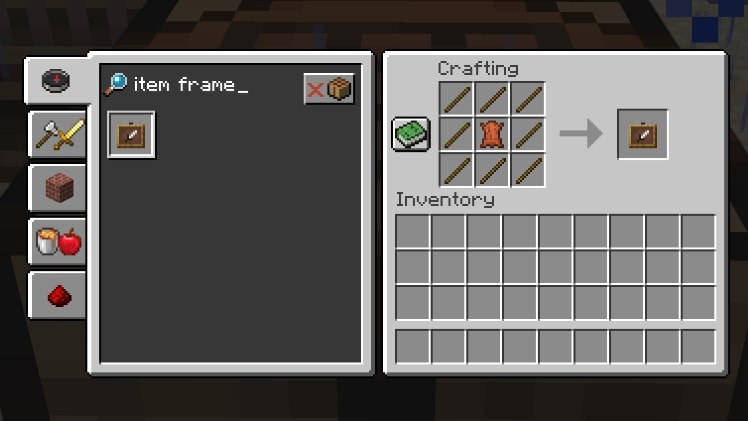
The fastest way to make and use an item frame
- Collect eight sticks and one leather.
- Open a crafting table and put the leather in the center slot of the 3×3 grid.
- Fill the eight slots around the leather with sticks, then take the item frame from the output slot.
- Select the item frame in your hotbar and press use on the side, top or bottom of a solid block to place it.
- Hold the item you want to show, point at the empty frame and press use again to put it inside.
Materials needed to make an item frame
The items required are the same in Java Edition and Bedrock Edition: sticks for the border and leather for the background.
| Material | Amount | Used for |
|---|---|---|
| Stick | 8 | The border, filling every slot around the edge of the grid |
| Leather | 1 | The background, placed in the center slot |
| Crafting table | 1 | The recipe fills all nine slots of a 3×3 grid, which the 2×2 inventory grid cannot hold |
| Glow ink sac | 1 per frame | Only for a glow item frame, combined with a finished item frame |
Glow ink sacs drop from glow squids, which spawn in underground water that is in total darkness with stone, granite, diorite, andesite, tuff or deepslate below.
Which way to get item frames should you use?
| Your situation | Method | Why |
|---|---|---|
| You have sticks and leather | Craft it at a crafting table | The easiest route: one leather and eight sticks per frame |
| You have spare emeralds but no leather | Trade with a high-level cartographer villager | Some high-level cartographers sell item frames, but at seven emeralds each they are pricey |
| You are exploring the End | Loot them from an End ship | Item frames generate naturally on End ships |
Minecraft item frame crafting recipe
The recipe is shaped: the leather has to sit in the middle of the grid, and a stick has to fill every other slot.
- Place a crafting table and press use on it to open the 3×3 crafting grid.
- Put one leather in the center slot.
- Put one stick in each of the eight remaining slots: the full top row, the left and right slots of the middle row, and the full bottom row.
- Take the item frame from the output slot and move it to your inventory.
- Repeat with another eight sticks and one leather for each extra frame.
How to make a glow item frame
Any item in a glow item frame is lit even at night, so it suits dark rooms, caves and builds viewed after sunset. Glow item frames arrived with the Caves & Cliffs Update: Part I in both Java Edition and Bedrock Edition.
- Get a glow ink sac by defeating a glow squid.
- Open a crafting table.
- Put one item frame and one glow ink sac anywhere in the grid; the recipe is shapeless, so their positions do not matter.
- Take the glow item frame from the output slot.
- Place it and fill it exactly like a normal item frame.
How to use item frames in Minecraft
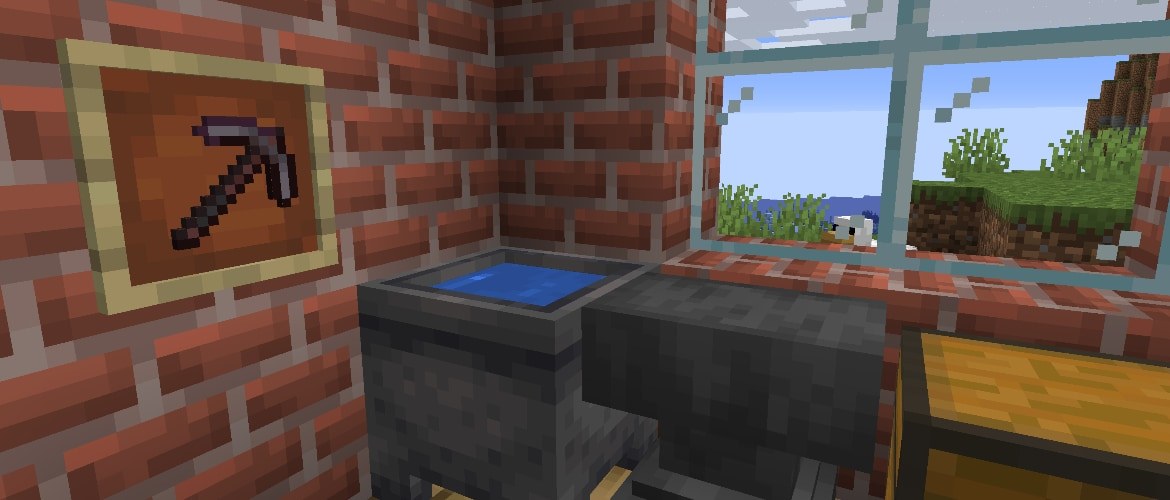
An item frame goes on the sides, top and bottom of any solid block, and also on cactus, pressure plates, fences, trees, slabs, walls, chests and doors.
- Hold the item frame and press use on the block face where you want it.
- Hold the item you want to display, point at the empty frame and press use to put it in.
- Press use on the filled frame to rotate the item one step at a time until it faces the way you want.
- To use the frame as a redstone input, read it with a redstone comparator, which measures the rotation of the item.
How to put a map in an item frame
A map in an item frame is enlarged to the size of a full block, so a grid of framed maps on a wall or floor shows a large area of your world at once.
- Craft or fill one map for each area you want to show.
- Place a grid of item frames on a wall or floor, one frame per map.
- Hold a map, point at a frame and press use to place it.
- Put each neighboring map in the neighboring frame, in the same layout the maps cover in the world.
- Press use on any map that sits at the wrong angle to rotate it into line with the others.
How to make invisible item frames in Java Edition
Java Edition item frames accept an Invisible tag, which hides the frame while the item inside stays visible, and a Fixed tag, which stops the frame from being broken and the item inside from being removed. Since Java Edition 1.20.5, that data goes in the minecraft:entity_data item component, which replaced the older EntityTag tag and must contain an id field with the entity type. Run the command in a world with cheats turned on.
/give @p item_frame[entity_data={id:'minecraft:item_frame',Invisible:1b}]Gives the nearest player an item frame that spawns with the Invisible tag set. Add ,Fixed:1b inside the braces to also stop the frame from being broken and its item from being removed.
You should see: An item frame appears in your inventory; once it is placed and filled, only the item shows on the block, with no frame border around it.
How to check the item frame worked
- Look at the placed frame: the item you used on it should show flat against the block face.
- Press use on the frame once and confirm the item turns, which proves the frame is holding it.
- For a glow item frame, look at the item at night or in a dark room; it should stay lit.
- For a framed map, confirm the map fills the whole block face.
Fix item frames when they do not work
The crafting grid shows no item frame
The leather is not in the center slot, a stick is missing, or the recipe was tried in the 2×2 inventory grid.
- Open a crafting table instead of the inventory grid.
- Put the leather in the center slot.
- Fill all eight outer slots with sticks.
The item in the frame is hard to see at night
A normal item frame does not light the item inside it.
- Combine an item frame with a glow ink sac at a crafting table.
- Place the glow item frame where the item should hang.
- Put the item in the glow item frame.
The invisible item frame command fails
Cheats are off, or the world runs a Java Edition version older than 1.20.5, which still uses the EntityTag tag.
- Turn on cheats for the world.
- Confirm the world runs Java Edition 1.20.5 or later.
- On an older version, put the same Invisible:1b data inside an EntityTag tag instead of the entity_data component.
Item frames in Minecraft FAQ
What do you need to make an item frame in Minecraft?
You need eight sticks, one leather and a crafting table. Put the leather in the center of the 3×3 grid and fill the eight slots around it with sticks to get one item frame.
How do you make a glow item frame?
Combine one item frame with one glow ink sac at a crafting table, in any arrangement. Glow ink sacs drop from glow squids, and any item inside a glow item frame stays lit, even at night.
Can you buy item frames from villagers?
Yes. Some high-level cartographer villagers sell item frames, at seven emeralds each, which makes them pricey. Crafting one from eight sticks and a leather at a crafting table is the easier way to get frames.
How do you rotate an item in an item frame?
Press use on the filled frame. Each press turns the item one step, and a redstone comparator can measure that rotation, which lets a framed item act as a redstone input.
How do you make a big map with item frames?
Place a grid of item frames on a wall or floor and put one map in each. A map in an item frame is enlarged to the size of a full block, so neighboring maps join into one large map.
How do you make invisible item frames in Minecraft?
In Java Edition, run /give @p item_frame[entity_data={id:'minecraft:item_frame',Invisible:1b}] in a world with cheats on. The Invisible tag hides the frame while the item inside stays visible.
Where can item frames be placed?
Item frames go on the sides, top and bottom of any solid block, and also on cactus, pressure plates, fences, trees, slabs, walls, chests and doors.
When were item frames added to Minecraft?
Item frames were added in the Pretty Scary Update in October 2012, the same update that added command blocks, anvils, pumpkin pie and the Wither.