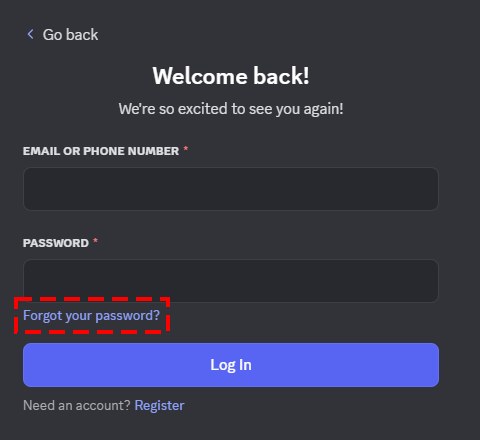
To reset a forgotten Discord password, enter your account email on the login page, select Forgot your password? and follow the link Discord emails you; to change a password you still know, open User Settings > My Account > Change Password.
On this page
Below are both routes on desktop, browser and mobile, the password rules, what to do when multi-factor authentication or a lost email blocks the reset, and fixes for the errors that stop it.
What to do when you forget your Discord password
The reset steps are identical in the desktop app, a web browser and the mobile app. Discord Support cannot reset a password for you, so the reset email is the route to use.
- Open the login page in the Discord app, or go to discord.com/login in a browser.
- Type the email address tied to your Discord account into the first box.
- Select Forgot your password?.
- Open the email Discord sends to that address and follow its instructions to set a new password.
- If multi-factor authentication is on, enter your authentication code when asked, then sign in with the new password.
Reset or change your Discord password: which do you need?
| Your situation | What to do | Why |
|---|---|---|
| You know your current password and are signed in | Change it in User Settings > My Account > Change Password | Fastest route; no email round trip |
| You forgot the password but can open the account email | Select Forgot your password? on the login page | Discord sends a reset link to the account email |
| You forgot which email the account uses | Try each likely address with Forgot your password?, or sign in with a verified phone number | Discord Support will not disclose the email on an account |
| You no longer have access to the account email | Ask your email provider for temporary access first | Discord Support cannot change the email on your account |
| Someone changed your email and password | Use Start Account Recovery in the email-change notice sent to your old address | The link reverts the email and forces a new password, valid for 48 hours |
| You are stuck at the authenticator code prompt | Select Verify with something else and use a backup code or SMS code | Discord cannot remove MFA for you without your backup codes |
How to change your Discord password on desktop or in a browser
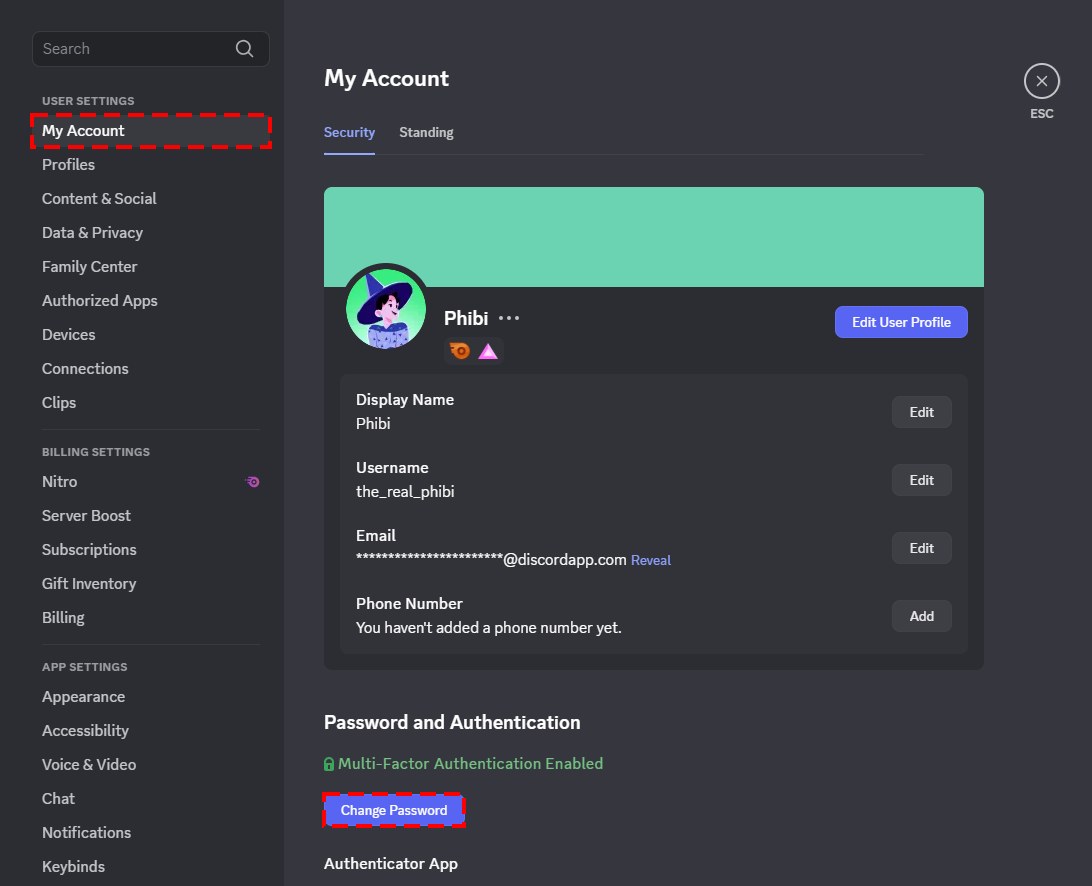
- Select the cogwheel next to your Discord username at the bottom left to open User Settings.
- Stay on the My Account tab and select Change Password.
- Type your current password, then the new password you want.
- Enter your authentication code if your account has multi-factor authentication, then confirm.
How to update your password in Discord on mobile
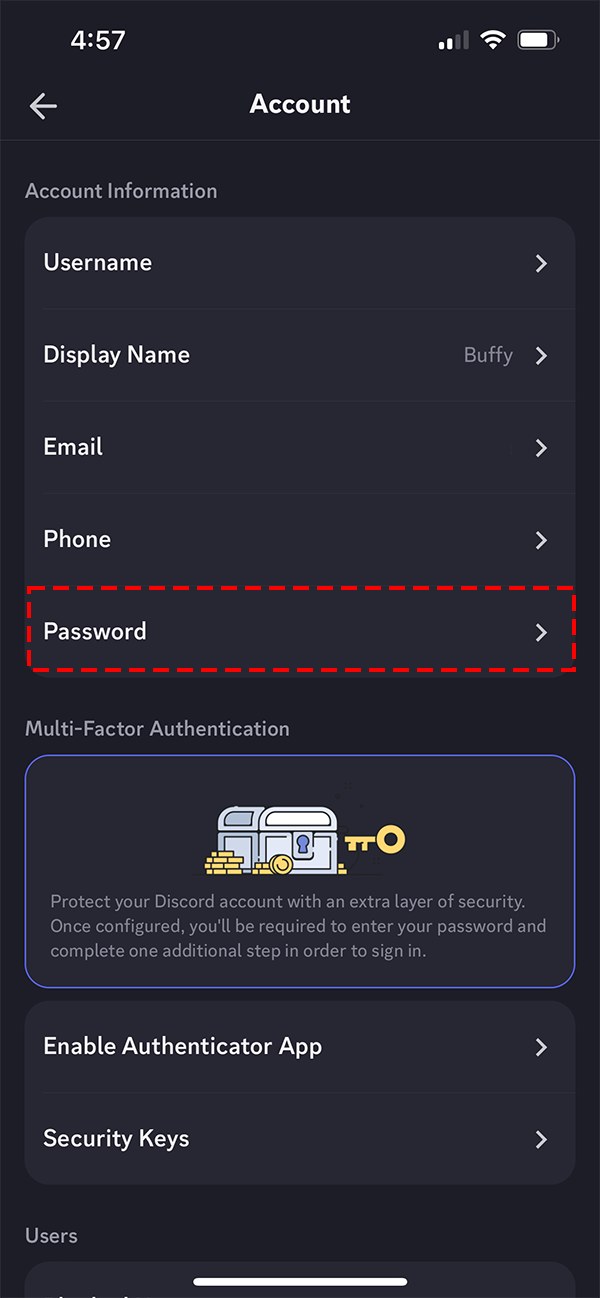
- Tap your avatar in the bottom-right corner.
- Tap the cogwheel in the top-right corner.
- Tap Account under Account Settings.
- Tap Password, then enter your current password and the new one.
- Tap Change Password to save it.
Things to note while making a new password for Discord
| Rule | What it means for your new password |
|---|---|
| Minimum length | At least 8 characters; Discord rejects anything shorter |
| Length over complexity | A longer password is usually more secure than a short one packed with symbols, numbers or mixed case |
| Unique | Use a password you do not use on any other site |
| Regional rules | Some regions apply additional password requirements on top of the minimum length |
| Password manager | A password manager can generate and store a strong password for each site |
| Multi-factor authentication | With MFA on, Discord asks for your code before it accepts a change or a reset |
How to recover a Discord account if you don’t know the email
Discord Support will not tell you which email address an account uses, so finding it is up to you.
- Check any device or browser where you are still signed in to Discord, open User Settings > My Account, and read the email shown there.
- On the login page, type an email address you think the account uses and select Forgot your password?; a reset email arrives only if that address is tied to an account.
- Search the inboxes of all your email addresses for messages from Discord.
- If a phone number is verified on the account, sign in with the phone number and your password instead of the email, then open User Settings > My Account to see the email on file.
- Once you know the address, reset the password with Forgot your password?, or change it from My Account while signed in.
How to sign in and change your Discord password when you are locked out of MFA
If you have lost the authenticator app and have neither backup codes nor SMS authentication, Discord cannot remove MFA or issue new backup codes.
- Find your backup codes: a text file named discord_backup_codes.txt or a screenshot of the codes.
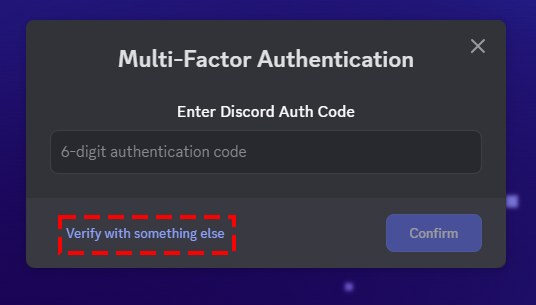
- At the authenticator code prompt, select Verify with something else.
- Select Use a backup code and enter an unused 8-digit code, or select Use a code sent to your phone if SMS authentication is set up, then select Confirm.
- Once signed in, open User Settings with the cogwheel and, on the My Account tab, select Remove Authenticator App, then Okay.
- Change your password from My Account > Change Password, then set up multi-factor authentication again.
How to recover your Discord account if someone changed the email and password
When an account email changes, Discord sends a notice to the original address with an account recovery link. The link works for 48 hours and always starts with https://discord.com/wasntme/; anything else is fake.
- Open the email-change notice in your original inbox and press Start Account Recovery.
- On the Account Recovery page, select Start revert process.
- Set a new password; Discord moves the email back to your original address, logs the account out of every device and removes any phone number and MFA methods.
- Sign in with the new password and add your phone number and MFA back.
- Open User Settings > Authorized Apps and select Deauthorize on any app you do not recognize (tap the x button on mobile).
- If the link has expired or you still cannot get in, submit a report at dis.gd/hackedaccount, the support form named on Discord's hacked account help page.
How to check your new Discord password worked
- Log out of Discord on one device, then sign in at discord.com/login with your email or verified phone number and the new password.
- Confirm the old password is refused if you try it.
- Update the saved entry in your password manager or browser so it holds the new password for discord.com.
- Open User Settings > My Account and confirm the email shown is yours.
Fix a Discord password reset that does not work
The password reset email never arrives
The message is filtered, or the address you typed is not the one on the account.
- Check your spam and junk folders for mail from Discord.
- Add [email protected], [email protected] and [email protected], the addresses Discord says to allowlist when its verification email does not arrive, to your safe senders.
- Request the reset again, from a different device if possible; on a phone, try mobile data instead of Wi-Fi.
- If nothing arrives, the address may not be tied to an account; work through the steps for an unknown email above.
Discord says Email does not exist
The address you entered is not tied to any Discord account.
- Try your other email addresses with Forgot your password?.
- Sign in with your verified phone number instead, then check My Account for the email on file.
You can no longer open the email account
Discord needs access to the current email to reset the password or change the address, and Support cannot change it for you.
- Contact your email provider and ask for temporary access to the mailbox.
- Once in, request the reset with Forgot your password? and change the account email from My Account if you plan to retire that mailbox.
The account recovery link shows an error
The error appears only at the password step, and has one of four causes: the link is older than 48 hours, an earlier recovery link was already used, another Discord account now uses the original email, or the new password is invalid.
- Set a password of at least 8 characters; an invalid password is the only cause you can fix on the spot.
- If another Discord account uses your original email, free that address from the other account, then retry the link.
- If the link is older than 48 hours, submit a report at dis.gd/hackedaccount; Discord Support cannot send a new recovery link.
Your browser or password manager will not fill the Discord password
The saved entry is stored under the old discordapp.com domain; Discord moved to discord.com.
- Open your password manager and edit the Discord entry.
- Change its website to discord.com and save the new password there.
The new password is rejected
It is shorter than 8 characters or breaks an additional regional rule.
- Choose a longer password of at least 8 characters that you do not use anywhere else.
- Enter your MFA code when prompted; the change will not save without it.
Discord password FAQ
Can Discord Support reset my password for me?
No. Discord Support cannot reset a password on your behalf. Use Forgot your password? on the login page, and contact Support through dis.gd/contact only for other password problems the reset link does not solve.
Can I reset my Discord password with my phone number?
The reset link goes to the email address tied to the account. A verified phone number lets you sign in instead of using the email, and once signed in you can change the password from User Settings > My Account.
How long does a Discord password have to be?
At least 8 characters. Discord refuses anything shorter, and some regions apply additional requirements. A long, unique password is usually more secure than a short one full of symbols.
Why does Discord ask for a code when I change my password?
Your account has multi-factor authentication turned on. Discord asks for your authentication code before it changes or resets the password, on desktop, browser and mobile alike. If you lost the authenticator app, select Verify with something else and use a backup code or an SMS code.
Can I change my Discord password in the mobile app?
Yes. Tap your avatar, tap the cogwheel at the top right, then Account under Account Settings, then Password. Enter the current and new passwords and tap Change Password.
How long is a Discord account recovery link valid?
The account recovery link in an email-change notice works for 48 hours. After that it expires, and Discord Support cannot send a new one, so use it as soon as the notice arrives.
Will Discord ever ask for my password in a message?
No. Discord never asks for your password or account token, and Discord staff do not contact users through the app for support matters. Ignore anyone in a DM who asks you to change or share your login.