DirectX is a Windows-only set of components built into the operating system: Windows 11 and 10 already have the latest version, Microsoft's DirectX downloads are the End-User Runtime packages that some older DirectX 9 games need, and there is no DirectX for Mac or iPhone.
On this page
On a Mac, GeForce NOW streams games, and on an iPhone, Xbox Cloud Gaming or GeForce NOW does; the sections below cover the Windows runtime downloads, the DirectX 12 Ultimate check, graphics driver updates and common DirectX errors.
Which DirectX download do you need?
DirectX is the set of Windows components that lets games work directly with the graphics and audio hardware. Windows 11 and 10 ship it, so a PC needs either nothing extra or the legacy runtime that some older games still call.
| Your situation | Do this | Official link |
|---|---|---|
| Windows 11 or 10 PC, a game asks for DirectX 12 | Nothing to download. Run Windows Update and update the graphics driver. | Install Windows Updates |
| An older DirectX 9 game reports a missing D3DX9, XInput 1.3 or XAudio 2.7 file | Install the DirectX End-User Runtime Web Installer. | DirectX End-User Runtime Web Installer |
| Same game, but the PC has no internet connection during setup | Use the full DirectX End-User Runtimes (June 2010) package. | DirectX End-User Runtimes (June 2010) |
| You build games and want the DirectX SDK | The DirectX headers and libraries are part of the Windows SDK. | Where is the DirectX SDK? |
| Mac | No DirectX exists for macOS. Stream games with the GeForce NOW Mac app. | GeForce NOW download |
| iPhone | No DirectX exists for iOS. Stream with Xbox Cloud Gaming in Safari or with GeForce NOW. | Xbox Cloud Gaming |
Download DirectX for Windows 11 and Windows 10
Both runtime packages come from the Microsoft Download Center and install the same legacy components. Neither one changes the DirectX version Windows reports.
- DirectX End-User Runtime Web Installer (dxwebsetup.exe) (9.29.1974.1 · 288.4 KB): installs the D3DX, HLSL Compiler, XInput, XAudio and Managed DirectX 1.1 components
- DirectX End-User Runtimes (June 2010) (directx_Jun2010_redist.exe) (9.29.1974.1 · 95.6 MB): the same components in one package, which Microsoft recommends for PCs without an internet connection during installation
DirectX 12 has no standalone installer from Microsoft. Microsoft states that the DirectX Runtime (Direct3D, DirectInput, DirectSound) is part of Windows and cannot be installed or uninstalled, and that Windows Update is the way to get the latest DirectX for a given version of Windows.
How to download and install DirectX 9 on Windows 11 and 10
The DirectX runtime itself is part of Windows 11 and 10. What some older games miss are the side-by-side libraries from the legacy DirectX SDK: D3DX9, D3DX10, D3DX11, XAudio 2.7, XInput 1.3, XACT and Managed DirectX 1.1. The End-User Runtime installs them without modifying the DirectX Runtime in Windows.
- Open the DirectX End-User Runtime Web Installer page on microsoft.com.
- Leave the language on English, or pick another from the list, and select Download.
- Choose Open or Run this program from its current location to start setup right away, or Save to keep dxwebsetup.exe for later.
- Follow the prompts in the installer until it finishes.
- Restart the game that reported the missing file.
The Download Center lists Windows 7 and older under supported operating systems, yet the same page names Windows 10 among the systems that already include DirectX and describes this package as the source of the optional components that older games use.
Is there a DirectX 9 offline installer?
Yes. Microsoft publishes the full DirectX End-User Runtimes (June 2010) package and recommends it for users who have no internet connection during installation. It contains all of the components the web installer installs, in a single package.
| Web installer | Offline installer | |
|---|---|---|
| File name | dxwebsetup.exe | directx_Jun2010_redist.exe |
| File size | 288.4 KB | 95.6 MB |
| Version | 9.29.1974.1 | 9.29.1974.1 |
| Date published on the Download Center | 7/15/2024 | 7/15/2024 |
| Choices after selecting Download | Open, Run this program from its current location, or Save | Run, Save or Cancel |
| What it installs | D3DX, HLSL Compiler, XInput, XAudio and Managed DirectX 1.1 | All June 2010 and earlier side-by-side components, including D3DX, XInput and Managed DirectX |
| Changes the Windows DirectX version | No | No |
DirectX 12 Ultimate download for Windows 11/10 PC: check your version and update
DirectX 12 Ultimate is not a separate download. It is a feature set inside DirectX 12 that bundles DirectX Raytracing, Variable Rate Shading, Mesh Shaders and Sampler Feedback, shared between PC graphics hardware carrying the DX12 Ultimate logo and Xbox Series X. A Windows 11 or 10 PC gets it through Windows Update plus a graphics card and driver that support it.
- In the Search box on the taskbar, enter dxdiag and select dxdiag from the results.
- In the DirectX Diagnostic Tool, select the System tab and read the DirectX version under System Information.
- To update, select Start > Settings > Windows Update > Check for Windows updates on Windows 11. On Windows 10 the path is Start > Settings > Update & Security > Windows Update.
- Select Download & install for anything offered and restart if prompted.
- Update the graphics driver, as described in the next section.
Microsoft ended Windows 10 support on October 14, 2025, and no longer provides free software updates from Windows Update for it; Microsoft recommends moving to Windows 11.
How to update the drivers for DirectX 12 Ultimate
Windows Update delivers driver updates for video cards automatically. Device Manager covers the cases where it has not, where a new driver caused the problem, or where the newer driver comes from the card manufacturer.
A game says the graphics driver is too old for DirectX 12
Windows Update has not yet installed a newer display driver.
- Right-click the Start menu and select Device Manager.
- Expand Display adapters.
- Right-click the graphics card and select Update driver.
- Select Search automatically for updated driver software and let Windows install anything it finds.
- If nothing is found, select Search for updated drivers on Windows update and install the offered driver.
Games crash or show artifacts after a driver update
A recent driver update introduced the problem, and the previous driver often resolves it.
- Sign in with an administrator account and open Device Manager from the Start menu.
- Expand Display adapters, right-click the graphics card and select Properties.
- Open the Driver tab and select Roll Back Driver.
- Choose a reason, select Yes and restart if prompted.
Windows Update and Device Manager find no newer driver
Windows Update does not offer the newer driver the card manufacturer publishes.
- Download the driver for the graphics card from the manufacturer's official site, matching the version and architecture of Windows, and uncompress it if necessary.
- Right-click the Start menu, select Device Manager and expand Display adapters.
- Right-click the graphics card, select Update driver, then Browse my computer for drivers.
- Select Browse…, pick the folder with the downloaded driver, select OK and then Next.
- If Windows shows The best drivers for your device are already installed, the card already has that driver. Select Close.
Microsoft advises against downloading drivers from any site other than the manufacturer's official site.
Fix your system does not support DirectX 12 Ultimate and other DirectX errors
Your system does not support DirectX 12 Ultimate
The graphics card lacks the full DX12 Ultimate feature set, or Windows or the driver is out of date.
- Install every Windows update; on Windows 10, Mesh Shading and Sampler Feedback arrived with the 20H1 update.
- Update the graphics driver from Device Manager.
- Check that the graphics card carries the DX12 Ultimate logo. NVIDIA lists GeForce RTX graphics cards and laptops as DirectX 12 Ultimate ready.
- If the card does not support it, run the game anyway: Microsoft states that games using DX12 Ultimate features continue to run on non-DX12 Ultimate hardware, without the visual benefits of those features.
A game reports a missing D3DX9, XINPUT1_3.DLL or XAUDIO2_7.DLL file
The legacy DirectX SDK libraries the game was built with are not on the PC.
- Download the DirectX End-User Runtime Web Installer from Microsoft.
- Run it and follow the prompts.
- Start the game again.
Can you download DirectX on Mac?
Apple's graphics API is Metal, which runs across iPhone, iPad, Mac, Apple TV and Apple Vision Pro. Apple's Game Porting Toolkit is for developers bringing their own games to Apple platforms.
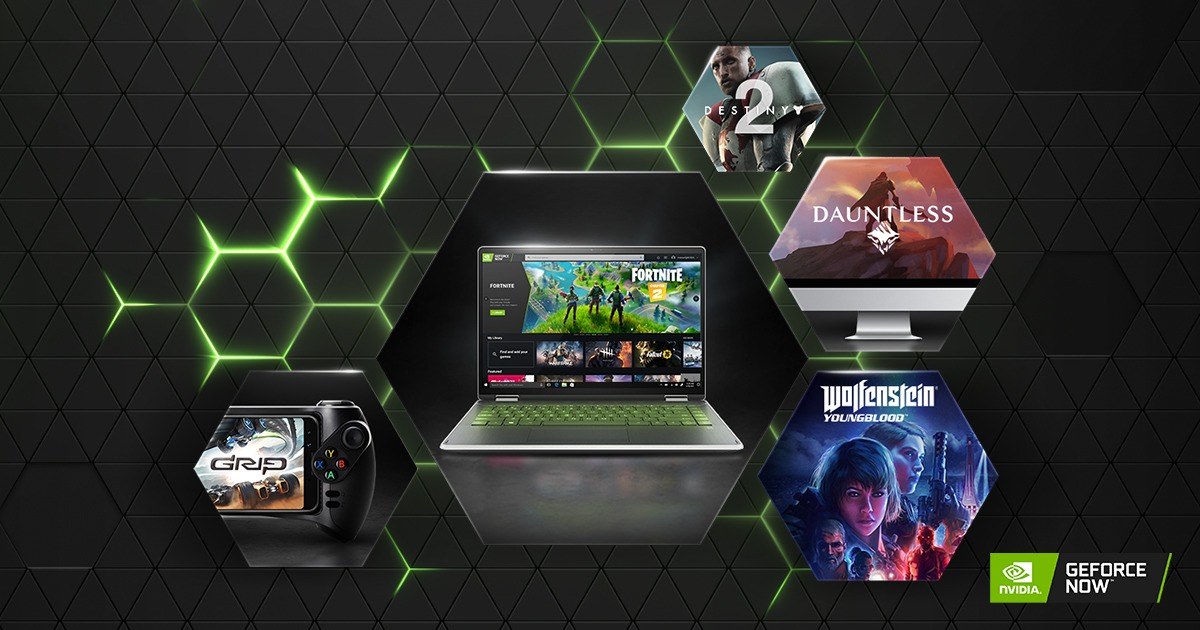
No. Microsoft makes no DirectX for macOS. To play a Windows game on a Mac, use the publisher's own Mac version where one exists, or stream it with the GeForce NOW app, which NVIDIA offers as a Mac download on its GeForce NOW download page.
DirectX on iPhone and Android
There is no DirectX for iOS or Android. Cloud gaming streams the game to the phone with no download required, so DirectX never has to be on the device.
- Xbox Cloud Gaming at xbox.com/play: plays in a supported browser such as Safari on Apple phones; select free-to-play games need only a free Microsoft account, the rest need Game Pass Ultimate, Premium or Essential
- GeForce NOW for iOS and iPadOS: NVIDIA lists iOS, iPadOS and Android among its supported mobile devices
Xbox Cloud Gaming needs at least 10 Mbps on mobile devices, a 5Ghz Wi-Fi or mobile data connection, and a compatible controller, though select games support touch controls.
Frequently asked questions
What is DirectX 9?
DirectX 9 is an older version of DirectX, the set of Windows components that lets games work directly with video and audio hardware. Some older games built on it also need legacy libraries such as D3DX9, XInput 1.3 and XAudio 2.7, which Microsoft's DirectX End-User Runtime installs.
Do I need to download DirectX 12 on Windows 11?
No. Microsoft states that Windows 10 and 11 already have the latest version of DirectX installed. Keep Windows Update and the graphics driver current, and check the version in the DirectX Diagnostic Tool by running dxdiag.
Does installing the DirectX End-User Runtime replace DirectX 12?
No. Microsoft states the package does not change the version of DirectX on the PC. It adds optional side-by-side components from the legacy DirectX SDK, so dxdiag reports the same DirectX version before and after.
Can you uninstall DirectX?
No. The DirectX Runtime, including Direct3D, DirectInput and DirectSound, is part of Windows and cannot be installed or uninstalled. Microsoft also states the DirectX runtime installed by the June 2010 package cannot be uninstalled.
Is DirectX 12 Ultimate a separate version of DirectX?
No. DirectX 12 Ultimate is a label for hardware that supports four DirectX 12 features together: DirectX Raytracing, Variable Rate Shading, Mesh Shaders and Sampler Feedback. Games that use them still run on hardware without the logo.
Does Xbox use DirectX?
Yes. Microsoft built DirectX 12 Ultimate as one graphics platform across PC and Xbox Series X, so PC graphics hardware with the DX12 Ultimate logo and the console are guaranteed to support the same DirectX 12 Ultimate feature set.
Where is the DirectX SDK?
Starting with Windows 8, the DirectX SDK is included in the Windows SDK. Developers get the Direct3D headers and libraries there, and the deprecated D3DX9, D3DX10 and D3DX11 utility libraries are available through NuGet.
How do I share DirectX diagnostic information with support?
Run dxdiag, then select Save All Information in the DirectX Diagnostic Tool. Microsoft provides it as an easily shared format that a support person can use to troubleshoot problems with DirectX sound and video on the PC.