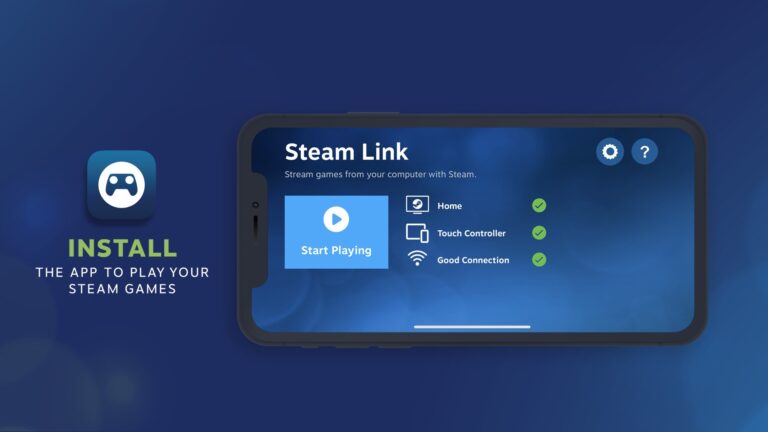
Lethal Company is a paid Windows-only game sold on Steam, with no Mac or iPhone version, so a Mac or iPhone plays it by streaming from a Windows PC running Steam through Valve's free Steam Link app.
On this page
Below are the Steam download and install on Windows 11 and 10, the price and refund terms, the system requirements, the Steam Link route for Mac, iPhone and Android, and fixes for the problems that stop an install.
Which Lethal Company download do you need?
Zeekerss, the developer and publisher, sells Lethal Company on Steam, and the Steam listing marks Windows as its only platform, with no Mac or Linux build.
| Your device | Native version? | How to play | Official link |
|---|---|---|---|
| Windows 11 or Windows 10 PC (64-bit) | Yes | Buy and install it through Steam | Lethal Company on Steam |
| Mac | No | Stream it from a Windows PC running Steam with the Steam Link app | Steam Link on the App Store |
| iPhone or iPad | No | Stream it from a Windows PC on the same local network with Steam Link | Steam Link on the App Store |
| Android phone or tablet | No | Stream it from a Windows PC with Steam Link | Steam Link on Google Play |
Download Lethal Company for Windows 11 and Windows 10
The game downloads through the Steam client, so a PC needs Steam installed and a Steam account before the purchase can be installed.
- Lethal Company on the Steam store (4 GB available space): Windows only, Early Access
- Install Steam (Valve): The free Steam client that downloads and updates the game
Install Lethal Company through Steam
- Open the Steam store's about page and select Install Steam, then run the installer Valve provides and sign in or create a Steam account.
- Open the Lethal Company store page in Steam or in a browser signed in to the same account.
- Under Buy Lethal Company, select Add to Cart and complete the purchase.
- Open your Steam library, select Lethal Company and install it.
- Keep Steam running until the download finishes, then launch the game from your library.
Steam handles automatic game updates, so there is no separate patch download for Lethal Company.
Is Lethal Company free?
| Question | Answer from the Steam listing |
|---|---|
| Price in the US Steam store | $9.99 |
| Free to play? | No. Steam lists it as a paid game |
| Will the price change after Early Access? | The developer states: "I don't plan on changing the price." |
| Refund window | Within two weeks of purchase and less than two hours of playtime |
| Does Early Access playtime count? | Yes. Any playtime counts against the two-hour refund limit |

Lethal Company system requirements and download size
Steam publishes only minimum requirements for Lethal Company; the recommended block repeats the 64-bit line and nothing else.
| Component | Minimum |
|---|---|
| Operating system | Windows 10, 64-bit processor and operating system required |
| Processor | Intel Core i5-7400 CPU @ 3.00GHz; Shader Model 5 |
| Graphics | NVIDIA GeForce GTX 1050 |
| DirectX | Version 11 |
| Network | Broadband Internet connection |
| Storage | 4 GB available space |
Windows 11 is 64-bit only, so any Windows 11 PC clears the operating system line. A Windows 10 PC must be running the 64-bit edition.

Can you download Lethal Company on Mac?
No. Steam lists no Mac build of Lethal Company, so a Mac can only play it by streaming from a Windows PC that owns the game and runs Steam. Valve's Steam Link app is available for macOS from the App Store, and Steam Remote Play is built to reach natively unsupported operating systems from a gaming PC. The Windows PC still does the work, so it has to be on and signed in to Steam.
Play Lethal Company on iPhone and Android with Steam Link
There is no Lethal Company app for iPhone, iPad or Android. Valve's Steam Link app streams the game from a computer running Steam to the phone, with an MFi or Steam controller paired on iPhone or a Bluetooth controller on Android.
- Steam Link for iPhone and iPad (App Store) (58.6 MB): Free, iOS 11.0 or higher, PC on the same local network
- Steam Link for Android (Google Play): Free, Android 5.0 or higher, pair a Bluetooth controller
Steam lists Lethal Company with Partial Controller Support, not full support, so check that the controls you need respond before relying on a controller alone.
Valve recommends connecting the PC to the router with Ethernet and keeping the phone on the 5GHz band of the Wi-Fi network for the smoothest stream.
How to update Lethal Company and read the patch notes
- Leave Steam signed in on the PC; Steam downloads Lethal Company updates automatically.
- Open the Lethal Company store page and select View update history to read the latest patch notes.
- Launch the game from your Steam library; reaching the main menu confirms the install works.
Fix Lethal Company not downloading or installing
Lethal Company will not run on a 32-bit Windows 10 PC
Steam requires a 64-bit processor and operating system for Lethal Company.
- Select Start, then Settings > System > About.
- Read System type under Device specifications.
- If it shows a 32-bit operating system, moving to 64-bit Windows means reformatting the drive, installing 64-bit Windows and reinstalling everything else.
The download stops because the drive is full
Lethal Company needs 4 GB available space on the drive Steam installs to.
- Free at least 4 GB on the target drive by removing files or games you no longer need.
- Return to your Steam library and start the Lethal Company install again.
Steam Link cannot find the PC running Lethal Company
The iPhone or iPad version of Steam Link needs the phone and the PC on the same local network.
- Make sure Steam is open and signed in on the Windows PC.
- Connect the phone to the same Wi-Fi network as the PC, on the 5GHz band.
- Connect the PC to the router with Ethernet, then open Steam Link and connect to the computer again.
The PC cannot run Lethal Company after buying it
The hardware is below the minimum requirements, which Steam accepts as a refund reason.
- Stop playing before two hours of playtime, because Early Access playtime counts against the limit.
- Go to help.steampowered.com within two weeks of purchase and request a refund for Lethal Company.
- Expect the refund within a week of approval, to the original payment method or the Steam Wallet.
Frequently asked questions
Is Lethal Company free to download?
No. Lethal Company is a paid game on Steam, listed at $9.99 in the US store, and Steam marks it as not free. The Steam client itself is free, but the game has to be bought before it downloads.
Can you play Lethal Company on a Mac?
Not natively. Steam lists no Mac build, so a Mac can only stream Lethal Company from a Windows PC that owns it and runs Steam, using Valve's Steam Link app. The PC has to stay on during play.
Is Lethal Company on iPhone or Android?
No. There is no mobile version of Lethal Company. Valve's free Steam Link app on iPhone, iPad and Android streams it from a computer running Steam, with a controller paired to the phone or tablet.
How big is the Lethal Company download?
Steam lists 4 GB available space as the storage requirement for Lethal Company. Leave that much free on the drive Steam installs games to before you start the download, or the install will stop part-way.
Is Lethal Company still in Early Access?
Yes. Steam still lists Lethal Company as an Early Access game, released into Early Access on October 23, 2023. The developer has said the price is not planned to change when it leaves Early Access.
How many players can play Lethal Company together?
The developer describes the Early Access version as playable with up to 4 players, and Steam lists online co-op. Steam also lists single-player, so you can play the game on your own.
Can I share Lethal Company with my family on Steam?
Yes. The Lethal Company store page lists Family Sharing among its features, so the copy one account buys can be shared with the members of that account's Steam family group.
Does Lethal Company support a controller?
Partly. Steam lists Partial Controller Support for Lethal Company rather than full controller support, so a controller does not cover every part of the game. Keyboard and mouse remain the dependable way to play it on a Windows PC.
Who makes Lethal Company?
Lethal Company is developed and published by Zeekerss, and Steam is the store that sells it. Buy it from the official Steam store page so updates and refunds go through your Steam account.