To whisper in Minecraft, open chat and type /msg PlayerName your message, which sends a private message to that player on both Java Edition and Bedrock Edition.
On this page
Bedrock also accepts /tell and /w and can whisper to a group with target selectors, while Java and Bedrock players cannot whisper to each other at all.
How to whisper in Minecraft with one command
A whisper is a private message command. On Bedrock, /tell sends a private message to one or more players, with /w and /msg as its aliases, and on Java Edition the command is /msg.
/msg PlayerName your messageOpen chat, replace PlayerName with the exact name of the player, type your message after it, and send. The same line works on Java Edition and Bedrock Edition, and only that player receives the message.
Minecraft whisper command syntax and usage
Every command starts with a forward slash, then the command name, then its arguments separated by spaces. For a whisper, the player comes first and the message second.
| Command | Edition | Who sees the message |
|---|---|---|
/msg <player> <message> |
Java and Bedrock | Only the players you target |
/tell <player> <message> |
Bedrock | Only the target player or players |
/w <player> <message> |
Bedrock | Only the target player or players |
/say <message> |
Java and Bedrock | Every player in the chat, so it is not a whisper |
/me <message> |
Java and Bedrock | Not private: it displays a message about yourself |
Step-by-step: whisper in Minecraft Java Edition
On Java Edition, chat messages between players are cryptographically signed, and the message argument of /msg is signed too.
- Join the world or server where the other player is online.
- Open chat and type
/msg, a space, the player's name, a space, and your message, for example/msg Alex meet me at the base. - Press Enter to send the whisper to that player.
- If a whisper you receive is tagged Modified, hover over its icon to see the original signed text the sender wrote.
Step-by-step: whisper in Minecraft Bedrock Edition
Bedrock Edition is the edition on Windows 10 and 11, Xbox One, Xbox Series S and X, PlayStation 4 and 5, Nintendo Switch, Android and iOS, so console and mobile players use these steps.
/tell does not require cheats, so it works in a world with cheats turned off.
- Open chat and type a forward slash. The command list appears and filters as you type.
- Type
/tellfollowed by a space. The chat switches to the syntax/tell <target: target> <message: message>. - Type the player's name. If the name contains spaces, wrap it in quotation marks, for example
/tell "Alex Builder" hi. - Type your message after the name. The message itself does not need quotation marks.
- Send it. To whisper again, open chat and press the up arrow on your keyboard to bring back your previous command.
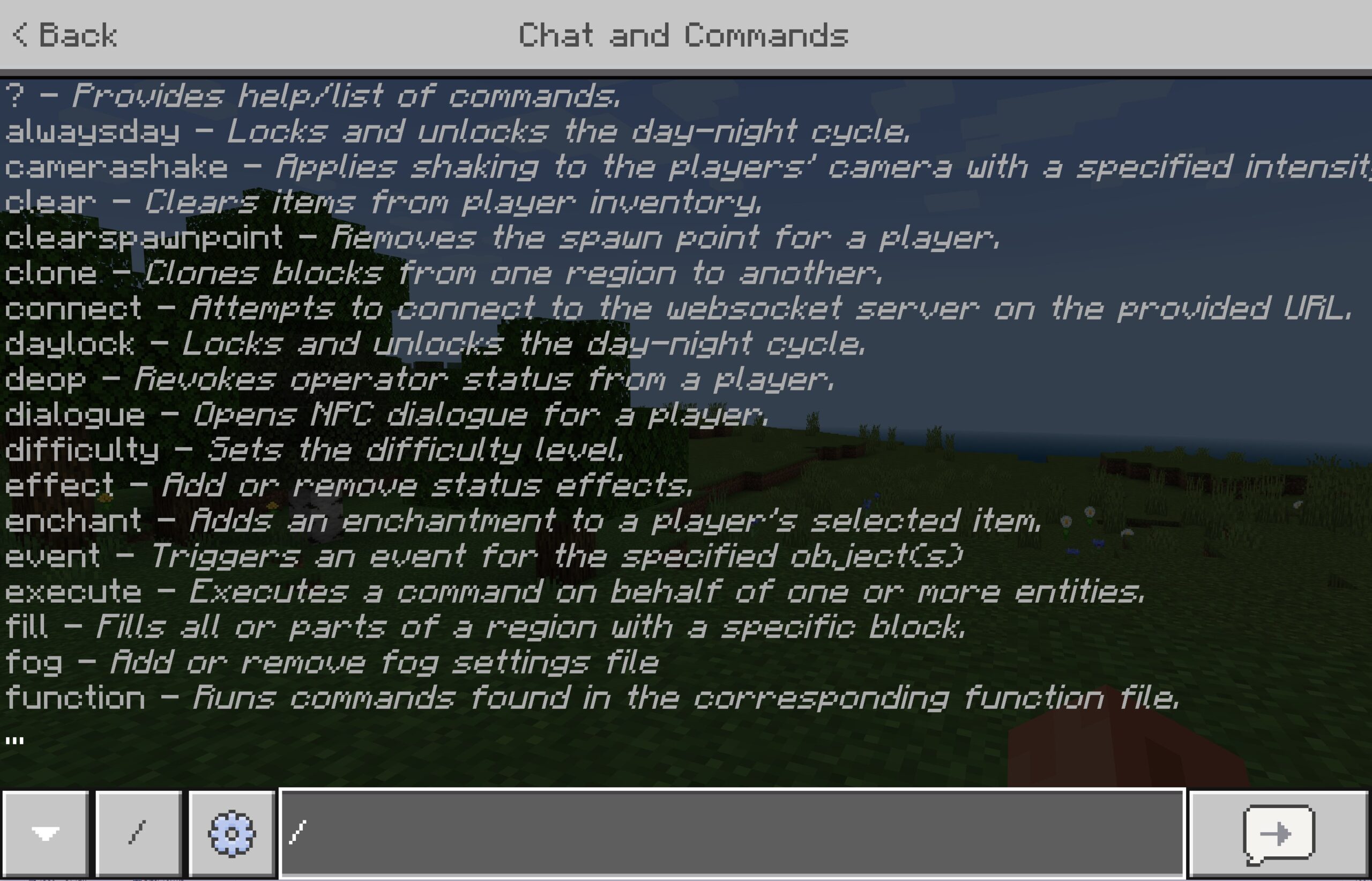
How to whisper to nearby players or a group on Bedrock
The /tell target can be a target selector instead of a name, so one whisper can reach the closest other player, everyone within a distance of you, or a filtered group.
| You want to reach | Command | What the selector does |
|---|---|---|
| The closest other player | /tell @p[rm=1] meet me here |
@p picks the closest living player, which is you, so rm=1 skips anyone less than 1 block away |
| Everyone within 10 blocks | /tell @a[r=10] follow me |
r is the maximum distance in blocks from you, and you are inside it too |
| Up to 3 other nearby players | /tell @a[rm=1,c=3] group up |
c caps the targets at the closest 3, and rm=1 leaves you out |
| Everyone in survival mode | /tell @a[m=survival] base is ready |
m filters players by game mode |
| Players with a tag you set | /tell @a[tag=team1] start |
tag selects players given that tag with /tag |
If no player matches the selector, the command fails to run and nobody receives the whisper.
Pros and cons of whispering in Minecraft
| Benefit or limitation | What it means in practice |
|---|---|
| Pro: discreet | Only the player or players you target receive the message, so the rest of the chat stays clear. |
| Pro: reaches groups on Bedrock | A selector such as @a[tag=team1] sends one whisper to a whole group instead of one message per player. |
| Con: still reportable on Java | A whisper is a signed chat message, and Java players can report abusive chat messages from the Social Interactions screen. |
| Con: subject to server moderation on Java | Server moderators can delete chat messages, which are then replaced with the text "This chat message has been deleted by the server." |
How to verify that your Minecraft whisper stayed private
- Ask the target player to confirm the whisper appeared in their chat.
- Ask a third player on the same world whether they saw it. A whisper sent with
/msgor/tellshould not appear for them. - If the third player saw it, open chat on Bedrock and press the up arrow to recall the line you sent, then confirm it starts with
/msg,/tellor/wand not/say.
Troubleshooting: when whispering in Minecraft doesn't work
Everyone saw the message instead of one player
The line did not start with a whisper command, so it went out as normal chat or as /say.
- To avoid the mistake, type the correct command before any text: a forward slash, then
msg, ortellorwon Bedrock, then a space. - Put the player name first and the message second:
/msg PlayerName message. - On Bedrock, wrap a name that contains spaces in quotation marks.
- Type
/help tellon Bedrock to print the command's syntax in chat.
A Bedrock group whisper misses players
A selector with r only reaches players within that distance, and a selector that matches nobody fails.
- Whisper by the player's exact name instead of a radius selector.
- If you use
@a[r=10], raise the radius or remove it. - Confirm the player is online.
@aselects all online players, so an offline player cannot be reached.
One player's messages never appear on Java
Only Show Secure Chat is on, and it hides any player's chat that is not signed.
- Open Chat Settings.
- Turn off Only Show Secure Chat to see unsigned messages.
- Look for the Not Secure tag on that player's messages. It confirms they carried no valid signature.
A Java player and a Bedrock player cannot whisper to each other
Java and Bedrock use different servers, so their players cannot play together.
- Check which edition each player owns.
- Join the same edition. On a Windows 10 or 11 PC, the Java & Bedrock Edition includes both.
- Send the whisper once both players are in the same world.
Minecraft whisper FAQ
Does whispering in Minecraft turn off achievements?
No. On Bedrock, /tell does not require cheats, and enabling cheats is what disables achievements for a world. Whispering with /tell, /w or /msg in a world where cheats stay off does not turn achievements off.
Do you need operator permission to whisper in Minecraft Bedrock?
No. /tell, /w and /msg have a permission level of Any on Bedrock, so every player can whisper without the operator commands permission that many other commands need. The world owner does not have to change any player permission first.
Is /msg the same as /tell in Minecraft?
On Bedrock, yes. /msg and /w are aliases of /tell, so all three take the same player name and message and send the same private message. On Java Edition, /msg is the whisper command to use.
How do you whisper to someone whose name has spaces?
Put the name in quotation marks. On Bedrock, the target accepts either a single word or text within quotation marks, so /tell "Alex Builder" hello reaches that player. The message after the name does not need quotation marks.
What is the difference between /tell and /say in Minecraft?
/tell sends a private message to the players you target, while /say sends a message to the chat for all players to see. Use /tell, /w or /msg to whisper, and keep /say for announcements meant for everyone.
Can you whisper to your whole team in Minecraft Bedrock?
Yes, with a tag. Give each teammate the same tag with /tag, then send one whisper to all of them with a selector such as /tell @a[tag=team1] message. Players without the tag do not receive it.
How do you whisper to everyone except one player on Bedrock?
Use a negated name selector. /tell @a[name=!Steve] message sends the whisper to every online player who is not named Steve, and that includes you. Swap in the name of the player you want to leave out of the conversation.
Is /me a private message in Minecraft?
No. /me displays a message about yourself rather than sending it to a chosen player. To keep a message between you and one player, use /msg on Java Edition or /tell, /w or /msg on Bedrock Edition.