To port forward for Minecraft, add a rule on your router that sends port 25565 (Java Edition) or 19132 (Bedrock Dedicated Server) to the local IP address of the PC running the server, then allow that port through the PC's firewall.
On this page
Only the machine hosting the world needs this; players who join a server do not need a rule on their own router.
Quick steps to port forward for Minecraft Java or Bedrock
- On the server PC, run
ipconfigand note the IPv4 address, subnet mask and default gateway. - Fix that address so it does not change: in Settings > Network & internet, open your Wi-Fi or Ethernet connection, select Edit next to IP assignment, choose Manual, turn on IPv4 and enter those three values.
- Type the default gateway address into a browser to open your router's admin page.
- In the router's port forwarding section, add a rule that sends port 25565 (Java) or 19132 (Bedrock) to the server PC's IPv4 address.
- Allow the same port through the firewall on the server PC.
- Start the server and give friends your public IP address and the port.
Which Minecraft port do you forward for Java or Bedrock?
Java Edition and Bedrock Edition servers listen on different default ports, so the rule on the router depends on which server software runs on the PC.
| Your setup | Port to forward | Why |
|---|---|---|
| Java Edition server (the .jar from minecraft.net) | 25565 | The port minecraft.net names for a Java server |
| Bedrock Dedicated Server, IPv4 | 19132 | Default value of server-port in server.properties |
| Bedrock Dedicated Server, IPv6 | 19133 | Default value of server-portv6 in server.properties |
| Bedrock server with a custom port | The value you set in server-port | Any port from 1 to 65535 works; ports under 1024 are usually reserved for well-known applications |
| You only join someone else's server | None | Forwarding is done by the host, not by players |
| You want friends to join without touching the router | None: use Realms | A Realm is an always-online server you set up with a few button clicks, and invited friends join it without a router rule |
What to set up before Minecraft port forwarding
A port forwarding rule only works once the server runs locally and the PC keeps the same address. Settle these first.
| Item | Where to get or find it | Why it matters |
|---|---|---|
| Java Edition server software | minecraft.net Java server download | Free; needs a compatible Java installation that runs from the command line |
| Bedrock Dedicated Server software | minecraft.net Bedrock server download | Free .zip, released for Windows and Ubuntu only |
| Bedrock host hardware | The PC that stays on while friends play | Intel Core i3 3210 or AMD A8 7600 APU or equivalent, 4 GB RAM, 180 MB to 1 GB of space, broadband |
| Bedrock host operating system | The PC that runs the server | Windows 10 version 10.0.15063 or later, Windows Server 2016 or later, or Ubuntu 22.04 or later |
| The server PC's local IPv4 address and default gateway | ipconfig, or Settings > Network & internet |
The router rule points at that address; the gateway is the router's own address |
| The router's admin password | The router's documentation, or whoever set the router up | Port forwarding rules are created on the router, not on the PC |
Give the Minecraft server PC a fixed IP address
A port forwarding rule points at one local IP address. If the router hands the server PC a different address later, the rule points at nothing and friends can no longer connect.
- Run
ipconfigin Command Prompt and write down the IPv4 address, subnet mask and default gateway of the adapter you use. - Open Settings > Network & internet.
- For Wi-Fi, select Wi-Fi > Manage known networks and choose your network. For a cable, select Ethernet and choose the connection.
- Next to IP assignment, select Edit.
- Under Edit IP settings, choose Manual and turn on IPv4.
- Fill in IP address, Subnet mask and Gateway with the values from
ipconfig. - Enter a Preferred DNS address and select Save.
If your router offers a DHCP reservation for the server PC, that also keeps its address fixed. Use one method, not both with different addresses.
How to port forward a Minecraft server on your router
Router menus differ by brand, but every port forwarding rule asks for the same handful of values.
- Open a browser and go to the default gateway address that
ipconfigshowed, then sign in with the router's admin password. - Find the port forwarding section. Some routers file it under NAT, virtual server or advanced settings.
- Create a new rule and name it Minecraft so it is easy to find later.
- Set the internal (local) IP address to the server PC's fixed IPv4 address.
- Set both the external and internal port to 25565 for Java, or 19132 for Bedrock. For Bedrock over IPv6, add a second rule for 19133.
- If the router asks for a protocol, choose both TCP and UDP.
- Save the rule and restart the router if it does not apply the change straight away.
- Before signing out, note the router's WAN or internet IP address on its status page. That public IP address is what friends enter to reach the server.
How to port forward for Minecraft Java Edition
- Download the Java Edition server from the Minecraft server download page and make sure Java runs from the command line. On Windows that can mean adding Java to the PATH environment variable.
- Forward port 25565 on the router to the server PC's fixed IPv4 address.
- Allow port 25565 through Windows Firewall with the PowerShell rule below.
- Start the server and leave the window open.
- Give friends your public IP address; 25565 is the default, so they only add a port if you changed it.
The Java server only accepts Java Edition players. Bedrock players on consoles, phones or the Windows Bedrock app cannot join it.
How to port forward for Minecraft Bedrock Dedicated Server
- Download Bedrock Dedicated Server for Windows or Ubuntu from the Bedrock server download page and unzip it into an empty folder, such as C:\MinecraftServer.
- Open server.properties and check server-port (default 19132) and server-portv6 (default 19133). Change them only if another program already uses those ports.
- Forward 19132 on the router to the server PC's fixed IPv4 address, plus 19133 if players connect over IPv6.
- On Windows, start
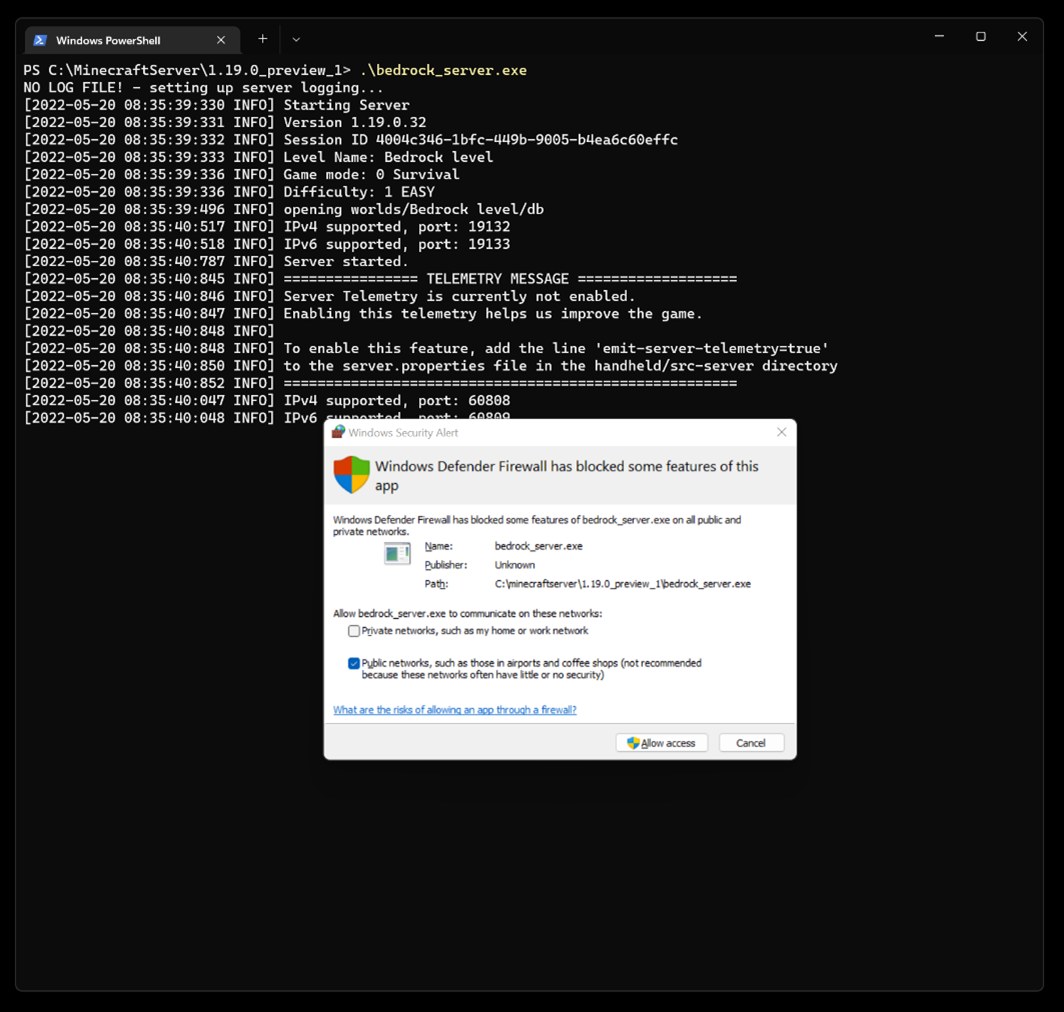
bedrock_serverfrom Command Prompt or PowerShell. When Windows Defender asks which networks Bedrock Server may use, choose public networks for internet play; private networks covers only your LAN. - On Ubuntu, open the ports with
sudo ufw allow 19132,sudo ufw allow 19133andsudo ufw reload. - Give friends your public IP address and port 19132. In Minecraft they select Play, then Add Server, and fill in Server Name, Server Address and the port.
Bedrock players on Windows PCs, Xbox and PlayStation consoles, mobile devices, Nintendo Switch and Nintendo Switch 2 all join the same server with the same IP address and port.
Open the Minecraft port in Windows Firewall with PowerShell
New-NetFirewallRule -DisplayName "Minecraft Java TCP" -Direction Inbound -LocalPort 25565 -Protocol TCP -Action Allow; New-NetFirewallRule -DisplayName "Minecraft Java UDP" -Direction Inbound -LocalPort 25565 -Protocol UDP -Action AllowCreates two inbound rules that allow traffic to port 25565, one for TCP and one for UDP. Run PowerShell as administrator. For a Bedrock server, replace 25565 with 19132 (and add 19133 for IPv6) if you dismissed the Windows Defender prompt.
You should see: PowerShell prints the properties of each new rule, including its DisplayName and Enabled : True.
How to check the Minecraft port forward worked
- Start the server and leave it running.
- Use a device outside your network, such as a phone on mobile data, so the test does not come through your own router.
- Java: in PowerShell on a PC outside your network, run
Test-NetConnection -ComputerName <your public IP> -Port 25565. TcpTestSucceeded : True means the port is reachable. - Bedrock: on the outside device, select Play, select Add Server, enter your public IP in Server Address, leave the port as 19132, select Save, then Join.
- Watch the server console. A message that a new player has joined confirms the whole path works: router rule, firewall and server.
Fix Minecraft port forwarding when friends cannot connect
You can join on your own network but friends outside cannot
The router rule, the firewall or the server PC's IP address does not line up.
- Run
ipconfigand confirm the PC's IPv4 address still matches the internal IP in the router rule. - Check that the rule uses the port the server listens on: 25565 for Java, 19132 for Bedrock, or your custom server-port value.
- Confirm the Windows Firewall rule exists for that port, or that Bedrock Server was allowed on public networks.
- Have friends use your public IP address, not the local IPv4 address.
You cannot join a Bedrock server running on the same Windows PC
Windows blocks the Minecraft app from connecting to a server on the same machine (loopback) by default.
- Stop the server.
- In Terminal, run
CheckNetIsolation.exe LoopbackExempt -a -p=S-1-15-2-1958404141-86561845-1752920682-3514627264-368642714-62675701-733520436. - Restart
bedrock_server.exeand connect to Server Address 127.0.0.1 with port 19132.
Players see "Outdated Client" or "Outdated Server"
The game and the server run different protocol versions; even 1.21.0 and 1.21.30 differ.
- For "Outdated Server", upgrade the server to the current version from minecraft.net.
- For "Outdated Client", update Minecraft on the player's device.
- If you run a Preview build of the server, connect with a Preview build of the game.
The connection worked yesterday and fails today
The server PC picked up a new local address, or your public IP changed.
- Set a fixed IP address on the server PC so the router rule stays valid.
- Check the public IP again on the router's status page and send friends the new one.
Is it safe to port forward for a Minecraft server?
Port forwarding for Minecraft is reasonable when you open only the server's port, point it at the one PC that runs the server, and control who can join. The rule exposes that single port, not the whole network. On Bedrock Dedicated Server keep online-mode set to true so every player must be authenticated to Xbox Live, and set allow-list to true with /allowlist add <GamerTag> to admit only invited players. Remove the router rule when you stop hosting.
Minecraft port forwarding FAQ
What port does a Minecraft Java server use?
A Minecraft Java Edition server uses port 25565. Forward 25565 on your router to the server PC's local IP address and allow the same port through Windows Firewall so players outside your network can connect.
What port does Minecraft Bedrock use for a server?
Bedrock Dedicated Server listens on port 19132 for IPv4 and 19133 for IPv6 by default. Both values are set in server.properties as server-port and server-portv6, and either can be changed to any port from 1 to 65535.
Do I need to port forward to join a Minecraft server?
No. Only the person hosting the server needs a port forwarding rule. Players who join a server, whether Java or Bedrock, connect outward and do not need to change anything on their own router.
Can Java and Bedrock players join the same server?
Not on the official server software. The Java Edition server accepts only Java players, and Bedrock Dedicated Server accepts Bedrock players on Windows, Xbox, PlayStation, mobile devices and Nintendo Switch. Each needs its own port forward if you run both.
Can I host a Minecraft server on Xbox or PlayStation and port forward it?
No. Bedrock Dedicated Server is released only for Windows and Ubuntu Linux, so the server runs on a computer. Xbox, PlayStation and Switch players join that server with its IP address and port, or play together on a Bedrock Realm instead.
How do I play Minecraft with friends without port forwarding?
Use Realms. Realms for Bedrock costs $3.99 USD a month for you plus 2 players, Realms Plus costs $7.99 USD for you plus 10, and Realms for Java costs $7.99 USD for you plus 10. Invited friends play free.
Why does my Minecraft port forward not work?
The usual causes are a server PC whose local IP changed, a rule on the wrong port, a firewall blocking the port, or friends using your local address instead of your public one. Test from mobile data to rule out your own network.
Is the Minecraft server software free?
Yes. The official server software for both Java Edition and Bedrock Edition is free to download from minecraft.net. The Java server needs a compatible Java installation; Bedrock Dedicated Server runs on supported Windows or Ubuntu versions.