Your Minecraft server IP address is the IPv4 address of the computer running the server software, followed by the server port: 25565 by default for Java Edition and 19132 for Bedrock Dedicated Server.
On this page
The steps below cover reading that address on Windows and Mac, which address to give players on your network and outside it, how players on consoles and phones join, and fixes for a server nobody can reach.
The fastest way to find your Minecraft server IP address on Windows
Run these steps on the computer that runs the server, not on the computer you play on. Both Java Edition server software and Bedrock Dedicated Server run on Windows.
- Select Start > Settings > Network & internet.
- Select Wi-Fi and then the network you are connected to, or select Ethernet for a wired connection.
- Read the number next to IPv4 address. That is the server address for players on the same home network.
- Add the port: Java Edition uses 25565 unless you changed it, and Bedrock Dedicated Server uses 19132 for IPv4.
- Give players the address and the port. Bedrock players type them into the separate Server Address and port fields after selecting Add Server.
Which Minecraft server address should players use?
The right address depends on where the player sits relative to the server. The IPv4 address Windows shows is a local network address, so it only works for devices on the same network.
| Who is joining | Address to give them | Why |
|---|---|---|
| You, on the same computer as a Bedrock Dedicated Server | 127.0.0.1 with port 19132 |
This is the localhost address; Windows first needs the loopback exemption shown further down |
| Players on your home network | The IPv4 address of the server computer plus the port | Devices on the same network reach the server directly |
| Players on the internet | Your router's public address plus the port, after port forwarding | Players outside your local network need the network configured, for example with port forwarding |
| Players on a hosted server you rent | The address the hosting company shows for your server | The server is not on your network, so your own IPv4 address is irrelevant |
| Friends on a Realm | No address; invite them to the Realm | Invited friends play your active world from any device without entering an IP |
Understanding Minecraft servers and their addresses
Java Edition and Bedrock Edition use different server software, different default ports and different players. Java Edition server software is only compatible with Java Edition, while Bedrock Dedicated Server accepts Bedrock players on every platform.
| Server type | Runs on | Default port | Who can join |
|---|---|---|---|
| Java Edition server | Any computer with a compatible Java installed | 25565 | Java Edition players only |
| Bedrock Dedicated Server | Windows 10 or later, Windows Server 2016 or later, or Ubuntu 22.04 or later | 19132 (IPv4) and 19133 (IPv6) | Bedrock players on Windows, Xbox, PlayStation, mobile and Nintendo Switch |
| Realms for Bedrock | Minecraft's own servers | Not needed | Invited Bedrock players; Realms costs $3.99 USD / Month and Realms Plus $7.99 USD / Month |
| Realms for Java | Minecraft's own servers | Not needed | Invited Java players on Windows, Mac and Linux; $7.99 USD / Month |
| Community servers | Run by their owners | Set by the owner | Anyone with the address, subject to the server's rules |
How to find your Minecraft server IP address with Command Prompt
ipconfigRun it in Command Prompt or PowerShell on the server computer. Without parameters, ipconfig displays the IPv4 and IPv6 addresses, subnet mask and default gateway for every network adapter.
You should see: The adapter you use for Wi-Fi or Ethernet lists an IPv4 address. That number, plus the server port, is the address local players enter.
How to find your Minecraft server IP address on a Mac
Bedrock Dedicated Server runs on Windows and Ubuntu Linux, so a Mac hosts a Java Edition server. Java should already be set up on macOS.
- Choose the Apple menu > System Settings, then click Network in the sidebar.
- Click the network connection you use, then click Details.
- Click TCP/IP and read the address in the IP address field.
- Give players that address and port 25565, the Java Edition default.
How do people join your server?
Both editions join an existing server through the Add server button. The Bedrock steps below are the ones for the Minecraft app on Windows.
- Java Edition: select Add server and enter the server's address. A Java Edition server uses port 25565 unless its owner changed it.
- Bedrock Edition: open Minecraft, select Play and go to the Servers tab.
- Select Add Server.
- Type any name in Server Name and the IP address in Server Address.
- Leave the port as 19132 unless the server owner changed
server-port. - Select Save, then select the new entry and Join.
Bedrock players need a free Xbox profile before they can join servers, and child accounts have online multiplayer turned off until a parent changes the setting.
How to find your Minecraft server address on a Nintendo Switch
Bedrock Dedicated Server runs on Windows and Ubuntu Linux, so the address a Switch player needs always comes from the server computer. Nintendo Switch and Nintendo Switch 2 players connect to it with the same IP address and port as players on every other Bedrock platform.
- Find the server computer's IPv4 address on Windows, or ask the server owner for the address.
- Note the port: 19132 unless the owner changed
server-port. - On the Switch, open Minecraft, select Play and open the Servers tab, which also lists featured servers.
- Make sure the Switch has its platform online subscription, because multiplayer on consoles requires one.
How to find your Minecraft server address on an iPhone or Android
An iPhone or Android phone runs Minecraft Bedrock Edition as a player, and Bedrock Dedicated Server runs on Windows and Ubuntu Linux, so the address comes from the server computer or its owner. Mobile players join with the same IP address and port as players on PC and console.
- Connect the phone to the same Wi-Fi network as the server computer if the server runs at home.
- Get the IPv4 address from the server computer, or the public address if you are away from home.
- Open Minecraft, select Play, open Servers and select Add Server.
- Enter the address in Server Address, keep port 19132, select Save, and then Join.
Set your rules for who can join your Minecraft server and how they play
On Bedrock Dedicated Server the rules live in server.properties, a text file in the server folder with one key and value per line. Restart the server after editing it.
| Property | Default | What it controls |
|---|---|---|
server-port |
19132 | The IPv4 port players add to the address |
server-portv6 |
19133 | The IPv6 port |
allow-list |
false | When true, only players listed in allowlist.json can connect; add them with /allowlist add <GamerTag> |
online-mode |
true | Requires every player to be authenticated to Xbox Live; keep it on for an internet-facing server |
max-players |
10 | How many players can be on the server at once |
gamemode |
survival | Game mode for new players: survival, creative or adventure |
enable-lan-visibility |
true | Lets the server answer players looking for servers on the local network |
How to check your Minecraft server IP address works
- On a second device on the same network, add the server with the IPv4 address and port and select Join.
- Watch the Bedrock Dedicated Server console: a message shows that a new player has joined.
- To test the internet address, join from a device that is not on your home network, such as a phone on mobile data.
Fix a Minecraft server IP address that will not connect
You cannot join your own Bedrock server from the same Windows PC
Windows blocks Minecraft from connecting to a server on the same machine, which is called loopback.
- Stop the server.
- Run this command in Terminal:
CheckNetIsolation.exe LoopbackExempt -a -p=S-1-15-2-1958404141-86561845-1752920682-3514627264-368642714-62675701-733520436 - Restart the server and connect to
127.0.0.1on port 19132.
Players on your network cannot find or reach the server
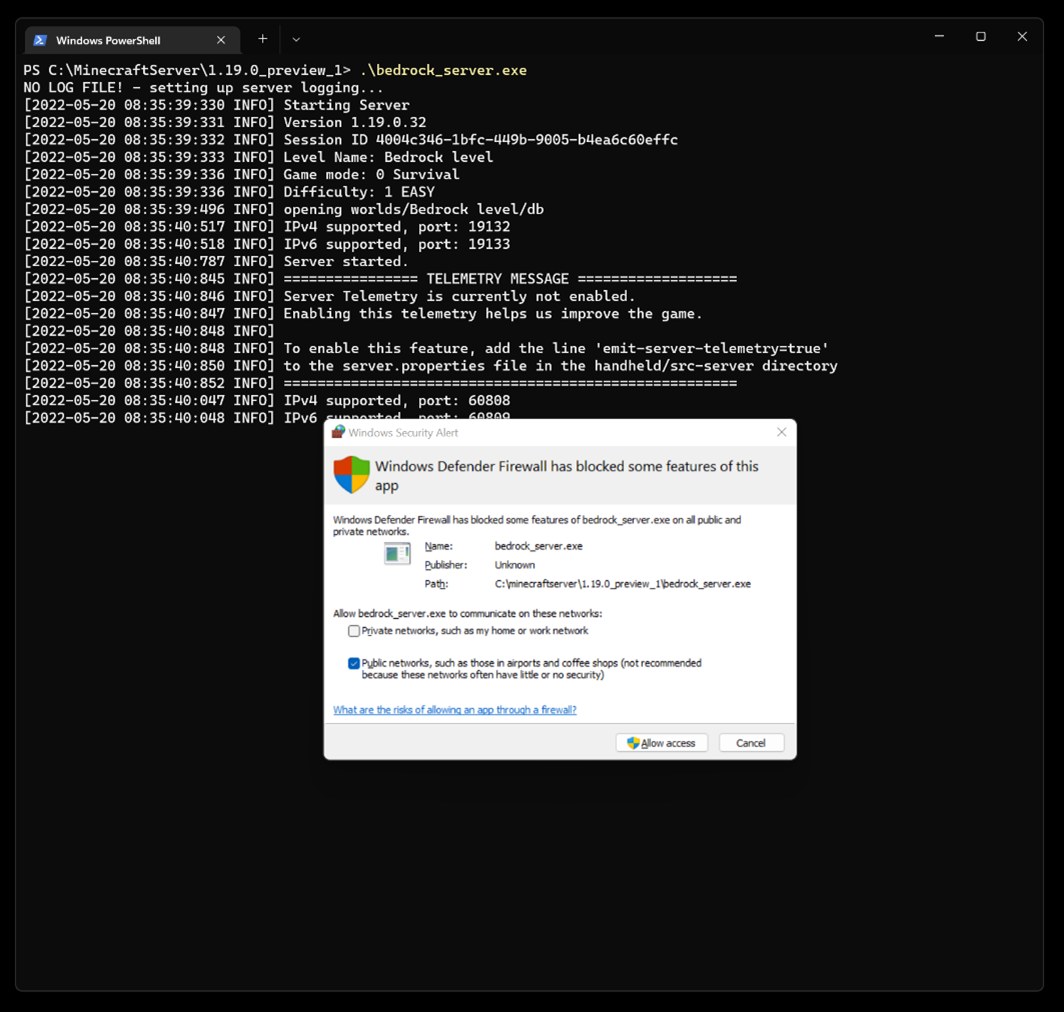
The firewall on the server computer is not letting the connection through.
- When Windows Defender asks whether Bedrock Server may communicate, allow private networks for local players.
- On Ubuntu, allow ports 19132 and 19133 with
sudo ufw allow 19132andsudo ufw allow 19133, then runsudo ufw reload. - For Java Edition, allow port 25565 through the firewall.
Friends outside your home cannot connect
The local IPv4 address only works inside your network, and the router is not forwarding the port.
- Set up port forwarding on your router for 25565 (Java) or 19132 (Bedrock) to the server computer.
- In Windows Defender, allow Bedrock Server on public networks if players connect over the internet.
- Give friends your public address, not the IPv4 address shown in Windows.
The game shows Outdated Client or Outdated Server
The Bedrock client and server run versions with different protocol versions.
- Update the server if the message says Outdated Server.
- Update the game if the message says Outdated Client.
- Connect a Preview client to a Preview build of the server, never a mix.
The server address worked yesterday and stopped today
The router assigned the server computer a new local address through DHCP.
- Check IPv4 address again in Network & internet settings.
- To keep the address fixed on Windows, open Wi-Fi > Manage known networks and the network, or Ethernet and the network, then select Edit next to IP assignment.
- Choose Manual, turn on IPv4, enter the IP address, Subnet mask and Gateway, and select Save.
- On a Mac, open TCP/IP in the network's Details, choose Manually from the Configure IPv4 pop-up menu and enter the address.
- Update the server entry on every player's device.
Frequently asked questions about Minecraft server IP addresses
What is the default port for a Minecraft server?
Java Edition servers use port 25565 by default. Bedrock Dedicated Server listens on port 19132 for IPv4 and 19133 for IPv6, set by server-port and server-portv6 in server.properties. Players add the port to the IP address when they join.
Is my Minecraft server IP the same as my computer's IP?
For players on your home network, yes: the server address is the IPv4 address of the computer running the server software. Players on the internet need your router's public address instead, with port forwarding pointing the Minecraft port at that computer.
How do I find the IP address of a server I am playing on?
Ask the server owner, who reads it from the IPv4 address of the host computer, or from the hosting company for a rented server. On Bedrock, the address you typed into Server Address stays in the saved entry under the Servers tab, so you only enter it once.
Where can I find Minecraft servers to join?
Bedrock players can open Minecraft, select Play and use the Servers tab to see featured servers, including Partner Servers. Players on both editions can browse the Official Minecraft Server List, where listed servers have been reviewed as following Minecraft's community standards and can be browsed by game type and play style.
Do Minecraft Realms have an IP address?
Realms players never enter an IP address. The Realm owner invites friends, and invited friends play the active world from any device at any time, even when the owner is offline. Realms for Bedrock and Realms for Java are separate subscriptions.
Can Xbox, PlayStation and Switch players join my server?
Yes, if you run Bedrock Dedicated Server. Players on Windows, Xbox, PlayStation, mobile, Nintendo Switch and Nintendo Switch 2 join with the same IP address and port. Java Edition servers accept only Java Edition players, and consoles need their platform's online subscription.
What does 127.0.0.1 mean in Minecraft?
It is the localhost address, meaning the same computer the game is running on. Use it to join a Bedrock Dedicated Server from the PC that hosts it, after enabling the loopback exemption in Windows. Other devices must use the computer's IPv4 address instead.
Why does my Minecraft server IP keep changing?
Windows gets its local address from the router through DHCP, and the router can hand out a different address later. Set a manual IP under IP assignment in Windows network settings so the server address stays the same.
Is the Minecraft server software free?
Yes. The official server software for both Java Edition and Bedrock Edition is a free download from minecraft.net. Java Edition needs a compatible Java installed, and Bedrock Dedicated Server runs on supported versions of Windows or Ubuntu Linux.