Roblox is a free download on every device in the title: 64-bit Windows 11 and Windows 10 PCs through the Microsoft Store or roblox.com, Macs on macOS 10.13 or later through roblox.com, and iPhones on iOS 14 or later through the App Store.
On this page
The same free account also plays on Android, Chromebook, Xbox One, Xbox Series X|S, PS4, PS5 and Meta Quest, and Roblox Studio for building games is a separate free app for Windows and Mac.
Which Roblox download do you need?
| Your device | Where to get Roblox | What to know |
|---|---|---|
| Windows 11 or Windows 10 PC | Roblox – Windows (Microsoft Store) | 64-bit Windows only. This is Roblox's new Windows app, and it asks you to link an Xbox profile once. |
| Windows PC, without the Store | roblox.com/download | The page offers Download Windows App, and the Play button on any experience installs Roblox Player. |
| Mac | roblox.com/download | macOS 10.13 (High Sierra) or later, Apple Silicon included. Install from the browser. |
| iPhone or iPad | Roblox on the App Store | Requires iOS 14.0 or later. |
| Android phone, tablet or Chromebook | Roblox on Google Play | Android 8.0 or later. A Chromebook needs Chrome OS version 53 or above with the Google Play Store turned on. |
| Xbox Series X|S or Xbox One | Roblox on xbox.com | Free+ with in-app purchases. |
| PS5 or PS4 | Roblox on playstation.com | Free, in select countries. Separate native PS5 and PS4 editions. |
| Meta Quest 2, Quest Pro or Quest 3 | Search for Roblox in the Quest Store on the headset | Quest software v57 or higher. Meta Quest 1 is not supported. |
| Linux PC | Not available | Roblox is not supported on Linux. |
Free download and official source for Roblox on Windows 11 and 10
Both official Windows downloads are free and use the same Roblox account. In the Microsoft Store, Roblox's new app is named "Roblox – Windows"; the old app is just called "Roblox" and will eventually stop working.
- Roblox – Windows on the Microsoft Store: Free download. It asks you to link an Xbox profile once, because Microsoft Store games use your Microsoft account.
- Download Windows App on roblox.com: Roblox's own download page for Windows.
Roblox installs on 64-bit versions of Windows 10 or Windows 11.
Installation instructions for Roblox on Windows 11 and 10
Use either route. Both sign in to the same account, with the same progress, friends, Robux and inventory.
- Microsoft Store route: open the Roblox – Windows page in the Microsoft Store and install it.
- Open the app, sign in with your Roblox username and password, and link your Xbox profile when asked. This is a one-time step.
- Website route: go to roblox.com in Microsoft Edge, Chrome or Firefox and log in.
- Open any experience and click the green Play button. A pop-up says Roblox Player is installing.
- If the browser asks which program to use, select Roblox and confirm. Tick the remember option so it does not ask again.
- Check it worked: the experience opens in Roblox. On your computer, the new Store app has a blue icon and the old app has a light gray icon.
- Once the new Store app signs in, uninstall the old light gray Roblox app. It will eventually stop working.
Is Roblox free to download and play?
Yes. The Microsoft Store, App Store, Google Play, Xbox and PlayStation all list Roblox as free. Robux, the in-game currency, is the optional purchase; the prices below are the US Xbox store's add-on list.
| Item | Price | Where it is listed |
|---|---|---|
| Roblox app on Windows | Free | Microsoft Store |
| Roblox app on iPhone and iPad | Free, in-app purchases | App Store |
| Roblox app on Android and Chromebook | Free, in-app purchases | Google Play |
| Roblox on Xbox | Free+ | xbox.com |
| Roblox on PS5 and PS4 | Free | playstation.com |
| 400 Robux for Xbox | $4.99 | Xbox store add-on |
| 800 Robux for Xbox | $9.99 | Xbox store add-on |
| 1,700 Robux for Xbox | $19.99 | Xbox store add-on |
| 4,500 Robux for Xbox | $49.99 | Xbox store add-on |
| 10,000 Robux for Xbox | $99.99 | Xbox store add-on |
| 22,500 Robux for Xbox | $199.99 | Xbox store add-on |
Roblox warns that any offer of a prize or Robux in exchange for your account details is an attempt to steal the account. Official promotions appear only on the Roblox blog, the Notifications tab of your Messages, or a banner at the top of roblox.com.
System requirements for Windows and macOS, mobile devices and browsers
| Requirement | Roblox's minimum or recommendation |
|---|---|
| Windows | 64-bit Windows 10 or Windows 11 |
| Mac | macOS 10.13 (High Sierra) or later; Apple Silicon / M1 supported |
| Graphics (PC) | DirectX 10 or higher feature level support |
| Processor | A recent processor (2005+) at 1.6 GHz or better |
| Memory | At least 1 GB on Windows 10 or Windows 11 |
| Storage | At least 300 MB free to install |
| Internet | 4-8 Mb/s for a single-use household; more for larger households |
| Browsers for roblox.com on Windows | Chrome, Firefox and Microsoft Edge |
| Browsers for roblox.com on Mac | Chrome, Firefox and Safari |
| iPhone and iPad | iOS 14 / iPadOS 14 or higher; oldest supported phones are the iPhone 6s, iPhone 6s Plus and iPhone SE |
| Android | Android OS 8.0 or higher with OpenGL ES 3.0 support |
| Chromebook | Chrome OS version 53 or above, with Google Play Store enabled |
| Linux | Not supported |
For smooth play, Roblox recommends a desktop under 5 years old with a dedicated video card, or a laptop under 3 years old with integrated graphics. The video recording feature works only on Windows 10 and Windows 11.
Can you download Roblox on Mac?
Yes. Roblox has its own Mac app for macOS 10.13 (High Sierra) and later, and it supports Apple Silicon / M1 chips. The app installs from roblox.com in Safari, Chrome or Firefox.
| Your situation | Do this |
|---|---|
| Safari or Chrome on a Mac | Log in at roblox.com, open any experience and click Play. Follow the on-screen instructions; the installer places the Roblox icon in your apps. |
| The installer does not start | Open Finder, select Today and open Roblox.dmg to run the installer. |
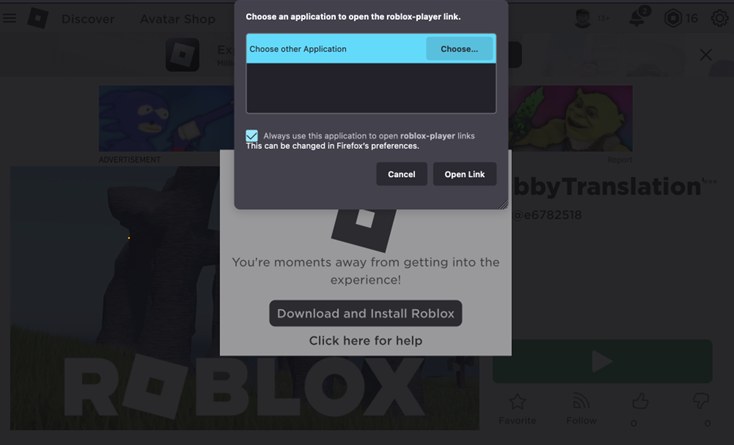
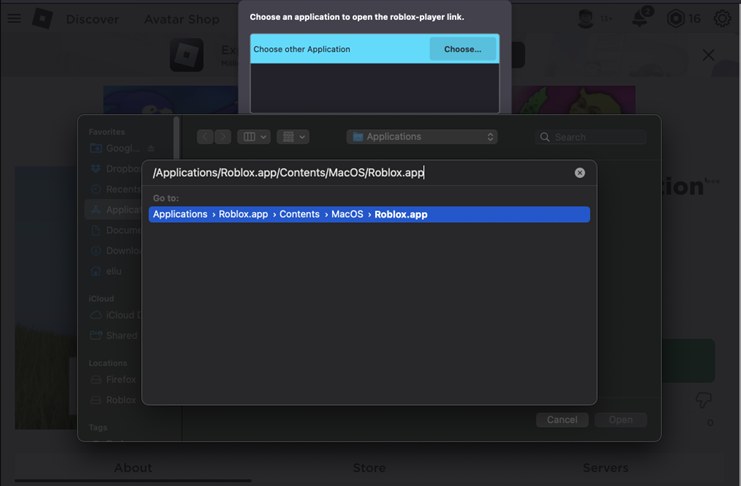
| Firefox on a Mac | After the install, check Always use this application to open roblox-player links and click Choose. Press CMD+SHIFT+G, enter /Applications/Roblox.app/Contents/MacOS/Roblox.app, select Roblox.app and click Open, then Open Link. |
| "Upgrade Failed" when opening the app | Go back to the browser and click Play on the experience's page. That installs the newest Roblox player. |
| Experiences will not start from Safari | Try Firefox or Google Chrome instead, or launch Roblox from the Dock. |
| Check it worked | The Roblox icon sits in your Dock and Roblox shows in the Applications folder. |
Roblox on iPhone, iPad and Android
The phone and tablet apps are free from Apple and Google, and a Chromebook uses the same Google Play app.
- Roblox on the App Store (iPhone, iPad) (2.742.1053 · 225.1 MB): Requires iOS 14.0 or later. Rated 13+ on the App Store.
- Roblox on Google Play (Android, Chromebook): Requires Android OS 8.0 or higher. Rated for 12+ on Google Play.
To check your iPhone's version, open the Settings app, go to General > About and read the Version field. On Android, open Settings > About phone > Software information and read the Android version field.
Download Roblox on Xbox Series X|S and Xbox One
Roblox on Xbox is free, plays on Xbox One and Xbox Series X|S, and supports cross-platform play, Xbox achievements and cloud saves.
- On the console, open the Store, search for Roblox and install it. The Roblox page on xbox.com lists it as Free+.
- Launch Roblox. The home screen shows Create Account, Sign In and the gamertag of the signed-in profile.
- Select Sign In to link an existing Roblox account to your Xbox profile, or Create Account to make a new one.
- On an Xbox child account, a parent must first give permission in the Xbox family account before the app will launch.
Some account features, such as creating or joining groups and adding Roblox friends, are not available on Xbox and are done on PC, Mac or mobile instead. Quick Login is also unavailable on Xbox.
Install Roblox through the PlayStation Store on PS5 and PS4
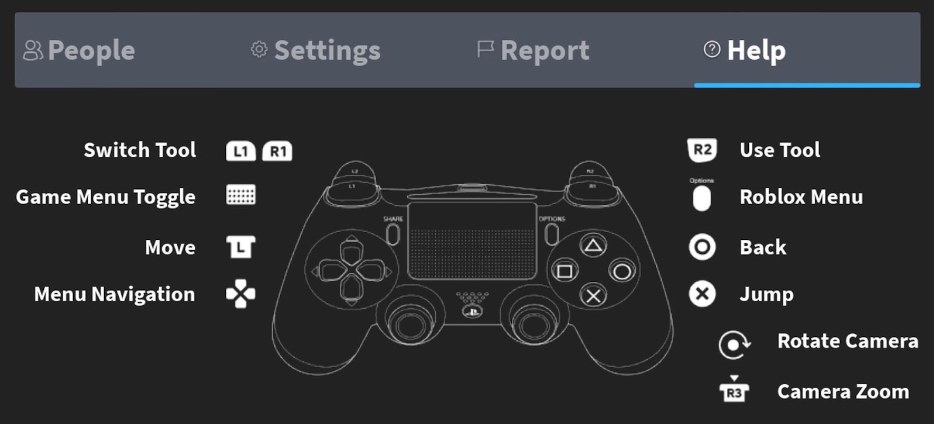
Roblox is free on PS5 and PS4 in select countries, with a native PS5 version that loads up to 30% faster. PlayStation rates it T for Teen.
- Open the PlayStation Store on the console, or the Roblox page on playstation.com in a browser.
- Search for Roblox, select it and choose Add to Library, then follow the on-screen instructions.
- Start Roblox from Game Library on the Games home.
- Sign in with the Quick Login option, using a computer or phone that is already signed in to Roblox.
- To play only with PlayStation users, open Settings in Roblox and turn off Cross-Platform Play under PlayStation Network Settings.
Only one Roblox account can be linked to a PlayStation Network account at a time, and Roblox gift cards cannot be redeemed on PlayStation.
Install Roblox through the Meta Quest Store
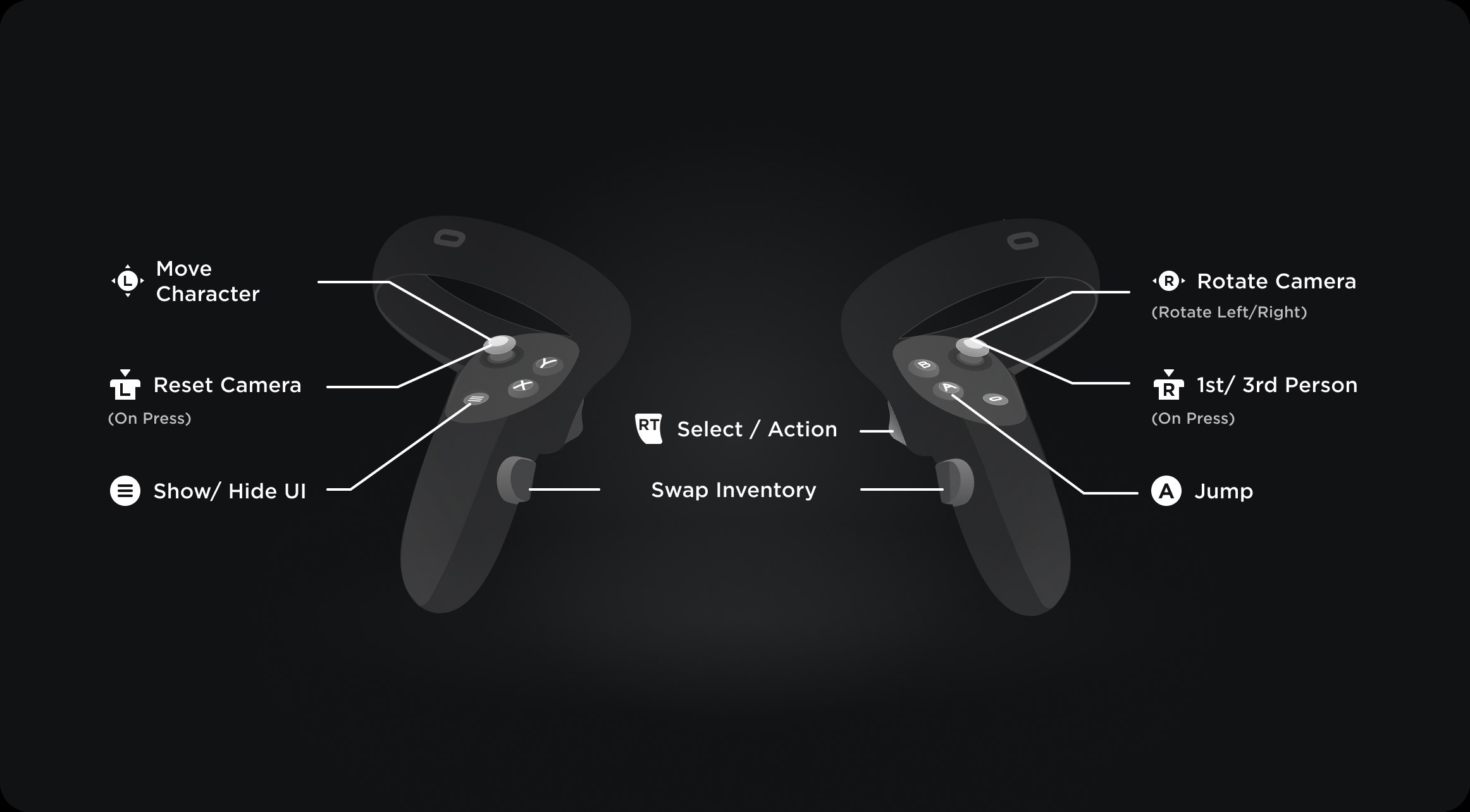
Roblox on Meta Quest is available to users 10 and older.
- Update the headset to Meta Quest software v57 or higher. Meta Quest 2, Quest Pro and Quest 3 are supported; Meta Quest 1 is not.
- Search for Roblox in the Quest Store and install it.
- Start Roblox on the headset and sign in with Quick Log In from your computer or phone. Account creation and password login are not available on Quest.
How to install Roblox Studio for game creation
Roblox Studio is Roblox's free app for building games, available on Windows and Mac, and it installs separately from the Roblox player.
- Check the specs first: Studio needs Windows 10 or macOS 10.14, 3 GB of RAM and a 1600×900 or higher display at minimum; Windows 11 or macOS 14+ with 8 GB is recommended.
- Log in at roblox.com, open one of your own experiences, click the menu in the upper-right corner and select Edit.
- When the pop-up appears, click Download Studio, then open RobloxStudio.exe on Windows or RobloxStudio.dmg on Mac from your browser's download history.
- Click Launch Studio when the confirmation appears, and sign in with your Roblox account.
- Keep Studio updated: every game runs on the latest version of the Roblox engine, and an Update button appears in the upper-right corner when Studio is out of date.
Studio's toolbar takes custom tabs, shortcuts are set under File > Customize Shortcuts, and opt-in beta features sit under File > Beta Features.
How playing Roblox in the browser works
On Windows and Mac, the roblox.com website starts Roblox rather than running it: the first press of Play installs Roblox Player, and later presses launch it.
Streaming sites such as now.gg are not among the platforms Roblox supports, and Roblox asks players to enter their login only on roblox.com or the login screen of an official Roblox app.
| Device | Lightest official way to play | What gets installed |
|---|---|---|
| Windows PC | Play on roblox.com | Roblox Player, which needs at least 300 MB of storage |
| Mac | Play on roblox.com | The Roblox Mac app, placed in your apps |
| Chromebook | Roblox on Google Play | The Android app, on Chrome OS version 53 or above |
| Linux PC | None | Roblox is not supported on Linux |
Common problems and quick fixes when Roblox will not install or open
Close every other program before installing or updating Roblox; Roblox or another program still running during the install is one of the causes Roblox lists for failed setups.
Roblox keeps downloading or is stuck on "Getting Latest Roblox"
Roblox did not install properly the first time.
- Uninstall Roblox (steps in the uninstall section below).
- Restart the PC.
- Install Roblox again from roblox.com or the Microsoft Store.
The browser says it cannot find Roblox, or keeps asking you to install it
Corrupted temporary files, or Roblox or another program still running during the install.
- Restart the computer and try Play again.
- Clear your browser's temporary internet files and cookies.
- Reinstall Roblox with all other programs closed.
"Failed to load library" when Roblox launches
A Windows system file Roblox needs is missing, corrupted or blocked, or the Roblox install itself is corrupted, especially the Microsoft Store version.
- Uninstall the version you have. If it is the Microsoft Store app, install the desktop version from roblox.com instead, and the other way round.
- Before reinstalling, press Windows key + R, type
%localappdata%, press Enter and delete the Roblox folder. - If the error remains, right-click Start and open Windows Terminal (Admin) or Command Prompt (Admin).
- Run
DISM /Online /Cleanup-Image /RestoreHealth(this may take 10-20 minutes), thensfc /scannow, and restart the PC. - On a Windows N or KN edition, open Settings > Apps > Optional features, click Add a feature, find the Media Feature Pack and click Install.
- Open Settings > Windows Update and install all available updates.
Roblox will not open on a Mac
Stale settings or log files, or an unsupported macOS version.
- Confirm the Mac runs macOS 10.13 or later.
- Restart the Mac.
- Press Command + Space Bar, paste ~/Library/Logs/Roblox/ and delete everything in that folder.
- Go to Library > Preferences, delete the Roblox com files and launch Roblox again so it recreates them.
- If it still fails, uninstall and reinstall Roblox.
Safety and account security after you install Roblox
- Add and verify your own email address; 2-Step Verification needs a verified email.
- Open Account Settings (the gear icon on the website), go to the Security Tab and turn on a 2-Step Verification method. Roblox recommends the authenticator app option.
- On the same tab, click Generate under recovery codes and store the backup codes somewhere safe. Each code works once.
- On a shared computer, such as at school or a friend's house, log out every time you finish playing.
- To sign in on a new device without typing your password, use Log In with Another Device there, then enter the code under Quick Login on a device that is already signed in. The code is valid for 5 minutes.
- Install Roblox only from roblox.com or an official app store. Roblox warns that programs from untrusted sources can be malware or keyloggers that collect passwords.
- Roblox does not make browser extensions, so any "Roblox extension" is from a third party.
How to uninstall and re-download Roblox
Reinstalling over the top usually replaces broken files without an uninstall. Uninstall first only when a plain reinstall does not help, and restart between the two.
- Windows 11: select Start > Settings > Apps > Installed apps, find Roblox and select More > Uninstall.
- Windows 10, or any Roblox app Settings cannot remove: open Control Panel, select Programs > Programs and Features, right-click Roblox and select Uninstall.
- For a stubborn problem, open File Explorer, go to C:\Users\(Your Windows Username)\AppData\Local and delete the Roblox folder. Places saved in Studio are not stored there unless you chose that folder.
- Mac: press Command + Option + Esc and Force Quit Roblox or Roblox Studio if either is listed.
- Open Finder > Applications, drag the Roblox icon to the Trash and empty the Trash.
- Restart the computer, then download Roblox again from the links above.
Roblox download FAQ
Is Roblox a free download?
Yes. Roblox is free on the Microsoft Store, roblox.com, the App Store, Google Play, Xbox and PlayStation, and creating an account costs nothing. Robux, the in-game currency, is the optional purchase, sold from $4.99 for 400 Robux on Xbox.
Why is Roblox downloading every time I press Play?
An endless install loop or a stuck "Getting Latest Roblox" message means Roblox did not install properly. Uninstall it, restart the computer, close every other program and install it again from roblox.com or the Microsoft Store.
Why can't I download Roblox on Windows?
Roblox requires a 64-bit version of Windows 10 or Windows 11, so check that first. On a supported PC, a failed install is usually fixed by restarting, closing every other program, clearing your browser's temporary files and reinstalling.
How do I fix the Roblox Microsoft Store download?
Uninstall the Microsoft Store version, delete the Roblox folder from %localappdata%, and install the desktop version from roblox.com instead. Roblox recommends switching to the other version when an installation is corrupted, and the same works in reverse.
How do I re-download Roblox?
Uninstall Roblox from Settings or Programs and Features on Windows, or drag it from Applications to the Trash on a Mac. Restart, then install it again. Progress, friends, Robux and inventory items are tied to your Roblox account, so sign back in with your usual username and password.
How do I fix Roblox files on PC?
Close Roblox, open the folder C:\Users\(your username)\AppData\Local and delete the Roblox folder, then reinstall. If Windows itself has damaged files, run DISM /Online /Cleanup-Image /RestoreHealth and then sfc /scannow from an admin terminal.
Can I download Roblox on a Chromebook?
Yes, through the Google Play Store. The Chromebook needs Chrome OS version 53 or above, and the Google Play Store must be turned on first. The Roblox app from Google Play is the same free Android app used on phones and tablets.
Does Roblox work on Linux?
No. Roblox states plainly that it is not supported on Linux. The supported computers are 64-bit Windows 10 or 11 PCs and Macs on macOS 10.13 or later, and a Chromebook runs the Google Play app on Chrome OS version 53 or above.
Is the Microsoft Store Roblox app different from the website version?
Yes. The Microsoft Store app, named Roblox – Windows with a blue icon, is Roblox's new Windows app and links an Xbox profile once. The website installs Roblox Player. Both use the same account, Robux and inventory.
Can I play Roblox without downloading it?
Not on Windows or Mac: pressing Play on roblox.com installs Roblox Player the first time and launches it after that. On phones, Chromebooks, Xbox, PlayStation and Meta Quest, Roblox is a free app installed from that device's own store.