You change your Steam username by editing your profile name, the player name friends see, because the account name you type to sign in can never be changed, even by Steam Support.
On this page
Below: the profile edit on the website, desktop app and phone, finding your Steam ID, what a new account costs you, and the account data, deletion and recovery routes.
Change your Steam profile name
The profile name is the public persona name shown with your avatar, and you can change it at any time. The edit page has a direct address that works on any device.
- Open steamcommunity.com/my/edit/info in a browser and sign in with your Steam account name and password.
- Delete the old name in the profile name field and type the new one.
- Save the change.
- Open your profile again; the new name now shows next to your avatar.
What is a Steam display name?
Steam attaches three identifiers to every account, and the display name is the only one you can change.
| Name | What it is | Can you change it? | Can another account use it? |
|---|---|---|---|
| Profile (display) name | The public persona name you chose to represent you on Steam, readable by anyone through your Steam ID | Yes, at any time | Yes, profile names can be used freely on other accounts |
| Account name | The user name you picked at registration and type to sign in | No, not even by Steam Support | No, each account name can only be used once, even after deletion |
| Steam ID | A 17-digit number Steam assigns automatically when the account is set up | No | No, it identifies one account |
Changing the display name never touches the account name or the Steam ID, so your sign-in details and the account behind them stay the same.
Which method should you use?
| Your situation | What to do | Why |
|---|---|---|
| You want friends to see a different name | Edit the profile name on the website, desktop app or phone | The profile name is the only Steam name you can change |
| You want to type a different name when signing in | Create a new Steam account with the new account name | An existing account name cannot be changed, and accounts cannot be merged |
| You want your current account name on a fresh account | Not possible | Account names can only be used once, even after an account is deleted |
| You forgot the name you sign in with | Use the Find Account page on help.steampowered.com | It searches by email address or phone number |
How to change your Steam display name on the Steam website
- Go to steamcommunity.com and sign in.
- Open your Steam Community profile.
- Click Edit Profile.
- Replace the text in the profile name field.
- Save, then reload your profile to confirm the new name.
Change your display name in the Steam desktop app
- Open the Steam desktop app and sign in.
- Open your profile from your name in the Steam window.
- Click Edit Profile.
- Type the new name in the profile name field.
- Save the change and reopen your profile to check it.
Change your display name in the Steam phone app
The Steam Mobile app for iOS and Android covers the store, Steam Guard, the community and notifications. The profile edit page also works from the phone browser.
- Open steamcommunity.com/my/edit/info in the phone browser.
- Sign in, confirming the sign-in in the Steam Mobile app if Steam Guard asks.
- Edit the profile name field.
- Save the change and reopen your profile in the Steam Mobile app to see it.

How to check your Steam ID
The Steam ID most often used is the 64-bit ID, a 17-digit number that stays the same whatever display name you pick.
- Open your Steam Community profile.
- Click Edit Profile.
- If you never set a custom profile URL, read the 64-bit ID in the URL under the CUSTOM URL box; it starts with 76561198.
- If you did set a custom URL, delete the text in the CUSTOM URL box to see the 64-bit ID in the URL listed below it, then leave without saving to keep your custom URL.
How do I change my Steam account name? Create a new account
Steam Support cannot change an account name, and Steam accounts cannot be merged. The only way to sign in with a different name is a second account, and nothing moves across with it.
- Sign out of Steam and select Create an account.
- Enter your email address and country of residence.
- Choose the new account name and a password; the name must never have been used by another Steam account, including deleted ones.
- Confirm you are at least 13, the minimum age for a Steam account.
- Set up Steam Guard on the new account in the Steam Mobile app.
Games, CD keys and Steam Wallet funds stay on the old account. The Steam Subscriber Agreement makes subscriptions and Wallet funds non-transferable, and a CD key cannot be registered more than once.
How to check your new Steam display name is live
- Copy your profile address, then open it in a private browser window where you are not signed in.
- Confirm the new display name shows next to your avatar to a signed-out visitor.
- Sign in again with your unchanged account name and password to confirm the login still works.
Viewing data held by Steam
Steam's Privacy Dashboard shows the personal data held on your account and lets you correct or delete individual items.
- Sign in at help.steampowered.com with your Steam account.
- Select My Account.
- Select View Account Data.
- Review each category, and edit or delete individual items where the dashboard allows it.
Deleting your Steam account
Account deletion is permanent: game licenses, the community profile, gifts, inventory items and Wallet funds are not recoverable. Deleting an account also does not free its account name for reuse.
- Apply for refunds on any qualifying purchases on the Steam help site first, because deletion does not refund anything automatically.
- Save anything you want from your community profile, such as screenshots or artwork.
- Submit a deletion request from help.steampowered.com and provide the Proof of Ownership Steam Support asks for, such as payment details used on the account.
- Wait out the 30 days the account is restricted and queued for deletion; to cancel, sign in, open the red notification at the top of the page and click cancel.
Accounts with a developer or publisher role can only be deleted after that role moves to another user. Discussion posts and comments on other profiles stay up after deletion, and matches that feed other players' matchmaking are anonymized rather than deleted.
Keeping your Steam account safe
A new display name changes nothing about security, but a new account starts with none of the old protections.
| Protection | What it does | Where to set it |
|---|---|---|
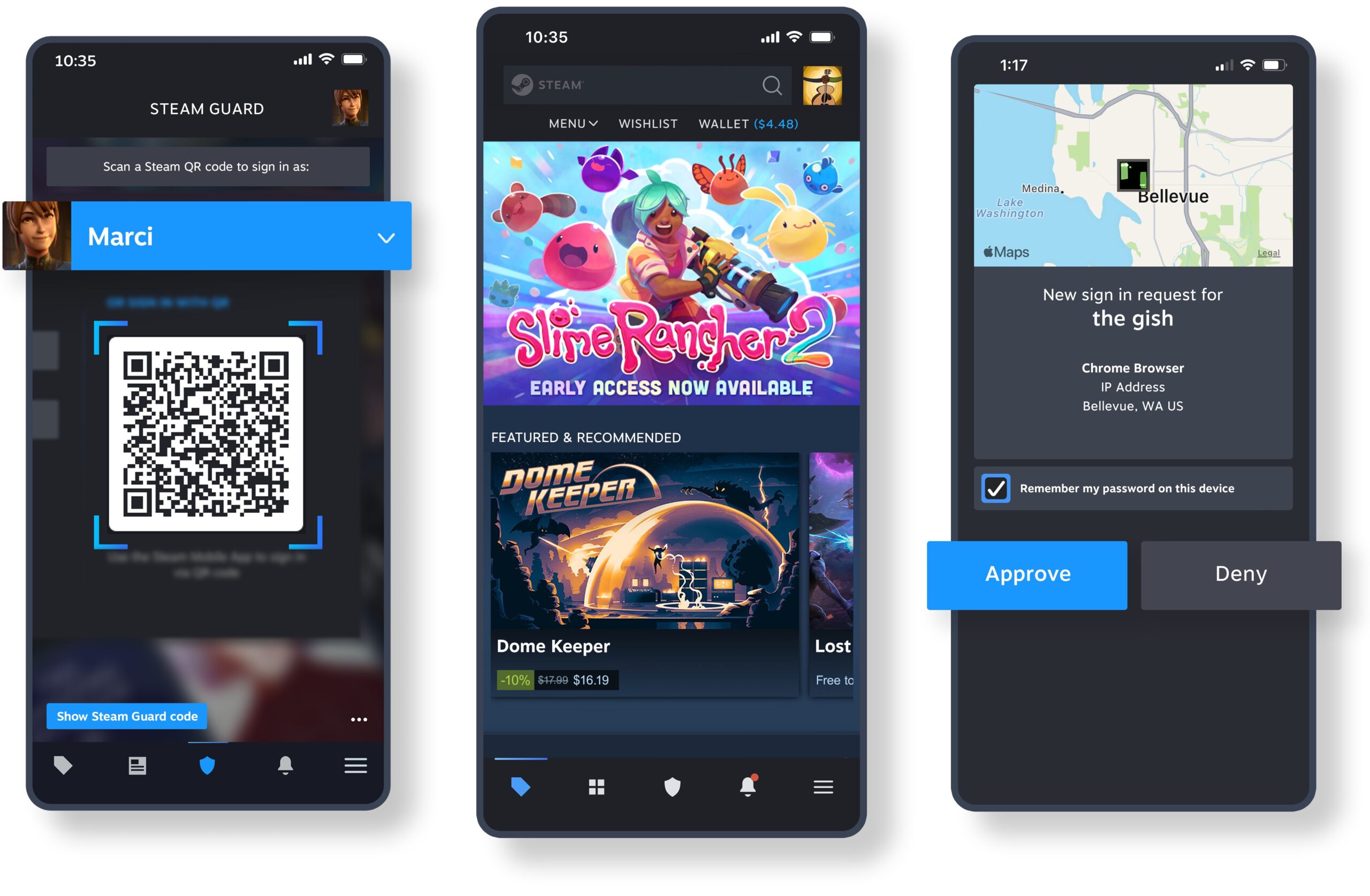
| Steam Guard in the Steam Mobile app | Confirms sign-ins with one touch, signs you in by QR code and confirms trades and Market sales | Steam Mobile app (iOS 15.1 or Android 7.0 and newer) |
| Phone number on the account | Helps recover the account or reset the password later, even without a smartphone | Your Steam account, linked from the Steam Mobile page |
| A password nobody else knows | Sharing your password or account breaks the Steam Subscriber Agreement | Kept by you |
How to recover your Steam password or account name
You forgot your Steam password
Steam resets the password through the Find Account page once it identifies the account.
- Go to help.steampowered.com and select Help, I can't sign in.
- Choose I forgot my Steam Account name or password.
- Select Search with my account name and enter it.
- Follow the prompts Steam gives for the account it finds to set a new password.
You forgot the account name you sign in with
The display name friends see is not the sign-in name.
- Open Help, I can't sign in on help.steampowered.com.
- Choose I forgot my Steam Account name or password.
- Enter your email address or phone number on the Find Account page, or contact Steam Support from that page if the account does not turn up.
- Sign in with the account name Steam returns.
The profile edit page says the account can't be accessed from this computer without additional authorization
Steam has locked access to the account from that device until Steam Support verifies it.
- Contact Steam Support from help.steampowered.com.
- Provide Proof of Ownership when Steam Support asks.
- Return to steamcommunity.com/my/edit/info once access is restored and change the profile name.
Steam username FAQ
Can I change my Steam account name?
No. Your Steam account name, the name you chose at registration and use to sign in, can not be changed, even by Steam Support staff. You can change the profile name friends see at any time, or create a new account.
Does changing my Steam profile name change my login?
No. The profile name is only the public display name. You keep signing in with the same account name and password, and your Steam ID stays exactly the same.
Is a Steam profile name unique?
No. Profile names can be used freely on other accounts, so another player can pick the same display name as you. Account names are different: each one is unique and can only be used once.
Can I reuse my account name after deleting my Steam account?
No. Steam account names are unique and can only be used once, regardless of whether the account has been deleted. Email addresses, profile names and payment methods can be used again on a new account.
Can I merge two Steam accounts?
No. Steam accounts can not be merged, and under the Steam Subscriber Agreement game subscriptions and CD keys are non-transferable, so they cannot be moved from an old account to a new one with a different name.
Who can see my Steam display name?
Anyone. Steam makes the public persona name and avatar readable by querying your Steam ID, along with any multiplayer cheating bans. Other profile details follow the privacy settings on your Steam Community profile.
Can I undo deleting my Steam account?
Yes, within 30 days of the request. Sign in, open the red notification at the top of the page and click cancel. Once Steam Support has deleted the account, neither the account nor its information can be restored.
Do I get a refund if I delete my Steam account?
No, not automatically. Deleting the account refunds nothing, and the Wallet balance is lost. Apply for refunds on qualifying purchases through the Steam help site before you request deletion.
How old do you have to be to create a Steam account?
You must be at least 13 to create a Steam account. Where a country sets a higher age of consent, Steam requires parental consent before the account can be created.
Can the Steam Mobile app hold more than one account?
Yes. The Steam Mobile app supports multiple accounts in the app and on the Steam Guard authenticator, which helps if you keep an old account alongside a new one with a different account name.